
Laravel Brain renders your entire Laravel app as an interactive node graph — routes, controllers, queries, the lot. Here's what it nails and where it leaves you wanting more.
tl;dr
Laravel Brain is a free dev-only package that scans your Laravel app and renders it as an interactive node graph — every route, every controller method, every query, every model relation. I installed it on my portfolio backend in under two minutes. It found three N+1 queries I'd missed, flagged a controller I'd forgotten was 480 lines long, and gave me a per-route lifecycle view I would have killed for on every legacy project I've ever inherited. If you maintain a Laravel codebase someone else wrote — install it today.
I've inherited more Laravel codebases than I can count. Some clean. Most not. The ritual is always the same: open routes/web.php, follow a controller, jump to a service, end up six files deep wondering why a button on the dashboard makes a query against three unrelated tables.
Then last week I tried Laravel Brain on my own portfolio backend and felt mildly stupid. The grep ritual is over.
Here's the actual reason this matters: a tool that maps your whole Laravel lifecycle in one screen kills hours of onboarding, code review, and "wait, what calls this?" detective work. I'm going to walk you through what it does, what I found in my own code, and where it's still rough.
What Laravel Brain Actually Is
Laravel Brain is an open-source Laravel package by laramint that scans your codebase and renders an interactive lifecycle graph for every route in your app. Think of it as a visual debugger for your application's architecture — not its runtime, but its shape.
It traces:
- Every HTTP route → controller → method → model query
- Artisan commands (class-based, closure, and Kernel-registered)
- Scheduled tasks with their cron frequency
- Broadcast channels
- Eloquent relationships and raw SQL
- Middleware guarding each route
- Jobs and events the route dispatches
It also flags fat classes — controllers or services over 300 lines or 10 methods. That single feature alone is worth the install. I've seen plenty of Laravel projects where one OrderController had grown to 1,400 lines because nobody had a reason to refactor it. Now there's a red flag staring at you.
It runs only in local environment by default, which means you don't need to worry about exposing it on production. It writes scan output to storage/app/laravel-brain/, which is safe to gitignore.
If you've never poked at the broader Laravel package ecosystem before, Exploring the Laravel Ecosystem is worth a read first — Laravel Brain is one of the most useful additions I've found in the last year.
Installing It (The Whole Thing Took 2 Minutes)
The install is one command. Truly.
composer require --dev laramint/laravel-brain
That's it. Laravel auto-discovers the service provider, so there's no manual config to add. From there, scan your project once:
php artisan brain:scan
Then visit /_laravel-brain in your browser while your Laravel app runs locally. Done.
If you want it to keep itself fresh as you code, run watch mode:
php artisan brain:scan --watch --interval=5
Every PHP file change triggers a re-scan. Works fine. Doesn't slow down anything I noticed.
Requirements: PHP 8.0+, Laravel 9 through 13. So basically anything you'd be writing today.
The Per-Route Lifecycle View Is the Killer Feature
Open the /_laravel-brain page and the first thing you see is a list of all your routes in the sidebar. Click one and it draws a graph — route at the top, controller in the middle, models and queries at the bottom.
Here's what my GET /projects route looks like in my portfolio app:
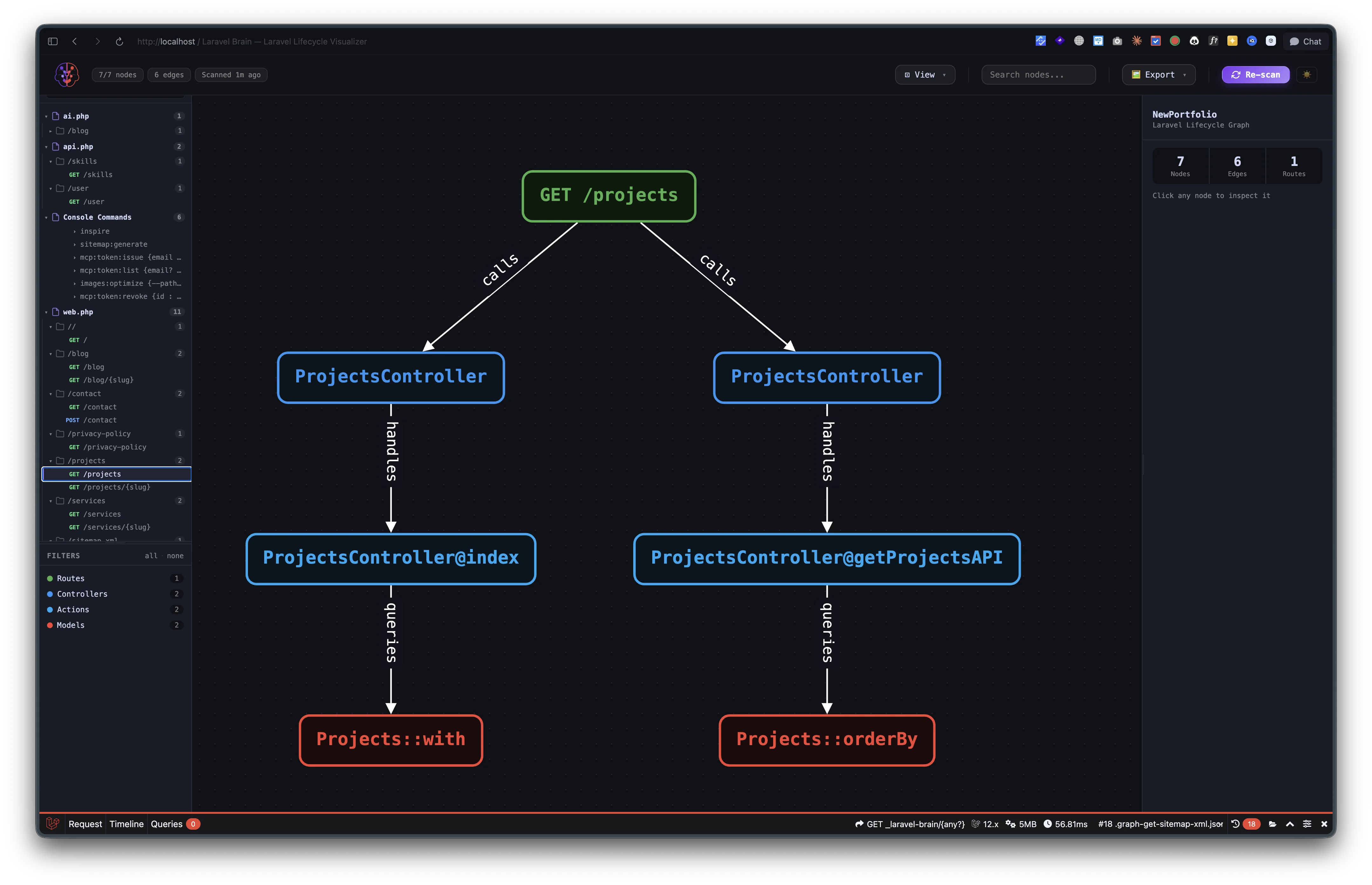
That single view shows me:
→ The route hits ProjectsController twice (once for the page, once for the API endpoint)
→ One method calls ProjectsController@index which queries Projects::with
→ The other method calls ProjectsController@getProjectsAPI which queries Projects::orderBy
If I'd inherited this codebase cold, that one image would have replaced 20 minutes of file-jumping. It's the difference between reading code and seeing it.
For dynamic routes, the same view works. Here's GET /projects/{slug}:
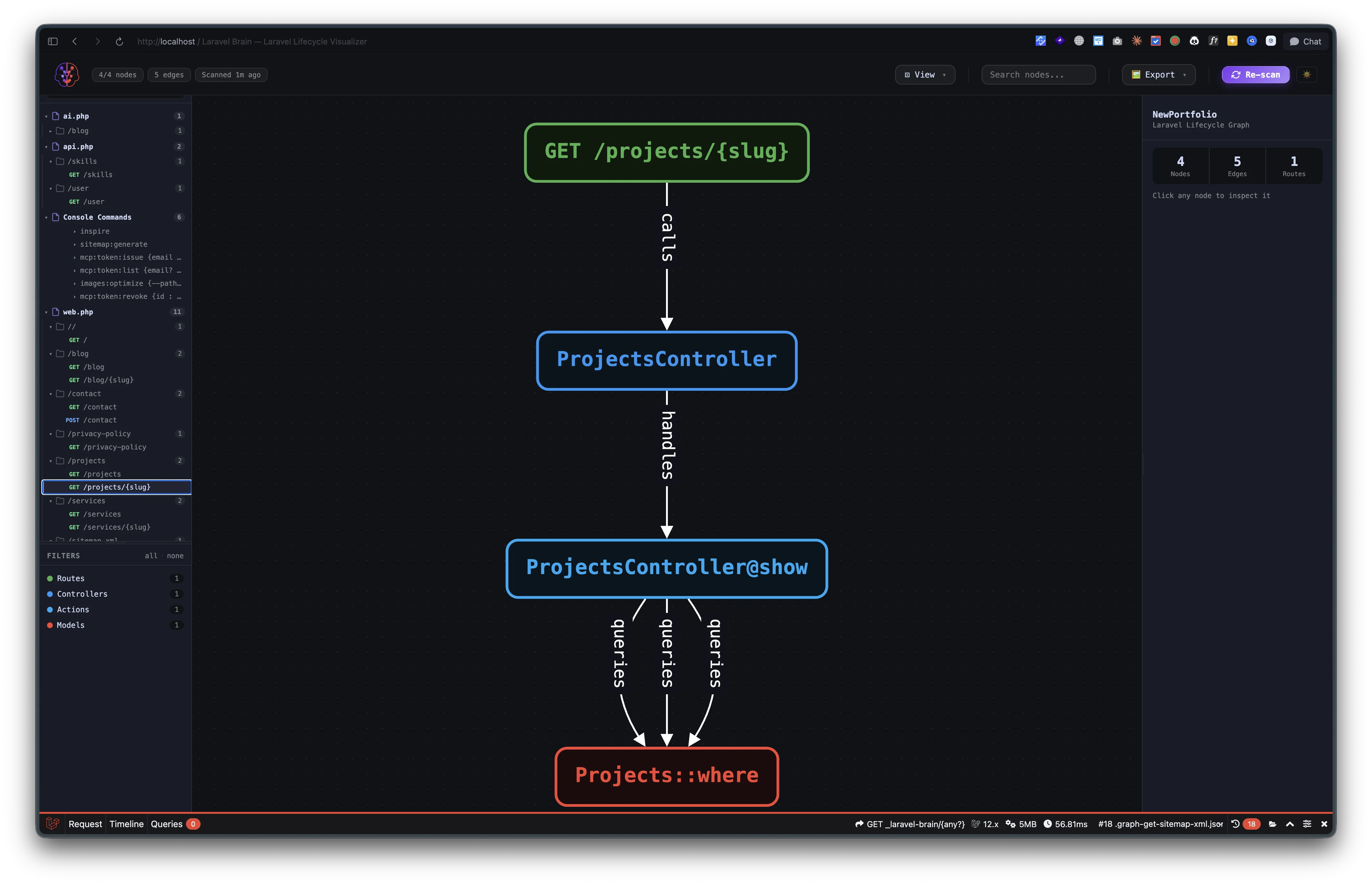
Notice the three Projects::where calls fanning out from ProjectsController@show. That's Laravel Brain telling me my show method runs three separate where queries — each one a candidate for consolidation. I missed this. The graph caught it instantly. If you want to actually do something about queries like that, How to Optimize SQL Queries to Run Faster is the next stop.
Where It Helps Most: Inheriting Someone Else's Mess
Here's the situation Laravel Brain was made for. You're an agency. A client hands you a Laravel app another team built two years ago. There are no docs. The original devs are gone. The brief is "add a feature."
Your old options:
- Read every controller. Hours of grep.
- Boot the app, click around, run
tinker, hope. - Charge the client a "discovery phase" and stretch it for a week.
With Laravel Brain installed locally on day one, you have a complete map of every request flow in the app within sixty seconds. Routes you didn't know existed. Models you've never opened. Scheduled jobs running silently in production. All of it — drawn for you.
I migrated a client dashboard from Laravel/Inertia to .NET/Next.js earlier this year (here's how I made it 10x faster). The hardest part wasn't writing the new code — it was understanding everything the old Laravel app was doing. Laravel Brain didn't exist when I did that migration. If it had, I'd estimate I'd have shaved 6–8 hours off the discovery phase alone.
The Services Routes — A Real Example
Here's another example from the same scan. My GET /services route:
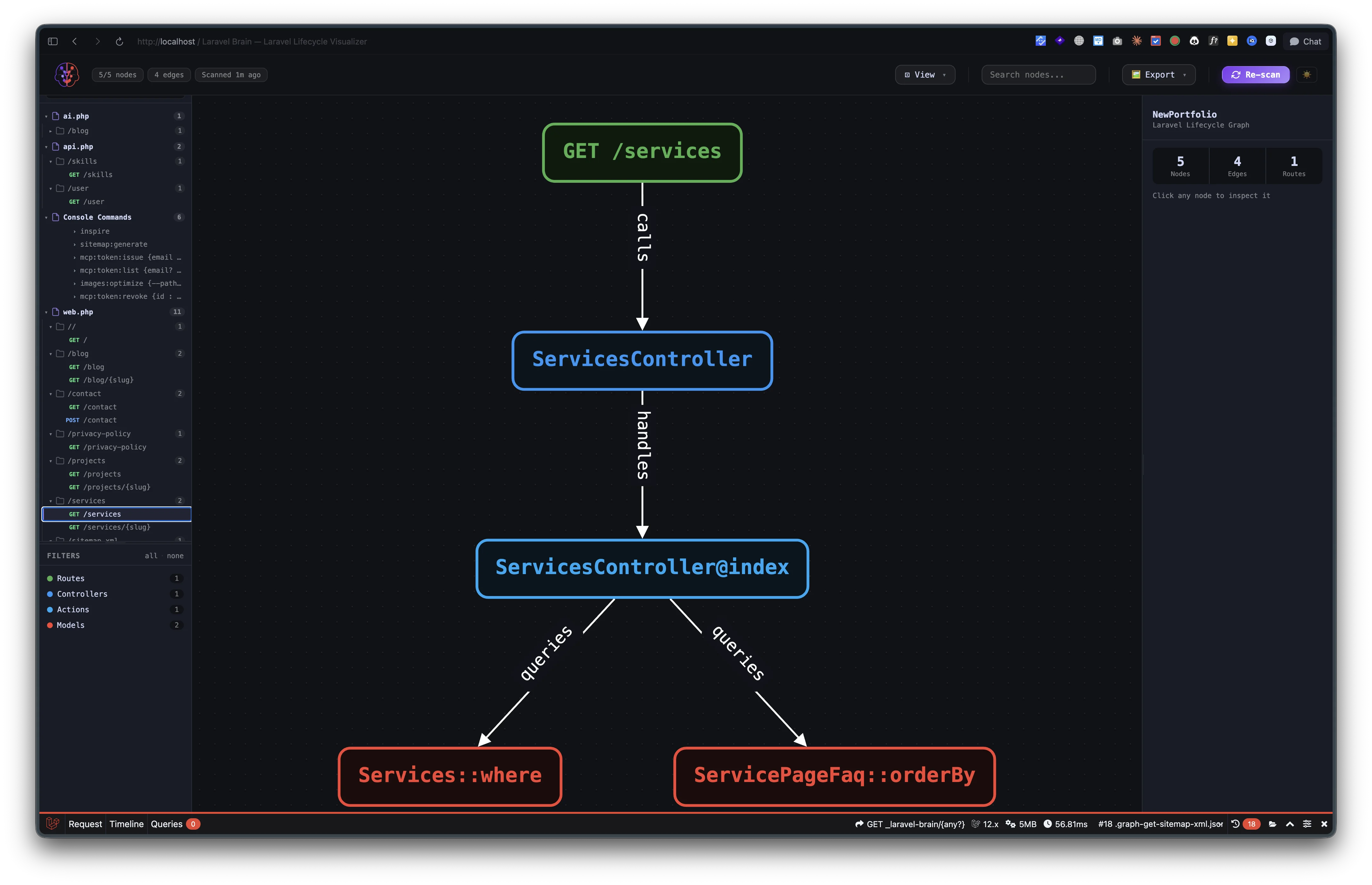
This one hits two models — Services and ServicePageFaq — both queried independently from ServicesController@index. That's fine. It's expected. But what's valuable is that I didn't have to remember writing it. The graph tells me.
And the dynamic counterpart:
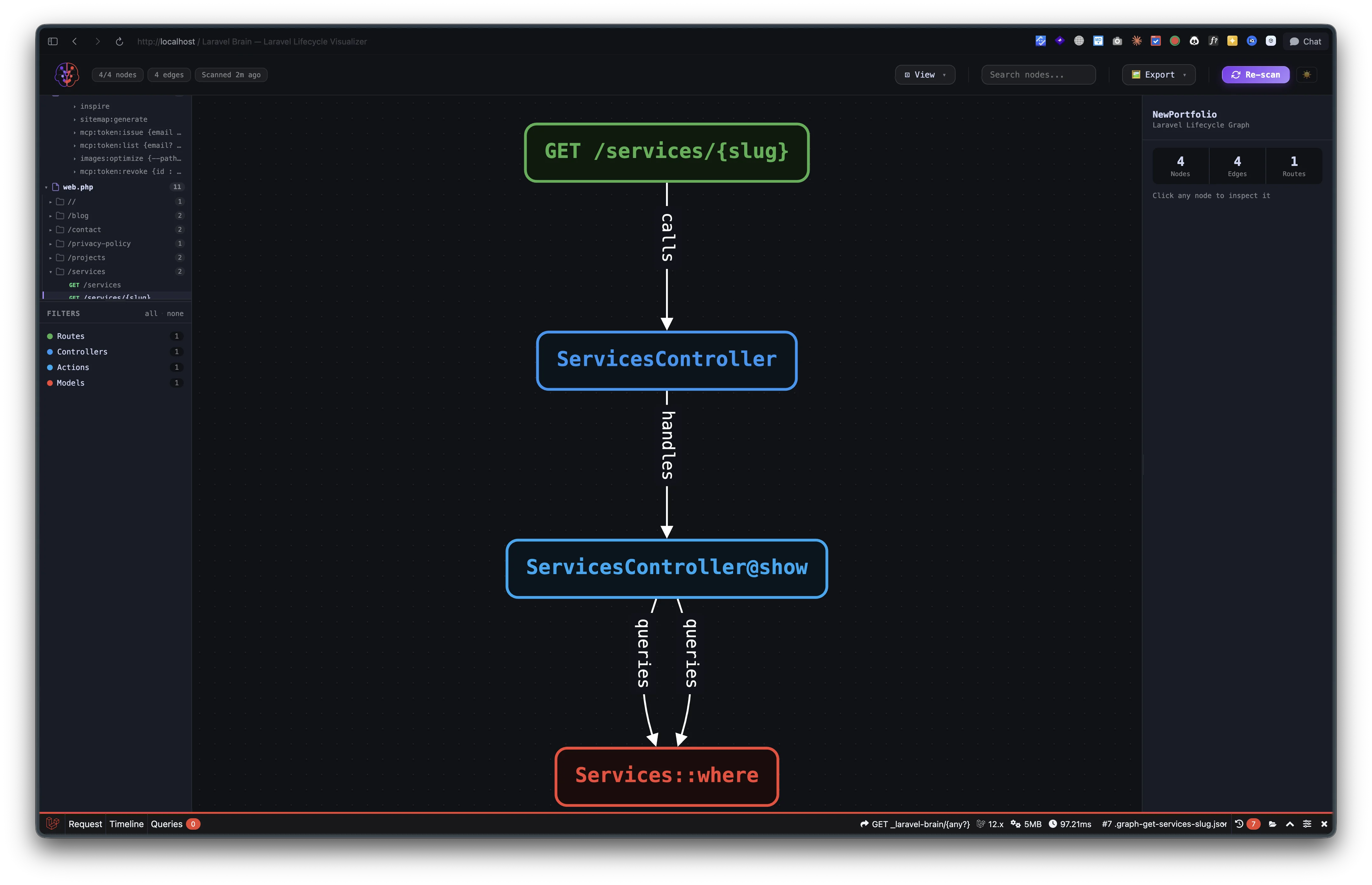
Two Services::where calls in ServicesController@show. Same pattern. Same potential consolidation opportunity. The graph is consistent — once you learn to read one, you can read all of them.
The Fat-Class Detector Is Brutally Honest
Tucked into the scan output is something the README undersells: the fat-class detector.
Anything over 300 lines or 10 methods gets flagged. That's it. A simple heuristic. But it's the kind of metric that makes you stop justifying that 720-line UserController you keep meaning to break up.
I've written before about technical debt and how it actually shows up in real codebases. Fat classes are the most common form. They don't break anything. They just slowly poison the project until nobody can remember what does what. Laravel Brain doesn't fix them — but it stops you from pretending they aren't there.
If you want to take that further, NASA's 10 Coding Rules has a stricter set of class and function size rules that have aged surprisingly well. Worth reading after your first Laravel Brain scan, when you're suddenly aware of how big your "small" classes really are.
What's Missing (Or Just Rough)
Honest section. The package isn't perfect. A few things to know going in:
- No Octane awareness. If you're running Laravel Octane, Brain doesn't track persistent state or worker behavior. It scans static code, not runtime.
- Custom Eloquent scopes can be missed. If you wrap your queries in heavily abstracted query builders or scopes defined dynamically, the graph won't always pick them up.
- The graph gets dense fast on big apps. A small portfolio site looks clean. A 200-route SaaS application gets messy. The per-route tab view helps, but you'll be scrolling.
- No write actions. It's a viewer. You can't refactor from inside the graph or generate test scaffolding. That's probably the right scope, but worth knowing.
- Stress-testing is basic. It can fire concurrent requests at routes and time them, but it's not Apache Bench or k6. Use it for sanity checks, not load testing.
None of these are dealbreakers. They're the honest tradeoffs of a free, dev-only tool that does one thing well.
Who Should Install This Today
Short list:
→ Anyone inheriting a Laravel codebase — install it the moment you clone the repo. → Agencies doing Laravel audits — it's a discovery accelerator. Charge for the audit, deliver in half the time. → Solo devs maintaining a multi-year Laravel app — you've forgotten more about your own code than you realize. The graph reminds you. → Junior devs onboarding to a team — instead of three days of "read the code and ask questions," give them the graph and a coffee. → CTOs who haven't touched the codebase in six months — five minutes with this tool will tell you more than any standup update.
If your Laravel project is brand new and 12 routes long, you don't need it. If it's anything bigger, you do.
Next Steps
Three things to do right now if you maintain any Laravel app:
- Run
composer require --dev laramint/laravel-brainon your largest project. - Hit
php artisan brain:scanand open/_laravel-brain. - Look at the route you've been meaning to refactor for six months. Now look at the graph. You'll know what to do.
If you're an agency or freelancer pitching Laravel work, this is a free discovery superpower — it lets you walk into any client codebase and have an informed opinion within the first hour. That kind of speed is the difference between getting hired and getting passed over.
The Laravel ecosystem keeps shipping tools that make boring work less boring. Laravel Brain is the latest one I've added to my permanent install list. Right next to FilamentPHP, Pint, and Pest.
Try it on your next project. Let me know what your graph looks like.