
Vs code · plugin · complete
ClarifAI: Free AI-Powered Code Analysis for Visual Studio Code
A free, privacy-focused VSCode extension that uses local Ollama AI models to explain code and suggest enhancements directly inside your editor. No cloud uploads, no subscriptions, works offline with any programming language.

- Role
- Developer
- Timeline
- 1 month
- Year
- 2025
- Status
- Completed
01
The overview
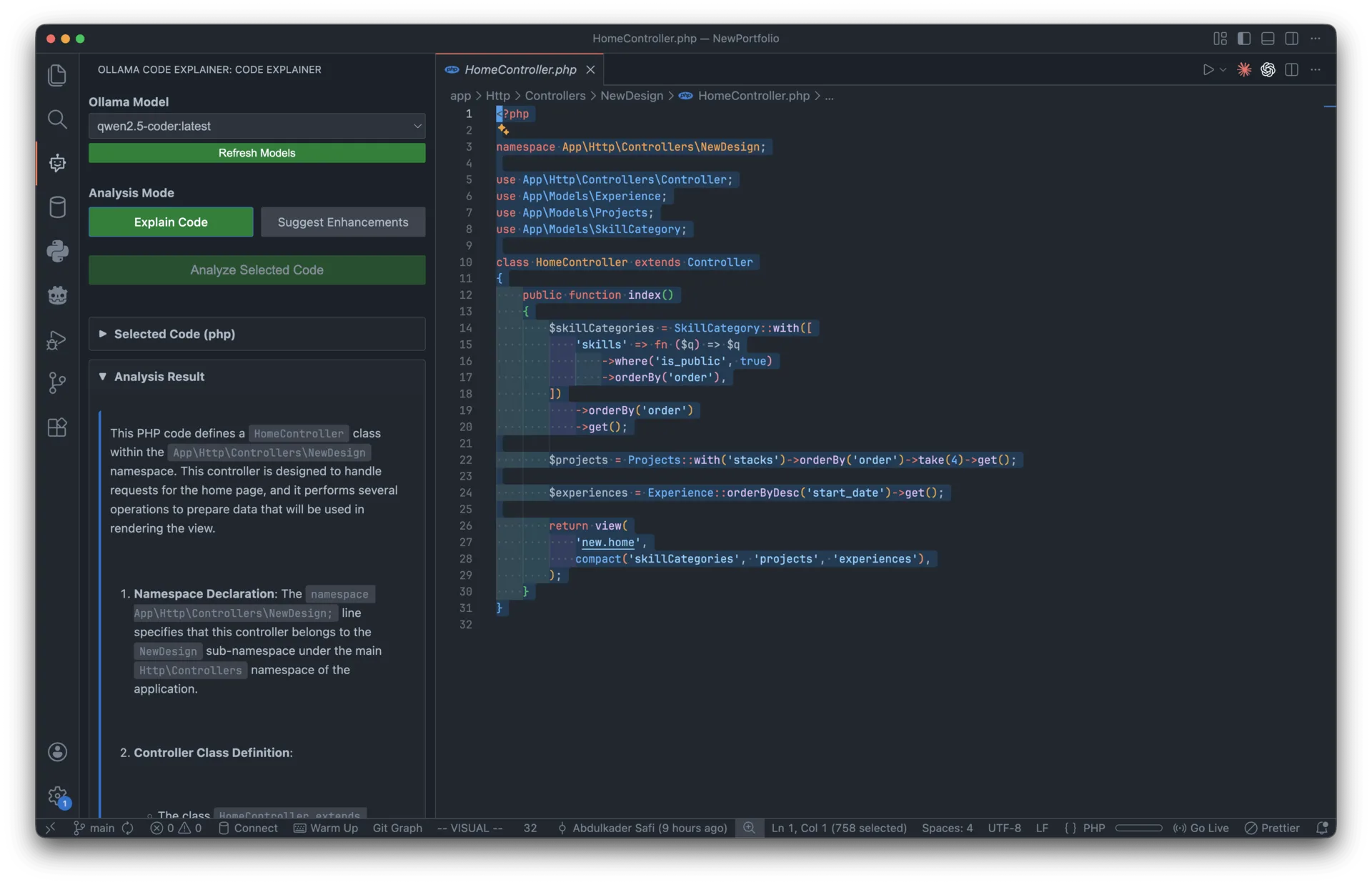
ClarifAI is a Visual Studio Code extension that brings AI-powered code analysis into the IDE without sending a single line of code to the cloud. Built with TypeScript and VSCode's Webview API, it connects to Ollama running locally to provide two core analysis modes: detailed code explanations in plain English and smart enhancement suggestions covering quality, performance, and readability.
The extension features real-time streaming responses, a clean sidebar panel with markdown rendering and syntax highlighting, automatic language detection, collapsible sections for organized output, and support for swapping between any installed Ollama model (deepseek-coder, codellama, mistral, etc.). It works with every programming language VSCode supports and requires zero accounts, API keys, or recurring costs.
Tech stack: TypeScript, VSCode Extension API, Ollama API, Webview API, esbuild, ESLint.
02
The challenge
Understanding complex codebases is one of the most time-consuming parts of development. Jumping into unfamiliar projects, reviewing pull requests, revisiting your own code from months ago, or tracing logic through legacy systems with no documentation all require significant mental effort.
Cloud-based AI coding assistants like GitHub Copilot and Cursor solve parts of this, but they require sending proprietary code to external servers. For developers working with sensitive codebases, client projects, or environments where privacy is non-negotiable, that's a dealbreaker. On top of that, these tools come with monthly subscriptions and require constant internet access, making them inaccessible for offline work or cost-conscious developers.
03
The solution
ClarifAI keeps everything local by running inference through Ollama on the developer's own machine. Select any code snippet, choose a model, pick an analysis mode, and the AI streams its response in real-time directly into a sidebar panel. The "Explain Code" mode breaks down what the code does with high-level summaries, function-by-function walkthroughs, data flow details, and security considerations. The "Suggest Enhancements" mode returns actionable improvements for input validation, error handling, performance, and readability.
The extension dynamically discovers all installed Ollama models, remembers the last-used model between sessions, and renders all output as formatted markdown with syntax-highlighted code blocks. Streaming means feedback starts appearing immediately rather than waiting for the full response to generate. The result is a tool that gives developers Copilot-level code understanding for free, fully offline, with their code never leaving their machine.
FAQ
About this project
What does ClarifAI do?
ClarifAI is a Visual Studio Code extension that brings AI-powered code analysis directly into the editor. It offers two main modes: explaining what selected code does in plain English, and suggesting enhancements around quality, performance, and readability. The analysis appears in a clean sidebar panel with markdown rendering and syntax highlighting.
How does ClarifAI keep my code private?
All inference runs locally through Ollama on your own machine, so no code is ever sent to the cloud. This makes it suitable for sensitive codebases, client projects, and environments where privacy is non-negotiable. It also means the extension works fully offline without any accounts or API keys.
What technologies were used to build it?
ClarifAI was built with TypeScript using the VSCode Extension API and Webview API for the interface. It connects to local AI models through the Ollama API and was bundled with esbuild, with ESLint for linting. The result supports every programming language that VSCode supports.
Which AI models can I use with ClarifAI?
The extension dynamically discovers all the Ollama models installed on your machine and lets you swap between them, including options like deepseek-coder, codellama, and mistral. It also remembers your last-used model between sessions for convenience. Responses stream in real time, so feedback starts appearing immediately rather than after the full response is generated.
Is ClarifAI free and where can I get it?
Yes, ClarifAI is completely free with no subscriptions or recurring costs. It is published on the Visual Studio Code Marketplace and the source code is open on GitHub. The project was built solo by Abdulkader Safi as the developer over roughly one month in 2025 and is listed as completed.
Work with me
Got a product in your head? Let's put it on a screen.
Tell me what you're building, who it's for and when it has to be live. I'll reply with questions first, then a fixed quote.
Start a project