Tools · Web Application · Frontend · Claude Code · agents · AI Agent
MD Kanban
A kanban board where every card is a markdown file on your disk, built so you can watch what an AI coding agent is doing without asking it. Each connected folder is a project, each subfolder groups work, and each task is one `.md` file whose YAML frontmatter holds status, priority, assignee, due date and labels. Dragging a card between columns rewrites the file, and the agent edits the same files from its side. That is the whole design: Jira and Linear keep state behind an API, so an agent needs credentials and a connector before it can move a card, while a folder is something it can already write to. The repo ships the contract twice, as `AGENTS.md` for any agent and as a Claude skill, and tracks its own remaining build as task files inside itself. Vue 3, Vite, TypeScript and Tailwind v4 over the browser File System Access API, about 1,800 lines, MIT.
- Tailwindcss
- Javascript
- Typescript
- Vue
- Role
- Design and development
- Timeline
- 1 day
- Year
- 2026
- Status
- In Progress
01 / The overview
Hand a piece of work to a coding agent and you lose sight of it. The agent knows what it has finished. You find out by reading its output, or by asking again.
The usual fix is a task tool, and the usual task tools are the wrong shape for this. Jira, Linear and Notion keep their state behind an API, so before an agent can move a single card it needs an account, credentials and a connector. That is a lot of setup to answer one question: what is done and what is not.
MD Kanban puts the state somewhere the agent already has permission to write. A folder on disk. Connect the folder in the browser and it becomes a project. Subfolders group the work. Every task is one markdown file with YAML frontmatter carrying status, priority, assignee, dueDate, labels and order, and a markdown body holding the description.
Drag a card from In Progress to Done and the file's status field is rewritten on disk. The agent edits the same file from its side and the card moves on the board. Nothing sits in between: no account, no server, no API key.
The board is a Vue 3 app of about 1,800 lines. It reads folders through the browser's File System Access API, which is why real folders need Chrome or Edge. Firefox and Safari get two built-in demo projects so the app is still usable, just not against your own files.
02 / The challenge
The interesting problems were all about two writers touching the same files.
The board is not the only thing editing a card. An agent might rewrite the same file a second after a drag, and neither side holds a lock. Polling every five seconds and re-reading the folder is the answer here, because there is no cheap way to know when a file changed from inside a browser tab. Each pass skips hidden folders, node_modules and dist, stops at four levels deep, and leaves the previously loaded tasks in place if a read fails, so a transient permission problem does not blank the board mid-session. It also never changes which project or work folder is selected, because a refresh that moves the view out from under you is worse than a stale card.
Parsing is the second half of that problem. The board has to read frontmatter an agent wrote, which means it cannot assume the file was written by the board. Missing keys have to fall back rather than throw, an unrecognised status has to land somewhere sensible instead of dropping the card, and a file with no id has to take one from its filename. The parser is hand-written rather than a YAML library, because the schema is nine known keys of strings, nulls, numbers and inline string arrays, and shipping a general YAML parser to the browser for that is weight with no return.
File permissions are their own category. The File System Access API hands back a directory handle, which survives in IndexedDB across reloads, but the permission attached to it does not always survive with it. So the background refresh has to check read access without prompting (a prompt raised outside a click is silently refused), and a project that has lost access shows a message asking for a click rather than failing quietly.
The desktop build reuses that same folder code rather than forking it. Electron's renderer supports the File System Access API, so the picker, the stored handles and the permission checks all run unchanged inside the packaged app. That keeps the project as one codebase instead of a browser version and a desktop version that drift apart, and it means the desktop app is not carrying a second, subtly different file layer to maintain.
03 / The solution
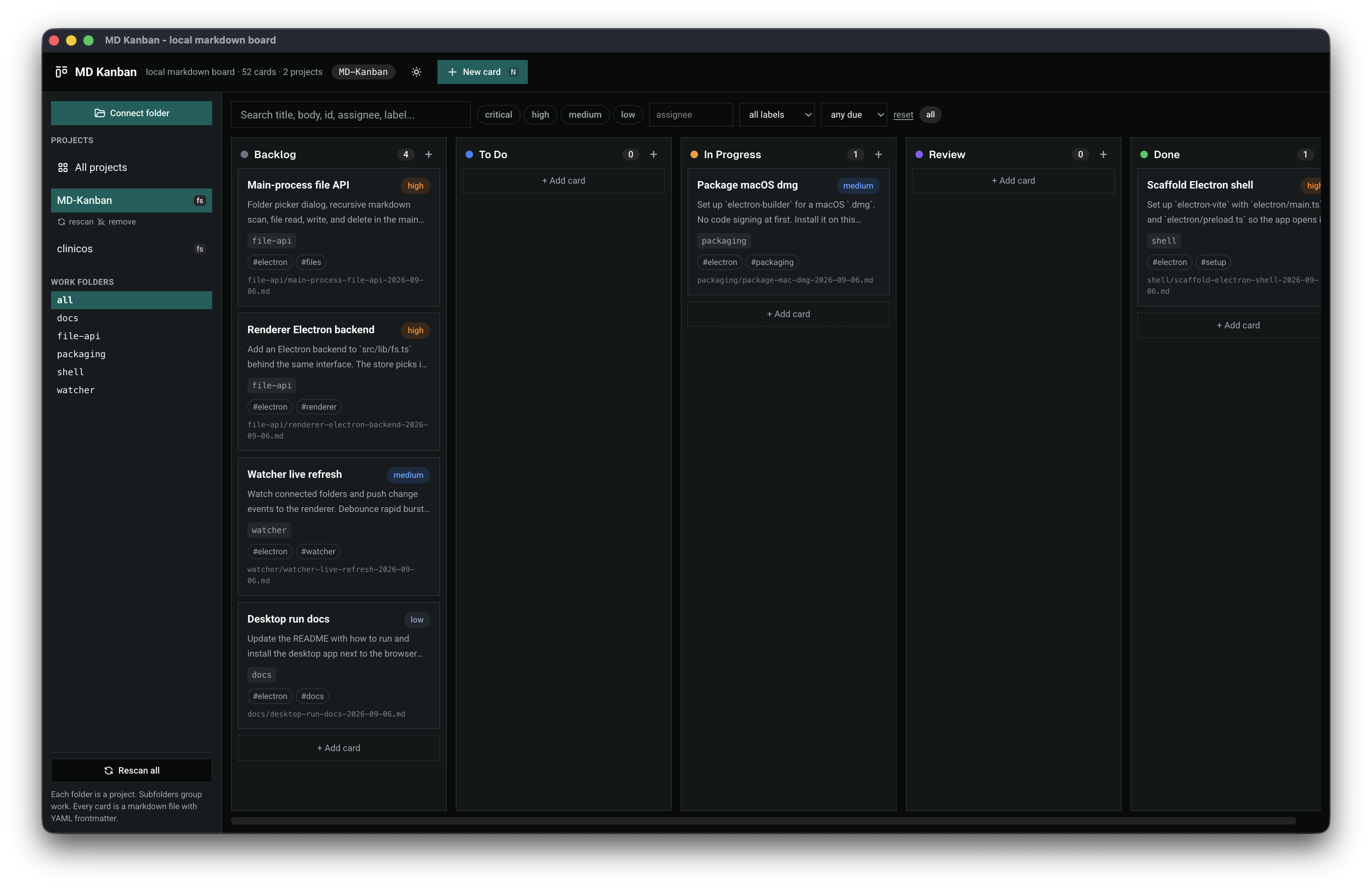
The board is five fixed columns (backlog, to do, in progress, review, done) and four priorities (critical, high, medium, low), with a sidebar listing connected projects and their work folders, and a filter bar across search, priority, assignee, label and due date.
Writes are optimistic. A drag updates the card in the store first, writes the file, then triggers a quiet rescan, so the board never stalls on disk. Moving a card touches status and order and nothing else, and a card dropped into a column takes the highest order in that column plus one, so it lands where you dropped it rather than jumping.
The agent side is a written contract, shipped twice so it gets picked up whichever way an agent arrives. AGENTS.md at the repo root states the folder layout, the frontmatter schema, the five allowed operations, and a recipe for answering "what is the status" (group by status, report counts, name what moved to done and what is overdue). skills/md-kanban/SKILL.md is the same contract as a Claude skill, so Claude loads it when the question is about task status or breaking a piece of work into cards. Both say delete a file only when explicitly asked.
It ships two ways. In the browser it needs Chrome or Edge, because the File System Access API is the only route a web page has to a folder you choose. npm run dist packages an Electron app instead, currently an unsigned macOS .dmg, tested on macOS and not yet on Linux or Windows. Unsigned means macOS warns on first launch: right click, Open, confirm.
The repo runs on itself. tasks/MD-Kanban/ holds the desktop work as real task files, split across shell/, file-api/, watcher/, packaging/ and docs/, and the screenshot in the README is the board displaying exactly those cards. The one still worth doing is the watcher: the main process can use a real filesystem watcher and push changes, which retires the five-second poll the browser has no way around.
Known gap worth naming: the serializer writes a fixed nine keys, so any extra frontmatter an agent invents is dropped the next time the board saves that card. Preserving unknown keys is the next correctness fix.
FAQ
About this project
Why not just use Jira or Linear with an MCP connector?
You can, and for a team that already lives in one of those it is the right answer. The difference is setup and ownership. A connector needs an account, an API token and a configured server before an agent moves its first card, and the state then lives on someone else's machine. MD Kanban needs a folder. If the agent can write to your project directory, which it already can, it can run the board. It also works offline and the history is in git alongside the code.
Is there a desktop app, or is it browser only?
Both. `npm run dist` packages an Electron app, currently an unsigned macOS `.dmg`: open it, drag to Applications, launch. Because the build is unsigned macOS warns on first launch, so right click, choose Open, then confirm. Linux and Windows are not tested yet. The desktop app runs the same folder code as the browser version rather than a separate file layer.
Which browsers does it work in?
Chrome and Edge, or any Chromium browser with the File System Access API, because that is the only way a web page can read and write a folder you choose. Firefox and Safari have not shipped it, so they fall back to two built-in demo projects: the board works, it just cannot see your files.
Does the board update when the agent writes a file?
Yes, within about five seconds. A browser tab has no filesystem watcher available to it, so the board re-reads the connected folders on a timer, skipping the pass when the tab is hidden. A real watcher in the Electron main process is the planned replacement, since it can push changes the moment a file lands instead of polling for them.
Can I use my existing markdown notes as cards?
Any `.md` file in a connected folder gets read. A file with no frontmatter still parses: it takes its id from the filename, its title from the first `#` heading, and defaults for everything else. Once the board saves that card it writes the full frontmatter block back, so the file changes shape on first edit. Files deeper than four folders, and anything in a hidden folder, `node_modules` or `dist`, are skipped.
What is the file format exactly?
Nine frontmatter keys: `id`, `status`, `priority`, `assignee`, `dueDate`, `created`, `modified`, `labels`, `order`. `status` is backlog, todo, in-progress, review or done. `priority` is critical, high, medium or low. The body is plain markdown and the first `#` heading is the card title. Files are named `<slug>-YYYY-MM-DD.md` by default.