Tailwindcss · Typescript · Tools · Desktop · Dashboard · Frontend · UI · Claude Code · SEO · website Audit
Nutshell: A desktop app for running and viewing squirrelscan website audits
A cross-platform desktop app (macOS, Windows, Linux) that runs squirrelscan website audits and shows the results in a clean dashboard. Run an audit and watch live progress, browse scores and issues with fixes, delete or refresh audits, and export styled Word reports. Built with Electron, TypeScript, and Tailwind CSS v4, and shipped as per-platform installers from a tagged GitHub release.
- Tailwindcss
- Typescript
- Role
- Solo design and development
- Timeline
- 2026
- Year
- 2026
- Status
- Completed
01 / The overview
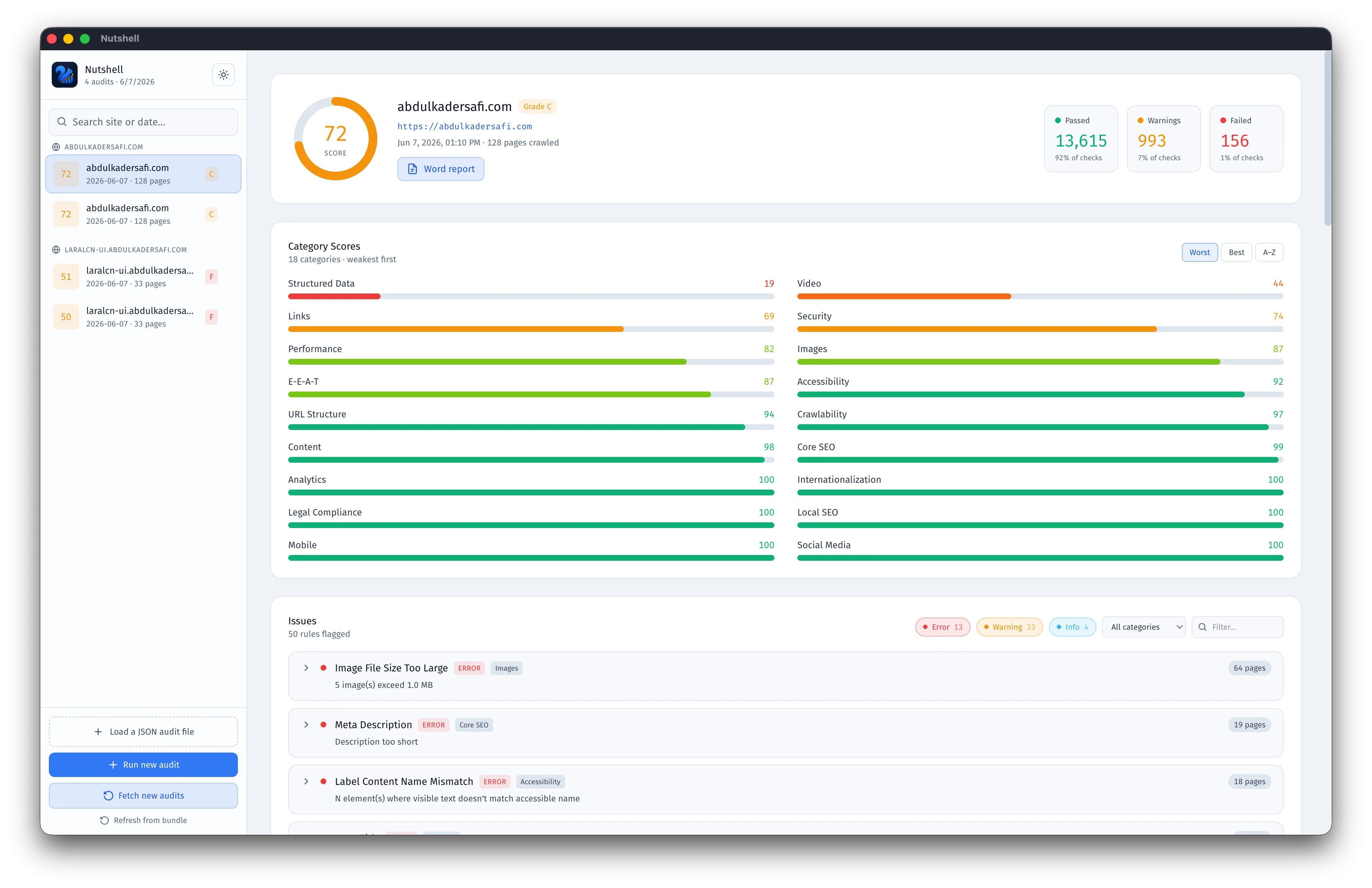
Nutshell turns the squirrelscan CLI into a desktop app. Instead of running audits in a terminal and reading raw JSON, you click "Run new audit", enter a URL, and the app crawls and scores the site in the background while a progress card shows live status. Finished audits land in a dashboard with an overall score gauge, category breakdowns sorted weakest first, and issues you can filter by severity and expand to see the fix and the affected pages. Any audit exports to a styled Word report in one click. It runs on macOS, Windows, and Linux from a single codebase.
02 / The challenge
A browser-based dashboard can't run CLI commands, and the starting point only viewed pre-fetched JSON. The goal was an app you can actually operate end to end: run audits, watch progress, and manage results without touching a terminal. A few things made that tricky. The squirrel CLI prints a live, redrawing progress display, so reliable per-page percentages aren't available when its output is piped. A packaged app launched from Finder or the dock gets a minimal PATH and can't find a CLI installed under the user's home folder. Audit data needs a writable location once the app is packaged, because the app bundle itself is read-only. And the whole thing had to behave the same on three operating systems.
03 / The solution
The app is Electron with a TypeScript main process and a single-file TypeScript dashboard, styled with an installed Tailwind CSS v4 build rather than the CDN. The main process spawns the squirrel CLI, streams its output to the renderer over a small contextBridge IPC API, and rebuilds the audit bundle in TypeScript so no bash or Python is needed at runtime. Audits and reports live under a per-user data folder when packaged and load over IPC, so they work inside the read-only bundle. PATH is enriched at startup from the user's login shell so the CLI is found however the app is launched. Progress shows as an animated, non-blocking card that auto-dismisses when done. Word reports are generated with the docx library and written through a native save dialog, then revealed in Finder or Explorer. Packaging uses electron-builder, and a GitHub Actions workflow builds on macOS, Windows, and Linux runners and attaches the dmg, exe, AppImage, and deb to a GitHub Release on every version tag.
FAQ
About this project
Does Nutshell run the audit itself, or only view results?
It runs them. Click "Run new audit", enter a URL and a page limit, and it crawls and scores the site in the background using the squirrel CLI, then loads the result into the dashboard. You can still drag in a JSON file to view an audit on a machine without the CLI installed.
Which platforms does it support?
macOS, Windows, and Linux. Installers (dmg, exe, AppImage, and deb) are built per platform by GitHub Actions and attached to each release.
What is it built with?
Electron and TypeScript, with Tailwind CSS v4 for the UI, electron-builder for packaging, and the docx library for Word export.