RAG for Developers: Building Context-Aware Documentation Assistants
Learn how to build a Retrieval-Augmented Generation (RAG) system for documentation assistants using Python, LangChain, PostgreSQL pgvector, and Ollama. Complete tutorial with open-source code.

13 min read


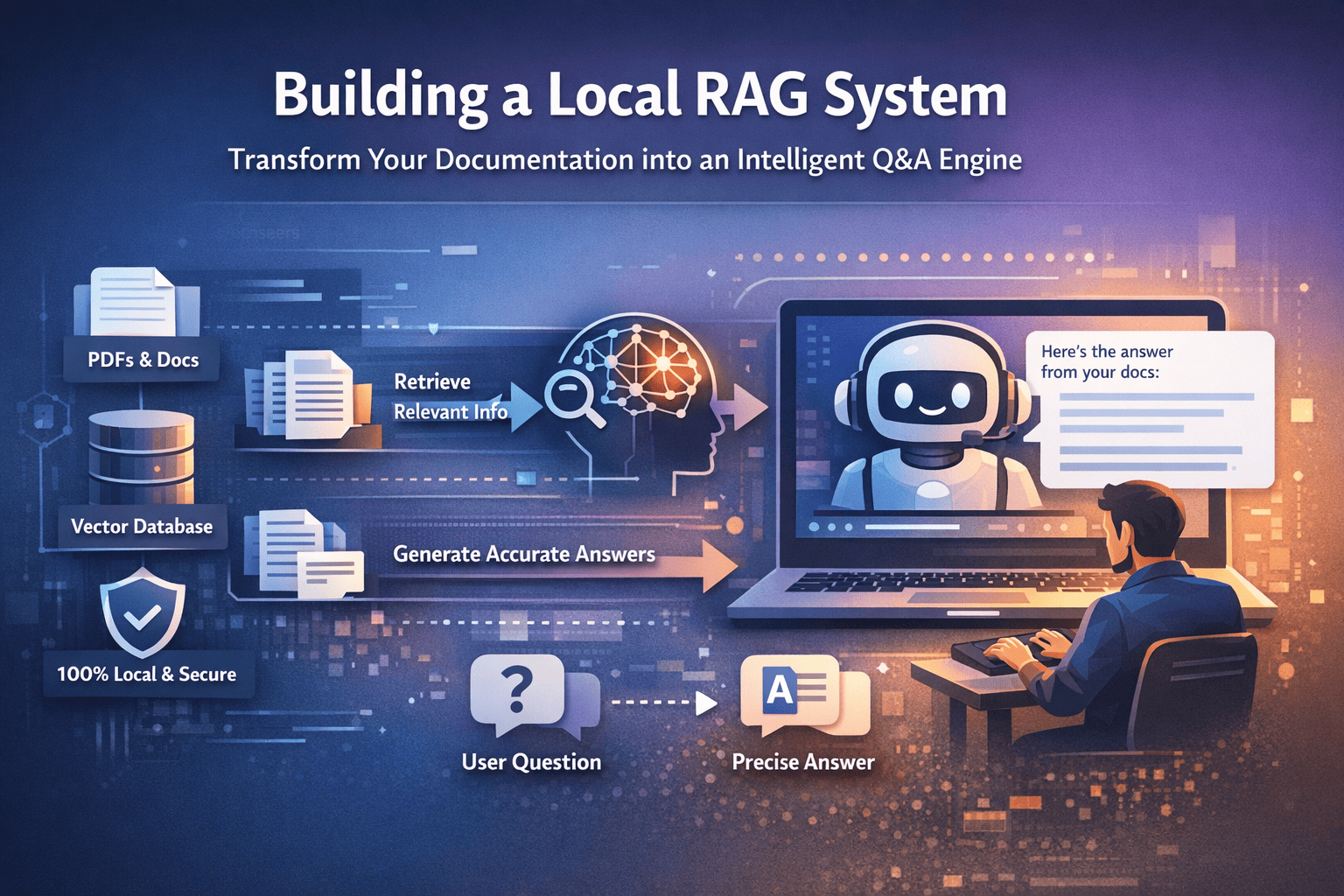
Every developer has experienced the frustration of searching through hundreds of pages of documentation, PDFs, or internal wikis to find a single piece of information. What if your documentation could answer questions directly, understanding context and providing precise answers from your actual content?
This is exactly what Retrieval-Augmented Generation (RAG) enables. In this comprehensive guide, I'll walk you through building a production-ready RAG system that transforms static documents into an intelligent, queryable knowledge base—all running locally on your machine for complete privacy and zero API costs.
What is Retrieval-Augmented Generation (RAG)?
Retrieval-Augmented Generation is an AI architecture pattern that enhances Large Language Models by providing them with relevant context from external knowledge sources before generating responses. Rather than relying solely on what the model learned during training, RAG dynamically fetches information from your documents, databases, or APIs in real-time.
The Core Problem RAG Solves
Traditional LLMs have three fundamental limitations that RAG addresses:
Knowledge Cutoff: Models only know information up to their training date. Your internal documentation, recent updates, or proprietary data simply doesn't exist in their knowledge base.
Hallucination: When LLMs don't know something, they often generate plausible-sounding but incorrect information. This is dangerous in documentation contexts where accuracy matters.
Context Limitations: Even with large context windows, you can't paste your entire documentation into every prompt. RAG intelligently retrieves only the relevant portions.
How RAG Architecture Works
The RAG pipeline consists of two main phases:
Indexing Phase (Offline)
- Load documents (PDFs, markdown, HTML, etc.)
- Split documents into smaller, manageable chunks
- Generate vector embeddings for each chunk
- Store embeddings in a vector database
Query Phase (Runtime)
- User submits a question
- Convert question to vector embedding
- Search vector database for similar chunks
- Pass retrieved context + question to LLM
- LLM generates answer grounded in your documents
This architecture ensures every answer is traceable back to source documents, dramatically reducing hallucinations while keeping responses current with your latest documentation.
Why Build a Local RAG System?
Before diving into implementation, let's address why running RAG locally matters:
Privacy and Security: Your proprietary documentation, internal APIs, and sensitive data never leave your infrastructure. This is critical for enterprise environments, healthcare, legal, and financial sectors.
Cost Efficiency: Cloud LLM APIs charge per token. A busy documentation assistant can cost thousands monthly. Local inference has zero marginal cost after initial setup.
Latency Control: No network round-trips to external APIs. Responses are faster and more predictable.
Customization: Full control over model selection, fine-tuning, and optimization for your specific domain.
Offline Capability: Works without internet connectivity—essential for air-gapped environments or field deployments.
Building a Complete RAG System: Architecture Overview
I've open-sourced a production-ready RAG implementation that you can use as a starting point or reference: PDF RAG System on GitHub.
Here's the high-level architecture we'll build:
┌─────────────────────────────────────────────────────────────────┐
│                        PDF RAG SYSTEM                           │
├─────────────────────────────────────────────────────────────────┤
│                                                                 │
│  ┌──────────┐    ┌──────────────┐    ┌──────────────────────┐  │
│  │  PDFs    │───▶│  PDF Loader  │───▶│  Text Chunking        │  │
│  │          │    │  + OCR       │    │  (1000 chars/chunk)   │  │
│  └──────────┘    └──────────────┘    └───────────┬──────────┘  │
│                                                  │              │
│                                                  ▼              │
│  ┌──────────────────────────────────────────────────────────┐   │
│  │              Vector Embeddings (HuggingFace)             │   │
│  │           sentence-transformers/all-MiniLM-L6-v2         │   │
│  └──────────────────────┬───────────────────────────────────┘   │
│                           │                                     │
│                           ▼                                     │
│  ┌──────────────────────────────────────────────────────────┐   │
│  │           PostgreSQL + pgvector (Vector Store)           │   │
│  └──────────────────────┬───────────────────────────────────┘   │
│                           │                                     │
│                           ▼                                     │
│  ┌──────────┐    ┌──────────────┐    ┌──────────────────────┐  │
│  │  Query   │───▶│  Semantic    │───▶│  Retrieved Context    │  │
│  │          │    │  Search      │    │  (Top K chunks)       │  │
│  └──────────┘    └──────────────┘    └───────────┬──────────┘  │
│                                                  │              │
│                                                  ▼              │
│  ┌──────────────────────────────────────────────────────────┐   │
│  │              Ollama LLM (Mistral/Llama)                  │   │
│  │                   Answer Generation                      │   │
│  └──────────────────────────────────────────────────────────┘   │
│                                                                 │
└─────────────────────────────────────────────────────────────────┘
Technology Stack Breakdown
Why These Specific Technologies?
LangChain: The de facto framework for building LLM applications. Provides abstractions for document loading, text splitting, embeddings, vector stores, and chains. Reduces boilerplate significantly.
PostgreSQL with pgvector: Production-grade vector database that scales. Unlike SQLite-based solutions, pgvector handles millions of vectors efficiently with proper indexing (IVFFlat, HNSW).
Ollama: Simple local LLM inference. Supports dozens of models (Mistral, Llama, Phi, CodeLlama) with a single command. No GPU required for smaller models.
HuggingFace Embeddings: The all-MiniLM-L6-v2 model offers an excellent balance of speed and quality. Runs on CPU, produces 384-dimensional vectors.
PyMuPDF + Tesseract: Robust PDF extraction with OCR fallback for scanned documents and images within PDFs.
Step-by-Step Implementation
Prerequisites
Before we begin, ensure you have the following installed:
# PostgreSQL with pgvector
# macOS
brew install postgresql pgvector

# Ubuntu/Debian
sudo apt-get install postgresql postgresql-contrib
# Install pgvector from source: https://github.com/pgvector/pgvector

# Ollama for local LLM inference
brew install ollama  # macOS
# Or download from https://ollama.ai

# Pull the Mistral model
ollama pull mistral

# Tesseract for OCR (optional but recommended)
brew install tesseract  # macOS
sudo apt-get install tesseract-ocr  # Ubuntu
Project Structure
A well-organized project structure is essential for maintainability:
test_rag/
├── main.py                 # CLI entry point
├── src/                    # Source code modules
│   ├── __init__.py        # Package initialization
│   ├── config.py          # Configuration settings
│   ├── pdf_loader.py      # PDF extraction & OCR
│   ├── vector_store.py    # Vector database operations
│   └── qa_chain.py        # LLM & QA chain setup
├── my_pdfs/               # Your PDF documents
├── .pdf_cache/            # Extracted text cache
├── requirements.txt       # Python dependencies
└── .env                   # Environment variables
Configuration Module
Centralize all configuration in a single file for easy customization:
# src/config.py
import os
from dotenv import load_dotenv

load_dotenv()

# Database Configuration
DATABASE_URL = os.getenv(
    "DATABASE_URL",
    "postgresql://user:password@localhost:5432/rag_db"
)

# Model Configuration
OLLAMA_MODEL = "mistral"
EMBEDDING_MODEL = "sentence-transformers/all-MiniLM-L6-v2"

# Performance Tuning
MAX_WORKERS = 4          # Parallel processing threads
TOP_K = 3                # Number of documents to retrieve
LLM_NUM_CTX = 4096       # Context window size

# Text Chunking Parameters
CHUNK_SIZE = 1000        # Characters per chunk
CHUNK_OVERLAP = 200      # Overlap between chunks

# Paths
PDF_DIRECTORY = "my_pdfs"
CACHE_DIRECTORY = ".pdf_cache"
PDF Loading with OCR Support
The PDF loader handles both text-based and scanned PDFs:
# src/pdf_loader.py
import fitz  # PyMuPDF
import pytesseract
from PIL import Image
from pathlib import Path
from concurrent.futures import ThreadPoolExecutor
from .config import MAX_WORKERS, CACHE_DIRECTORY

class PDFLoader:
    def __init__(self):
        self.cache_dir = Path(CACHE_DIRECTORY)
        self.cache_dir.mkdir(exist_ok=True)

    def extract_text(self, pdf_path: str) -> str:
        """Extract text from PDF with OCR fallback."""
        cache_file = self.cache_dir / f"{Path(pdf_path).stem}.txt"

        # Check cache first
        if cache_file.exists():
            print(f"[CACHE HIT] {pdf_path}")
            return cache_file.read_text()

        print(f"[PROCESSING] {pdf_path}")
        doc = fitz.open(pdf_path)
        text_parts = []

        for page in doc:
            # Try direct text extraction first
            text = page.get_text()

            # If no text found, try OCR
            if not text.strip():
                pix = page.get_pixmap()
                img = Image.frombytes("RGB", [pix.width, pix.height], pix.samples)
                text = pytesseract.image_to_string(img)

            text_parts.append(text)

        full_text = "\n".join(text_parts)

        # Cache the extracted text
        cache_file.write_text(full_text)

        return full_text

    def load_all_pdfs(self, directory: str) -> list[dict]:
        """Load all PDFs from directory in parallel."""
        pdf_files = list(Path(directory).glob("*.pdf"))

        with ThreadPoolExecutor(max_workers=MAX_WORKERS) as executor:
            results = list(executor.map(
                lambda p: {"content": self.extract_text(str(p)), "source": str(p)},
                pdf_files
            ))

        return results
Vector Store Implementation
The vector store handles embedding generation and similarity search:
# src/vector_store.py
from langchain_community.vectorstores import PGVector
from langchain_huggingface import HuggingFaceEmbeddings
from langchain.text_splitter import RecursiveCharacterTextSplitter
from langchain.schema import Document
from .config import DATABASE_URL, EMBEDDING_MODEL, CHUNK_SIZE, CHUNK_OVERLAP

class VectorStore:
    def __init__(self):
        self.embeddings = HuggingFaceEmbeddings(
            model_name=EMBEDDING_MODEL,
            model_kwargs={'device': 'cpu'},
            encode_kwargs={'normalize_embeddings': True}
        )

        self.text_splitter = RecursiveCharacterTextSplitter(
            chunk_size=CHUNK_SIZE,
            chunk_overlap=CHUNK_OVERLAP,
            separators=["\n\n", "\n", ". ", " ", ""]
        )

        self.collection_name = "documentation"

    def create_documents(self, texts: list[dict]) -> list[Document]:
        """Convert raw texts to LangChain documents with chunking."""
        documents = []

        for item in texts:
            chunks = self.text_splitter.split_text(item["content"])

            for i, chunk in enumerate(chunks):
                doc = Document(
                    page_content=chunk,
                    metadata={
                        "source": item["source"],
                        "chunk_index": i,
                        "total_chunks": len(chunks)
                    }
                )
                documents.append(doc)

        return documents

    def index_documents(self, documents: list[Document]) -> PGVector:
        """Create vector store and index documents."""
        return PGVector.from_documents(
            documents=documents,
            embedding=self.embeddings,
            collection_name=self.collection_name,
            connection_string=DATABASE_URL,
            pre_delete_collection=True  # Fresh index each time
        )

    def get_retriever(self, top_k: int = 3):
        """Get retriever for existing vector store."""
        vectorstore = PGVector(
            embedding_function=self.embeddings,
            collection_name=self.collection_name,
            connection_string=DATABASE_URL
        )

        return vectorstore.as_retriever(
            search_type="similarity",
            search_kwargs={"k": top_k}
        )
QA Chain with Ollama
The QA chain connects the retriever to the local LLM:
# src/qa_chain.py
from langchain_community.llms import Ollama
from langchain.chains import RetrievalQA
from langchain.prompts import PromptTemplate
from .config import OLLAMA_MODEL, LLM_NUM_CTX, TOP_K
from .vector_store import VectorStore

class QAChain:
    def __init__(self):
        self.llm = Ollama(
            model=OLLAMA_MODEL,
            num_ctx=LLM_NUM_CTX,
            temperature=0.1  # Lower temperature for factual responses
        )

        self.prompt_template = PromptTemplate(
            template="""You are a helpful documentation assistant.
Use the following context to answer the question accurately and concisely.
If the answer is not in the context, say "I don't have enough information to answer that."

Context:
{context}

Question: {question}

Answer:""",
            input_variables=["context", "question"]
        )

        self.vector_store = VectorStore()

    def get_chain(self) -> RetrievalQA:
        """Create the RAG chain."""
        retriever = self.vector_store.get_retriever(top_k=TOP_K)

        return RetrievalQA.from_chain_type(
            llm=self.llm,
            chain_type="stuff",
            retriever=retriever,
            return_source_documents=True,
            chain_type_kwargs={"prompt": self.prompt_template}
        )

    def query(self, question: str) -> dict:
        """Execute a query and return answer with sources."""
        chain = self.get_chain()
        result = chain.invoke({"query": question})

        return {
            "answer": result["result"],
            "sources": [
                {
                    "content": doc.page_content[:200] + "...",
                    "source": doc.metadata["source"]
                }
                for doc in result["source_documents"]
            ]
        }
Main CLI Application
The entry point ties everything together:
# main.py
import argparse
from rich.console import Console
from rich.panel import Panel
from rich.markdown import Markdown
from src.pdf_loader import PDFLoader
from src.vector_store import VectorStore
from src.qa_chain import QAChain
from src.config import PDF_DIRECTORY

console = Console()

def index_pdfs():
    """Load and index all PDFs."""
    console.print("[bold blue]Loading PDFs...[/bold blue]")

    loader = PDFLoader()
    texts = loader.load_all_pdfs(PDF_DIRECTORY)

    console.print(f"[green]Loaded {len(texts)} PDFs[/green]")

    vector_store = VectorStore()
    documents = vector_store.create_documents(texts)

    console.print(f"[green]Created {len(documents)} chunks[/green]")

    vector_store.index_documents(documents)

    console.print("[bold green]Indexing complete![/bold green]")

def interactive_mode():
    """Run interactive Q&A session."""
    qa = QAChain()

    console.print(Panel(
        "[bold]PDF RAG System[/bold]\n"
        "Ask questions about your documents.\n"
        "Type 'exit' to quit.",
        title="Welcome"
    ))

    while True:
        question = console.input("\n[bold cyan]Question:[/bold cyan] ")

        if question.lower() in ['exit', 'quit', 'q']:
            break

        with console.status("[bold green]Thinking..."):
            result = qa.query(question)

        console.print(Panel(
            Markdown(result["answer"]),
            title="Answer"
        ))

        console.print("\n[dim]Sources:[/dim]")
        for source in result["sources"]:
            console.print(f"  • {source['source']}")

def main():
    parser = argparse.ArgumentParser(description="PDF RAG System")
    parser.add_argument("--add-pdfs", action="store_true", help="Index PDFs")
    parser.add_argument("-q", "--query", type=str, help="Single query mode")
    parser.add_argument("--clear", action="store_true", help="Clear database")

    args = parser.parse_args()

    if args.add_pdfs:
        index_pdfs()
    elif args.query:
        qa = QAChain()
        result = qa.query(args.query)
        print(result["answer"])
    else:
        interactive_mode()

if __name__ == "__main__":
    main()
Optimizing RAG Performance
Chunking Strategy
The way you split documents significantly impacts retrieval quality:
Chunk Size: Smaller chunks (500-1000 chars) provide more precise retrieval but may lack context. Larger chunks (2000-3000 chars) preserve more context but may include irrelevant information.
Chunk Overlap: Overlap (100-200 chars) ensures important information at chunk boundaries isn't lost.
Semantic Chunking: For advanced use cases, consider chunking by semantic sections rather than character count. Split on headers, paragraphs, or logical sections.
Embedding Model Selection
Different embedding models have different trade-offs:
| Model | Dimensions | Speed | Quality |
|---|---|---|---|
| all-MiniLM-L6-v2 | 384 | Fast | Good |
| all-mpnet-base-v2 | 768 | Medium | Better |
| bge-large-en-v1.5 | 1024 | Slow | Best |
For most documentation use cases, all-MiniLM-L6-v2 offers the best balance.
Retrieval Tuning
Top-K Selection: Start with 3-5 documents. Too few may miss relevant context; too many adds noise and increases latency.
Similarity Threshold: Filter out low-confidence matches by setting a minimum similarity score.
Hybrid Search: Combine vector similarity with keyword search (BM25) for better results on technical terms and exact matches.
Caching Strategies
Implement multiple caching layers:
- PDF Text Cache: Avoid re-extracting text from unchanged PDFs
- Embedding Cache: Store computed embeddings to avoid recomputation
- Query Cache: Cache frequent queries and their results
Production Deployment Considerations
Scaling the Vector Database
For large document collections:
-
Use HNSW Indexing: Faster than IVFFlat for approximate nearest neighbor search
CREATE INDEX ON embeddings USING hnsw (embedding vector_cosine_ops); -
Partition Tables: Split by document category or date for faster queries
-
Connection Pooling: Use PgBouncer or similar for handling many concurrent users
Monitoring and Observability
Track these metrics in production:
- Query latency (p50, p95, p99)
- Retrieval precision (are sources relevant?)
- LLM response quality (user feedback)
- Token usage and generation time
- Cache hit rates
Security Considerations
- Sanitize user queries before passing to LLM
- Implement rate limiting
- Log all queries for audit purposes
- Use row-level security in PostgreSQL for multi-tenant deployments
Real-World Use Cases
Internal Documentation Search
Index your company's Confluence, Notion exports, or internal wikis. Employees can ask natural language questions instead of keyword searching.
Customer Support Knowledge Base
Build a support bot that answers questions from your product documentation, FAQs, and troubleshooting guides.
Legal Document Analysis
Lawyers can query contracts, case law, and regulatory documents to find relevant precedents and clauses.
Technical Specification Lookup
Engineers can query hardware manuals, API documentation, and technical specifications without reading hundreds of pages.
Research Paper Summarization
Academics can build assistants that answer questions across their entire research library.
Try It Yourself
I've open-sourced a complete implementation of everything discussed in this article. Clone the repository and have a working RAG system in minutes:
git clone https://github.com/Abdulkader-Safi/test_rag.git
cd test_rag
python -m venv .venv
source .venv/bin/activate
pip install -r requirements.txt

# Add your PDFs
cp your-documents.pdf my_pdfs/

# Index and query
python main.py --add-pdfs
python main.py -q "What are the main topics in these documents?"
The repository includes:
- Complete source code with modular architecture
- PDF extraction with OCR support
- PostgreSQL + pgvector integration
- Ollama local LLM support
- Rich terminal UI
- Caching for performance
- Detailed documentation
GitHub Repository: https://github.com/Abdulkader-Safi/test_rag
Conclusion
Retrieval-Augmented Generation transforms how developers interact with documentation. By combining the reasoning capabilities of LLMs with precise retrieval from your actual documents, RAG systems provide accurate, grounded, and contextual answers.
The implementation we built runs entirely locally, ensuring your sensitive documentation never leaves your infrastructure while eliminating ongoing API costs. With PostgreSQL and pgvector, it scales to millions of documents while maintaining fast query performance.
Whether you're building an internal knowledge base, customer support bot, or technical documentation assistant, RAG provides the foundation for context-aware AI applications that actually work in production.
Related Resources
Have questions or suggestions? Connect with me on LinkedIn or check out my other projects at abdulkadersafi.com.
Last updated 28 May 2026 · filed under Ollama, ai, python