Learn These 10 AI Concepts Before It's Too Late
AI familiarity is no longer optional for developers. As we head further into an AI-driven economy, this skill set will become core knowledge for all software developers to understand. No, you don't have to go back to school or retake your statistics class or even know how to train models. But as a software developer, you will be asked to integrate or maintain AI of some sort in your applications, whether it's chatbots, MCP servers, or large-scale systems.

10 min read


AI familiarity is no longer optional for developers. As we head further into an AI-driven economy, this skill set will become core knowledge for all software developers to understand. No, you don't have to go back to school or retake your statistics class or even know how to train models. But as a software developer, you will be asked to integrate or maintain AI of some sort in your applications, whether it's chatbots, MCP servers, or large-scale systems.
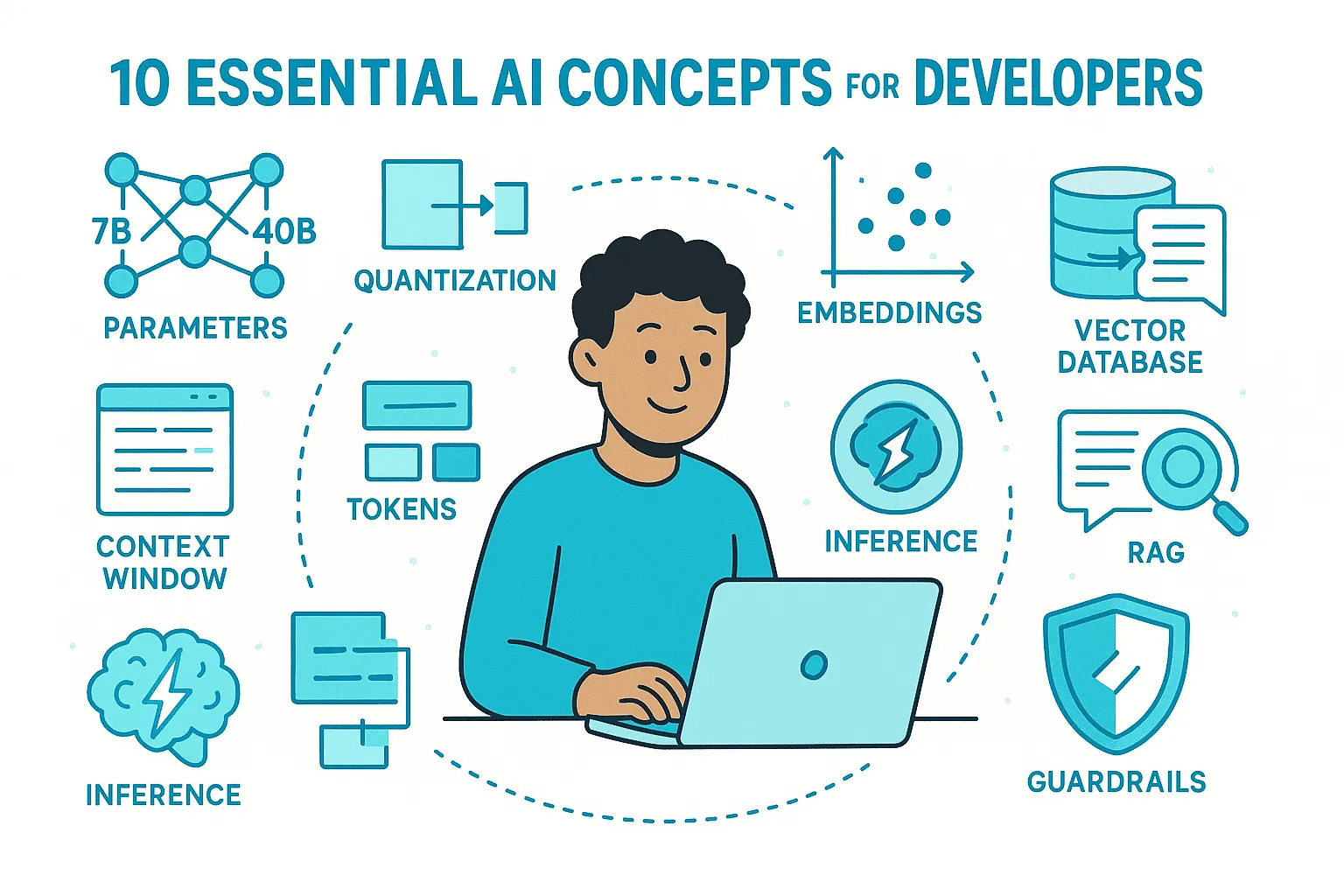
Having a core understanding of the terminology of LLMs and AI agents will give you an advantage over those who choose to ignore the changing landscape. In this article, I'll break down 10 essential AI and machine learning concepts or terms that you should already have a base understanding of.
If you don't know whether to choose a 7B or 24B model, don't understand why you would need a vector database or RAG, or think guardrails are just a slang term, you need to read this. You'll walk away with more tools in your belt that will give you a major advantage going forward.
Table of Contents
- Parameters - Understanding model size and capability
- Quantization - Making models smaller and faster
- Embeddings & Vector Databases - Capturing meaning in numbers
- Retrieval-Augmented Generation (RAG) - Working with your private data
- Inference - Running trained models efficiently
- Tokens & Context Windows - Managing model memory
- Guardrails - Controlling model outputs
- Function Calling - Making AI interactive
- Memory - Building stateful AI applications
- Cost & Rate Limits - Optimizing API usage
1. Parameters
When you see models described as 2B, 7B, or 40B parameters, parameters are the weights inside a neural network. A neural network starts with random adjustable numbers called parameters or weights. During training, the model is fed a lot of data, images or text, makes a prediction, checks how far off it is, and then adjusts its weights slightly to reduce that error.
More parameters generally mean a more capable model able to handle complex reasoning and generate better responses, but there's a trade-off: bigger models demand more GPU memory, more compute, and usually respond slower. You should think of a balance between power and efficiency.
A 7B model might run on a consumer GPU, while a 40B model could require enterprise-level hardware. In short, parameters reveal the true size of the model and help you judge if it's powerful enough for your goals while fitting your hardware.
Key Takeaways
- Parameters = weights in the neural network
- More parameters = more capability but higher resource requirements
- 7B models: consumer GPU friendly
- 40B+ models: enterprise-level hardware needed
2. Quantization
AI models are made up of billions of weights. Each weight is stored at full precision, like a high-resolution photo, sharp but very large. Quantization is like compressing those images. Instead of storing every number in full detail, you store them in a smaller format. The picture looks almost the same, but the file size drops dramatically.
This makes models smaller and faster, so you can run big ones on consumer GPUs. With 4-bit quantization, a 30-billion-parameter model can drop from 80 GB of VRAM to roughly 20 GB, with a small loss in accuracy or nuance, like a compressed JPEG versus the original.
When to Use Quantization
- Use quantized models for: chatbots, coding helpers, or internal apps
- Use full precision for: research or mission-critical tasks requiring absolute precision
Quantization makes powerful models accessible without enterprise hardware, and for most apps the trade-off is worth it.
3. Embeddings & Vector Databases
Embeddings turn data into lists of numbers that capture meaning. Every word, sentence, or image gets a set of coordinates, and similar ideas land close together, "I like dogs" and "I enjoy puppies", while unrelated ones, "I like dogs" and "my car broke down", end up far apart.
Vector databases store these embeddings and let you quickly find the closest matches. For small projects with a few hundred or a few thousand embeddings, you can keep them in a normal database or in memory, using a library like NumPy to calculate distances.
When You Need a Vector Database
- Small scale (hundreds to thousands): Normal database or in-memory storage
- Large scale (tens of thousands to millions): Vector database like Pinecone, Weaviate, or PGVector
You don't need to know the math behind how embeddings are stored; embeddings let AI compare by meaning, and vector databases make that comparison fast enough to power semantic search, chatbots with context, and recommendations.
4. Retrieval-Augmented Generation (RAG)
Large language models don't know your private data; they only know what they were trained on. Retrieval-augmented generation fixes that.
Here's how it works:
- You ask a question
- The app you built searches an external knowledge source (like a vector database full of documents or a PDF)
- It pulls the most relevant chunks
- Adds them to the model's prompt
- The answer is based on your data in addition to the model's training
Common RAG Use Cases
- Chatbots with company documentation
- Large PDFs split into chunks with stored embeddings
- Search with explanations (retrieves relevant passages and turns them into clear natural-language answers)
- Hallucination control by providing real context first
In short, RAG is the common pattern behind most AI apps that need to work with your data.
5. Inference
Inference means running a trained model to get results. Training builds the model and is the expensive part; inference is the practical part, calling it to generate text, classify an image, or answer a question.
The tricky part is making inference fast and cheap enough for real apps. When you hear that providers are running out of inference capacity, companies are hitting limits on how much inference they can serve with the GPUs they have.
Understanding costs and trade-offs helps you design smoother, more reliable systems.
6. Tokens & Context Windows
Tokens are chunks of text, words, parts of words, or punctuation, that the model processes. You can use OpenAI's tokenizer tool to see how tokens are broken down and counted.
The context window is how many tokens a model can handle at once, its working memory.
What You Need to Consider
- Cost: API pricing is based on tokens
- Limits: Small windows can't handle long documents or maintain long chat history
- App design: You may need to chunk, summarize, or trim input to fit under a limit
Current Context Window Sizes (2025)
- GPT-5: Over 200,000 tokens (hundreds of pages of text)
- Google Gemini 2.5 Pro: Up to 1 million tokens (book-sized)
- Claude: Around 200,000+ tokens
Important: The context window refers to the combined total of input plus output tokens. If your Gemini input is 900,000 tokens, there's only room for 100,000 output.
Choosing Context Windows
- Larger windows for: Long PDFs, conversation history, or RAG pipelines
- Smaller windows for: Short chats and queries for faster responses and lower costs
7. Guardrails
Guardrails are filters and rules that decide what a model will or won't say.
Two Types of Guardrails
1. Provider Guardrails (Non-Negotiable)
- Built into OpenAI, Anthropic, or Gemini
- Cause prompts to get blocked or redacted
- Result in "Sorry, I can't help with that" messages
2. Custom Guardrails (Your App)
- Added using tools like Guardrails AI or LangChain
- Force JSON output to follow a schema
- Filter profanity
- Block topics your product doesn't allow
Best Practices
- Design your UX so refusals don't break the flow
- Wrap refusals in friendly, helpful messaging
- Offer alternatives when requests are blocked
- Add rules for structure, safety, and compliance with your app
8. Function Calling
Function calling is a practical feature in modern AI APIs. Instead of just generating text, the model can call a function you define.
How It Works
- You register a function like
get_weather(city) - Someone asks, "What's the weather in Paris?"
- The model outputs structured JSON to call
get_weatherwithcity=Paris - Your code runs the function, gets real data
- The model uses it in the reply
Why Use Function Calling
- Standard: Works in OpenAI, Anthropic, and Gemini
- Structured output: Yields predictable JSON your app can work with
- Real actions: Triggers workflows, emails, database updates
- AI agents: Uses function calling under the hood to chain multiple steps (seen in MCP)
Function calling is the building block that makes AI interactive and more predictable, moving from chatbots to assistants that actually do things.
9. Memory
When people say AI has memory, it's not built into the model. By default, models are stateless; they only know what you send in that request.
How to Implement Memory
- Save past interactions (database, vector store, session state)
- Feed important pieces back on the next request
- Include history by tacking it on or pulling from storage
Memory Implementation Options
- Full transcripts: Store complete conversation history
- Summaries: Condense past interactions
- Embeddings: Use semantic recall for relevant context
Important Considerations
- Memory makes chatbots feel personal and consistent
- You're bound by the context window, memory isn't endless
- The developer must engineer persistence
Remember: When someone says AI has memory, they mean the developer engineered persistence.
10. Cost & Rate Limits
Cost and rate limits are among the first things you'll run into with AI APIs.
Understanding Costs
- Most providers charge by tokens
- Every word you send and every word the model sends back costs money
- Long prompts, giant documents, or huge context windows push costs up
Understanding Rate Limits
- Cap how many requests you can make per minute or day
- Prevent API abuse
- Require proper handling in your application
Cost Optimization Strategies
- Keep prompts lean: Cut fluff, summarize history, don't send more than needed
- Batch and cache: Don't pay twice for the same call; reuse results
- Choose the right model: Big expensive ones for heavy lifting, smaller ones for quick tasks
- Implement retries and backoffs: Handle limits gracefully so your app slows down instead of crashing
- Use queues: Manage request flow efficiently
Cost and rate limits shape how you design your app, so plan around them early.
Closing Thoughts
That was a lot of information to digest. Are you familiar with all 10 concepts? If so, great, you're adapting well to this changing industry. If not, now you know, and you're better off making more educated decisions in your IT role.
These concepts form the foundation of modern AI development. As AI continues to evolve and integrate into every aspect of software development, understanding these fundamentals will separate those who thrive from those who struggle to keep up.
The AI revolution isn't coming, it's already here. The question is: are you ready for it?
Want to dive deeper into AI development? Stay tuned for more in-depth articles on each of these concepts, complete with practical examples and implementation guides.
🤝 Need a Custom RSVP System or Dashboard?
I help businesses build tools that actually work , even on tight deadlines.
Whether you're planning an event, need internal tools, or want a custom dashboard for your team , I can help.
Reach out
📧 Email: safi.abdulkader@gmail.com | 💻 LinkedIn: @abdulkader-safi | 📱 Instagram: @abdulkader.safi | 🏢 DSRPT
Drop me a line, I’m always happy to collaborate! 🚀
Last updated 29 May 2026 · filed under AI