Using Zustand with Svelte: Why You'd Want To, How the Wrapper Works, and When to Skip It
A practical guide to wiring Zustand into a Svelte or SvelteKit app. The wrapper pattern, the auto-subscription trade-off, Redux DevTools, persist middleware — and an honest take on when reaching for Zustand actually beats Svelte's native stores.

9 min read


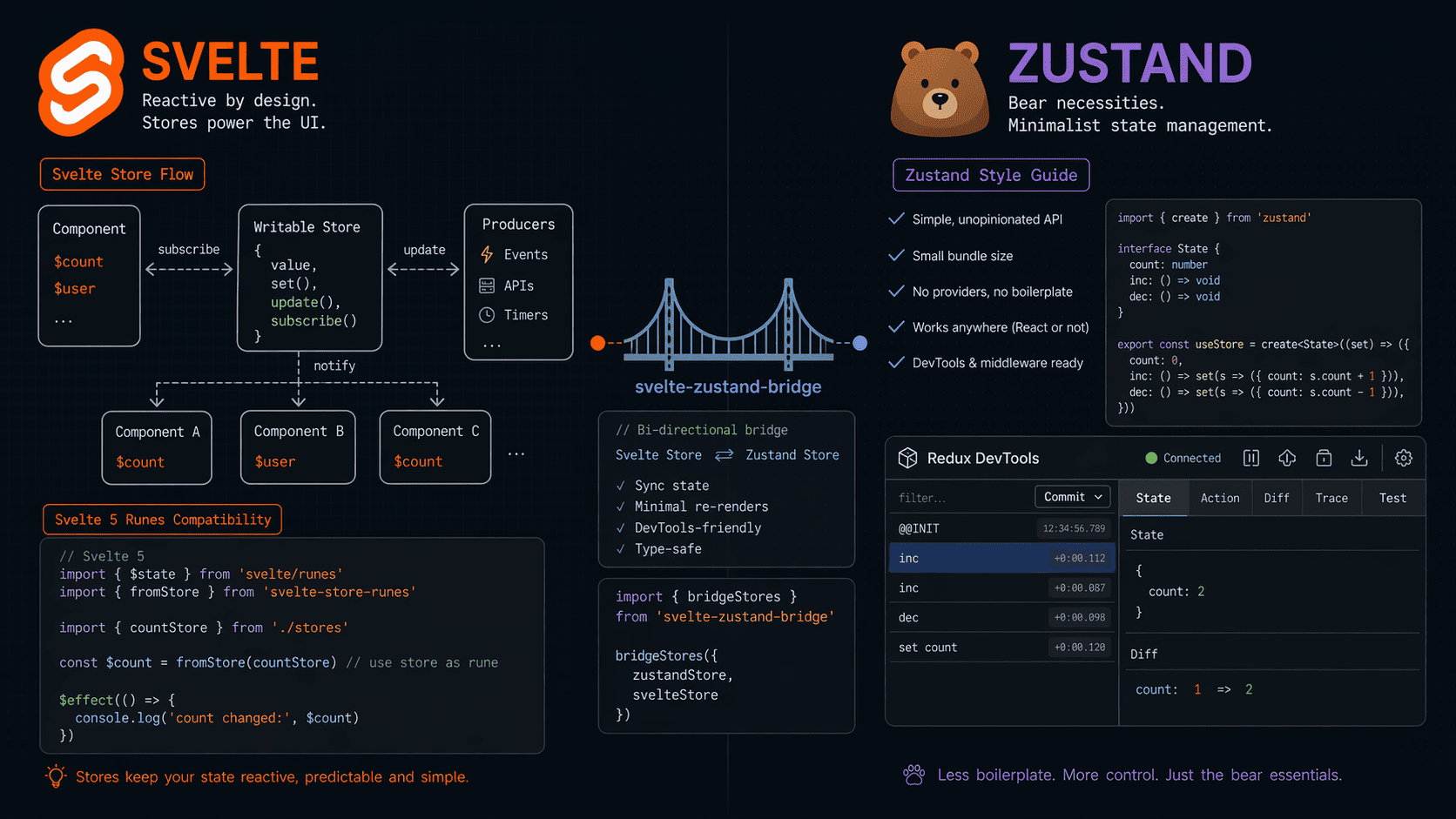
Svelte's stores are fine. They're small, reactive, and the $ auto-subscription feels like magic the first time you use it. But they're also missing a few things I lean on every day in other stacks — Redux DevTools time-travel, a drop-in persist middleware, and a middleware ecosystem that doesn't require me to hand-roll every integration.
So on a recent SvelteKit project, I did something mildly heretical. I pulled in Zustand.
Short version: it works. The catch is a tiny compatibility wrapper and one trade-off around how you use the $ prefix. Here's the whole picture — what Zustand actually buys you in a Svelte app, the exact 10-line wrapper that makes auto-subscription work, and the handful of cases where this is genuinely worth it vs. when you should just use writable() and move on.
What Zustand Actually Gives You That Svelte Stores Don't
Before we touch any code, let's be honest about why anyone would bolt a React-flavored state library onto a Svelte app. There are exactly four reasons that matter.
- Redux DevTools out of the box. Time-travel debugging. Action history. Diff inspection. In a complex app with 40+ store mutations across a session, this saves me more hours than any other debugging tool combined.
- Battle-tested middleware.
persist,immer,devtools,subscribeWithSelector— all one-liners. Writing a decent persist layer on top of Svelte'swritableis maybe 30 lines of code, but it's 30 lines I now have to own, test, and debug. - A mental model that travels. If your team already ships React work, your Zustand patterns transfer. Same
create()signature, same selectors, same middleware composition. That's not nothing when you're staffing a team across stacks. - Typed store composition. Zustand's TypeScript story is honestly better than Svelte stores for deeply nested state shapes. Selectors narrow types cleanly.
set()is strongly typed. I've gotten burned fewer times on refactors.
That's the upside. Now here's the catch.
The One Thing That Breaks: The $ Prefix
Svelte's auto-subscription — where $store reads the value and subscribes a component to updates — only works with objects that match Svelte's store contract. That contract is small, roughly:
interface Readable<T> {
  subscribe(subscriber: (value: T) => void): () => void;
}
Zustand's subscribe signature looks almost identical — but not quite. Zustand's subscribe doesn't immediately call the subscriber with the current value on subscription. Svelte expects it to. So if you hand a raw Zustand store to Svelte, $myStore returns undefined on first render, which is exactly the kind of bug that takes 20 minutes to find because the types don't complain.
Fix: a 10-line wrapper that makes Zustand look like a Svelte store.
The Wrapper (The Whole Thing Is 10 Lines)
Here's the one function you need. Stash it in src/lib/zustandToSvelte.ts:
import { readable } from 'svelte/store';
import type { StoreApi } from 'zustand/vanilla';

export default function zustandToSvelte<StateType>(
  zustandStore: StoreApi<StateType>
) {
  const svelteStore = readable(zustandStore.getState(), (set) => {
    return zustandStore.subscribe((value) => set(value));
  });

  return {
    ...zustandStore,
    subscribe: svelteStore.subscribe,
  };
}
What's happening here:
- We create a Svelte
readableseeded with Zustand's current state. - Inside the
readable's start function, we hook into Zustand's subscribe and forward every update to Svelte'sset. - We spread the original Zustand store back out — so you still get
.getState(),.setState(), and any custom actions. - We override
subscribewith the Svelte-compatible one, so$storeworks.
Critically, we return the unsubscribe function from readable's start callback. Svelte calls it when the last subscriber disappears — this is what prevents memory leaks in long-running SvelteKit apps.
Building a Counter Store, the Zustand Way
Here's what a real store looks like with the wrapper applied:
// src/lib/stores/counter.ts
import { create } from 'zustand/vanilla';
import { devtools, persist } from 'zustand/middleware';
import zustandToSvelte from '$lib/zustandToSvelte';

interface CounterState {
  value: number;
  increment: () => void;
  decrement: () => void;
  reset: () => void;
}

const counterStore = create<CounterState>()(
  devtools(
    persist(
      (set) => ({
        value: 0,
        increment: () => set((state) => ({ value: state.value + 1 })),
        decrement: () => set((state) => ({ value: state.value - 1 })),
        reset: () => set({ value: 0 }),
      }),
      { name: 'counter-storage' }
    ),
    { name: 'counter' }
  )
);

export default zustandToSvelte(counterStore);
Notice the key detail — we're importing from zustand/vanilla, not plain zustand. The vanilla build is framework-agnostic. It has no React hooks dependency. If you use the React build in a Svelte project, you'll pull in React as a phantom dependency and your bundle will cry.
Using It in a Svelte Component
This is where the trade-off I mentioned earlier shows up. With a native Svelte store, you'd do:
<!-- Native Svelte store -->
<script>
  import { count, increment } from '$lib/stores/counter';
</script>

<button on:click={increment}>
  Count: {$count}
</button>
With the Zustand wrapper, you reference the whole store under one $:
<!-- Zustand wrapper -->
<script>
  import counterStore from '$lib/stores/counter';
</script>

<button on:click={() => $counterStore.increment()}>
  Count: {$counterStore.value}
</button>
You're reading $counterStore.value instead of $count. You're calling $counterStore.increment() instead of a destructured function. That's the price. On the flip side — everything is in one place, and your store file looks exactly like a React Zustand store, which means the patterns travel.
One real-world tip from a project where I made this decision: if you hate the verbosity, you can destructure inside the template with $::
<script>
  import counterStore from '$lib/stores/counter';
  $: ({ value, increment, decrement } = $counterStore);
</script>

<button on:click={increment}>Count: {value}</button>
<button on:click={decrement}>-</button>
That's an ugly-ish workaround and I don't love it, but it gets you close to native Svelte ergonomics.
The Middleware That Actually Earns Its Keep
If the only reason you're doing this is "I saw Zustand on Twitter" — stop. Use writable(). The wrapper only pays off when you're using at least one of these middlewares:
persist— drops state intolocalStorageorsessionStoragewith one config object. You can even plug in your own storage (IndexedDB, encrypted storage, server-side cookies). Handles rehydration on page load. I've shipped this in three SvelteKit apps now. Zero custom code per store.devtools— Redux DevTools integration. Action names in the panel. State diffs. Time-travel. If you've debugged a complex multi-step form or a wizard flow without DevTools, you know how painful it is.immer— mutative syntax on top of immutable state. For deeply nested state trees (think: a form builder, a Kanban board, a settings panel with 40 toggles), the readability jump is real.subscribeWithSelector— subscribe to slices of state, not the whole object. Reduces unnecessary re-renders in big components with lots of bindings.
If your app uses one or more of these heavily, the wrapper earns its rent.
When You Should Absolutely Not Do This
Here's where I push back on the premise. The Zustand-in-Svelte move is not a default. It's a specific tool for specific pain.
Skip it when:
- Your state is simple. A toggle, a modal open/close, a small form.
writable(false)is the answer. You're adding a dependency for no reason. - You don't need persistence or devtools. Both of Zustand's best features go unused. You're just importing a library to write the same amount of code in a weirder syntax.
- You're not using SSR carefully. SvelteKit renders on the server. Zustand's
persistmiddleware toucheslocalStorage. You'll need theskipHydrationpattern or a custom storage that no-ops on the server. Totally doable — but it's one more thing to get right. - Your team doesn't know React. The "patterns travel" argument goes away. Now you're teaching people a non-native state pattern for no benefit.
For anyone deciding at the architecture level whether Svelte is even the right call for the project, this breakdown of when to use React/Vue vs Next.js/Nuxt covers the meta-framework decision from a slightly different angle — worth a read before you commit.
SvelteKit-Specific Gotchas I Hit
Because of course there are some. Here's what bit me across two real projects:
1. Server-side rendering and persist. On the server, window.localStorage doesn't exist. persist will either throw or silently break. Two fixes:
import { browser } from '$app/environment';

const storage = browser
  ? createJSONStorage(() => localStorage)
  : undefined;

persist(stateCreator, { name: 'my-store', storage });
Or use the skipHydration: true option and manually rehydrate on mount. I prefer the first approach — simpler, fewer moving parts.
2. Store instances across requests. A Zustand store created at module scope is shared across every request on the server. If you're storing per-user data, that's a data leak waiting to happen. For any store touched during SSR, create it inside a load() function and pass it down via context. Same rule as any other stateful singleton in SvelteKit.
3. Reactivity inside $derived or $effect (Svelte 5 runes). If you're on Svelte 5, the wrapper I showed still works, but you'll want to test your derived values. I found one edge case where a Zustand action that set multiple keys in a single call didn't batch properly with Svelte's reactivity — Svelte 5's runes handled it fine, Svelte 4's $: statement needed an extra tick() in one spot. Worth a dev-build test before you ship.
Quick Comparison: Zustand + Wrapper vs Native Svelte Stores
| Thing you need | Native Svelte | Zustand + Wrapper |
|---|---|---|
| Simple reactive value | writable(value) — 1 line |
Overkill |
| Persistence | Hand-rolled (~30 lines) | persist middleware (1 line) |
| Redux DevTools | Not supported | devtools middleware (1 line) |
| Derived state | derived() |
Selectors / subscribeWithSelector |
| Cross-framework team | Svelte-only knowledge | Patterns shared with React |
| Bundle cost | ~1KB (built-in) | +8KB (Zustand vanilla) |
| Auto-subscription ergonomics | $value |
$store.value |
For the projects where I've made this swap, the 8KB cost was trivial next to the dev experience gain. For a tiny personal site or a landing page, that math flips hard.
Next Steps
If you're going to try this:
- Drop the wrapper into
src/lib/zustandToSvelte.ts. - Install
zustand(pnpm add zustand). - Convert one store — the one you've been hand-rolling persistence for. That's where the payoff shows up fastest.
- Open Redux DevTools. Watch your actions flow through. Reconsider your life choices in a good way.
- If you hate it after two stores, rip it out. The wrapper is 10 lines. The migration back to
writable()takes an hour.
The broader lesson for me on this project: Svelte's "just use writable()" ethos is correct 90% of the time. The remaining 10% — complex persistent client state, debugging-heavy admin panels, mixed-framework teams — is where borrowing from the React ecosystem actually pays off. Zustand is the cleanest borrow I've found. No hooks baggage. Small API surface. One tiny wrapper and you're done.
If you want more takes on where the JavaScript ecosystem is heading — including what's landing in the language itself — this write-up on ES2025 features is where I'd point you next.
Last updated 29 May 2026 · filed under Javascript, frontend, zustand, svelte