- ImageMagick for VS Code: Native image editing inside the editor · part 4 of 4
- Typescript
- VS Code
- Plugin
- Tools
- Svelte
- obsidian
ImageMagick for Obsidian 1.0.0: the port that deleted more than it added
I ported my ImageMagick VS Code extension to Obsidian. The port removed about 700 lines, and then a rotate slider that would not slide taught me where the real cost was hiding.

6 min read



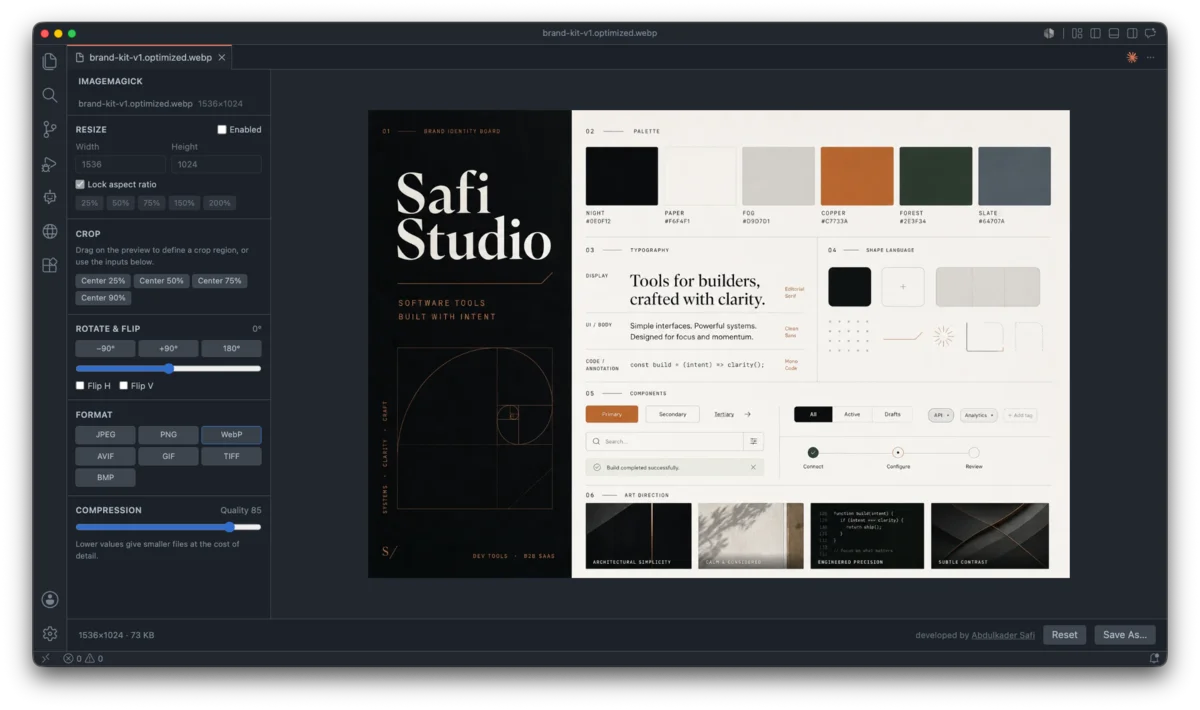
My ImageMagick extension has lived in VS Code for five releases. It resizes, crops, rotates, compresses and converts images with a live preview, and nothing ever leaves your machine. People kept asking the obvious question: my images are in my vault, why is the tool in my editor?
So 1.0.0 is the same thing, as an Obsidian plugin. Right-click any image in the file explorer and pick Optimize with ImageMagick, or run ImageMagick: Open image from the command palette. Presets, bulk edit and the live preview all came along.
Three things about the port were worth writing down.
The port deleted more code than it wrote
In VS Code, an extension is split in two. The host is a Node process, the webview is a sandboxed browser frame, and they can only talk by passing messages. Image bytes do not survive that trip intact. VS Code's transport silently drops oversized message fields, so I had built a chunked base64 stream: messages.ts, transport.ts, messageBus.ts, a panel controller, and a second copy of the encoder for the host side. Around 700 lines whose entire job was moving bytes across a boundary.
Obsidian has no boundary. A plugin runs in the renderer with direct access to the vault. So the Svelte view reads the file with vault.readBinary, hands the bytes to ImageMagick, and writes the result back with vault.createBinary. Every one of those files was deleted. The engine, the pipeline and the crop maths carried over unchanged.
The best part of a port is finding out how much of the original was tax.
Shipping a 14 MB engine through a three-file installer
Obsidian downloads exactly three files when you install a plugin: main.js, manifest.json and styles.css. Nothing else. That is a problem when your engine is a 14 MB WebAssembly build of ImageMagick, because a sidecar magick.wasm next to main.js would never reach anyone installing from the community store.
Downloading it at runtime was out. Obsidian's policy forbids fetching code after install, and rightly so.
That leaves inlining it into the bundle. Base64 of 14 MB is 19.5 MB, which is a lot of main.js. But gzip gets the wasm to 5.2 MB, and base64 of that is 6.8 MB, and every browser has had DecompressionStream for years:
const stream = new Blob([gz]).stream().pipeThrough(new DecompressionStream('gzip'));
const wasm = new Uint8Array(await new Response(stream).arrayBuffer());
The build gzips the wasm, esbuild inlines it as base64, and the renderer unpacks it the first time you open an image. main.js lands at 6.9 MB instead of 19.5 MB, the plugin installs from the store with nothing missing, and it still works with the network unplugged.
The slider that would not slide
The first build was unusable. Dragging the rotation slider on a 3174x1739 screenshot moved the image about once a second.
The easy guess was "the preview is too big, shrink it." I profiled instead, and the guess was wrong. Per slider tick, the plugin was running ImageMagick twice at full resolution: once to rotate and re-encode the preview, and once to encode the entire output just to display the size in KB. ImageMagick is synchronous, so all of it blocked the UI thread that the slider itself needs to move.
The numbers, on a 1600px preview copy:
| Step | Cost |
|---|---|
| Decode the preview bytes | 26 ms |
| Rotate it | 258 ms |
| Encode it back to PNG | 189 ms |
| Encode the full-size output to measure its size | 1650 ms |
Rotation alone was 258 ms. Shrinking the preview would never have got that under the 16 ms a smooth drag needs. The work had to stop happening, not get cheaper.
Two realisations did it.
The browser rotates for free. Rotation and flipping are pure visual transforms, so a CSS transform on the preview does them on the GPU at zero cost. The catch is the crop box, which has to keep pointing at the same pixels. The fix is to put the transform on a wrapper holding the image and its crop overlays, so they rotate together, and to map pointer positions back through the inverse transform when you drag a crop. I checked that inverse round-trips exactly across 224 combinations of angle, both flips and the fit scale, because a crop that silently lands on the wrong pixels is a much worse bug than a slow slider.
Quality and format never changed the preview anyway. The preview is always written as PNG so its colours are exact. The target format and quality only ever affected the reported file size, never the image on screen. So dragging the quality slider had been re-encoding an image that could not possibly look different.
After both, the rotate and quality sliders make zero engine calls. The preview only re-renders when you change the resize, and it runs against a downscaled copy built once when the file opens. Measuring the true output size still needs a full encode, so it waits 400 ms after you stop moving and dims while it is stale. That is the one honest trade-off: the size in KB lags your edit slightly, because the only way to know it truthfully is to actually encode the image.
Dropping Tailwind
The VS Code webview used Tailwind. The Obsidian plugin uses none: styles.css is hand-written against Obsidian's own CSS variables (--background-secondary, --interactive-accent, --text-muted). The editor then follows whatever theme you use, in light or dark, with no rebuild, and the CSS build step is gone entirely.
It also cost me a bug worth confessing. I wrote .im-panel label { flex-direction: column } to stack captions above inputs, and it quietly outranked .im-check { flex-direction: row }, so every checkbox label stacked underneath its box. Specificity, as always. Column layout is now scoped to an explicit class instead of a bare label selector, so it cannot leak across panels again.
Next
- Drag an image straight from Obsidian's file explorer into the preview
- Strip metadata as a standalone action
- Before and after size with percent saved
- A compare slider in the preview
- Auto-optimize images on paste into a note
The plugin is on GitHub. Community store submission is next.
Last updated 17 Aug 2026 · filed under Typescript, vs code, plugin, tools, svelte, obsidian