
Two releases to fix one review page
Cleaning up vault-crm's Obsidian community review warnings, a dependency override that was quietly broken, and a release that failed on the wrong lockfile.



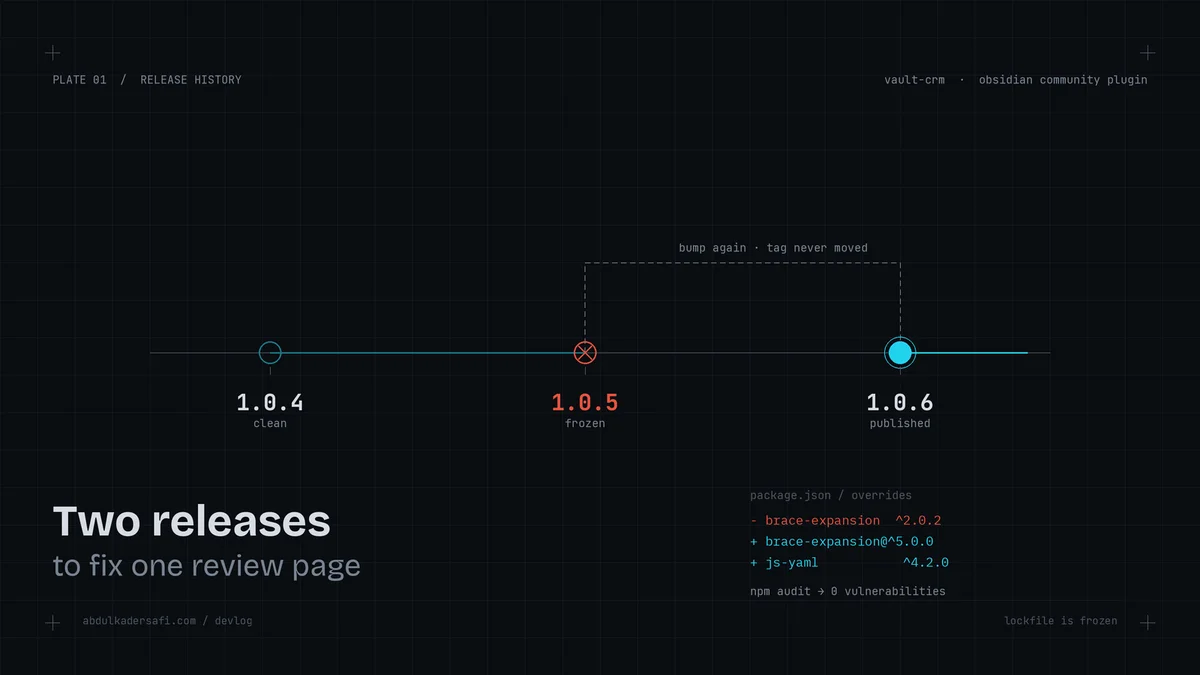
vault-crm is my Obsidian plugin that stores clients, deals, and projects as plain Markdown notes. It has a review page on the community plugins directory, and that page runs automated scans on every release. Mine came back "Satisfactory" with 8 issues. This is the story of clearing the ones worth clearing, and the two releases it took because I broke the build in the middle.
What the scanner flagged
The review page listed 8 issues across three buckets:
- Two disclosures: malware scan not available, vulnerable dependencies scan not available.
- Seven warnings: a text-decoration support warning (four times), an unknown @source at-rule, an unknown @theme at-rule, and a dependency vulnerability advisory.
- One "other": a deprecation notice for the settings tab's display() method.
The first thing I did was check where each one actually came from, because a review page will happily flag things you cannot or should not change. Half the work here was deciding what to ignore.
The at-rules were a false trail
The @source and @theme warnings are Tailwind v4 build directives. They live in my source stylesheet, src/styles.css, and the Tailwind CLI compiles them away. I checked the actual released styles.css from the 1.0.4 tag and it contained neither. So the scanner is reading my source file, not the shipped one.
There is no way to write a Tailwind v4 config without those directives, so I marked them as intentional with stylelint-disable-next-line comments. If the reviewer's linter honors inline disables, the warnings clear. If it does not, the comments cost nothing. They vanish at build time either way.
The text-decoration and display warnings I left alone
The text-decoration warning says the feature is "only partially supported by Obsidian 1.6.5." My plugin's minimum app version is 1.7.2, so the baseline it checks against is below what I even support. The only uses are strikethrough on completed tasks and underline on link hovers. Both are real affordances, and rewriting them in custom CSS would emit the same property and trip the same warning. So it stays.
The display() deprecation is more interesting. Obsidian's newer API wants a declarative getSettingDefinitions() method instead of the imperative display(). The catch is in the type definitions: once you implement getSettingDefinitions(), display() stops being called at all. My settings tab has a custom currency migration control, a button that appears under the currency field with a prompt like "your notes use KWD, migrate them to USD?" You cannot express that declaratively. Migrating would delete a feature to silence one low-severity note. Not a trade I want.
The override that was quietly broken
The real fix was the dependency advisory. Two packages were flagged: js-yaml and brace-expansion. Both are devDependencies, pulled in by eslint and typescript-eslint, so neither ships in the plugin bundle. The scanner counts them anyway.
I already had overrides in package.json for both. When I looked closely, one of them was doing the opposite of its job:
"overrides": {
  "brace-expansion": "^2.0.2",
  "js-yaml": "^4.1.0"
}
brace-expansion: ^2.0.2 forces every copy of the package to the 2.x line. But minimatch@10, deep under typescript-eslint, needs brace-expansion@^5. The override was dragging it down to 2.x, which npm ls reported as an invalid tree. The advisory was on the 5.x line (5.0.2 through 5.0.5), and my override was preventing the patched 5.x from ever resolving.
The fix was to scope the override to the version line that actually needed it, and bump js-yaml past its advisory range:
"overrides": {
  "brace-expansion@^5.0.0": "^5.0.6",
  "js-yaml": "^4.2.0"
}
js-yaml's advisory covered 4.0.0 through 4.1.1, and 4.2.0 is the first patched build. The scoped brace-expansion@^5.0.0 key rewrites only the 5.x copies, so the healthy 2.x consumers stay put. After npm install, npm audit reported 0 vulnerabilities, and eslint and svelte-check both still ran clean.
Then I shipped a broken release
I bumped to 1.0.5, tagged it, pushed, and the release workflow failed on the very first step:
error: lockfile had changes, but lockfile is frozen
My release CI runs bun install --frozen-lockfile. I had updated package-lock.json when I fixed the dependencies, but the repo also has a bun.lock, and that is the one CI uses. Frozen means it refuses to proceed if the lockfile disagrees with package.json. I had changed the dependency resolution without regenerating the lockfile CI actually reads.
This is the tax on keeping two lockfiles. npm's package-lock.json and bun's bun.lock describe the same tree, and it is easy to update one and forget the other until CI reminds you.
Recovering without rewriting history
The clean fix would be to fold bun.lock into the 1.0.5 release commit and move the tag. But 1.0.5 was already pushed, so moving the tag means a force-push over published history. I do not do that on a release tag, so I bumped again. 1.0.6 carries the updated bun.lock, built clean, and published with all three assets: main.js, manifest.json, styles.css.
That leaves a dead 1.0.5 tag pointing at the broken commit with no release attached. It is harmless, since Obsidian only reads published releases, but I will delete it for tidiness.
What I am taking from this
For a repo with both npm and bun lockfiles, the rule is simple: whenever a dependency or an override changes, run bun install and commit bun.lock next to package-lock.json. The frozen install in CI does not forgive a stale lockfile, and it fails at the worst moment, after the tag is already public.
The other takeaway is about review pages. An automated score is a starting point, not a to-do list. Two of the eight flags were worth real work, two I suppressed as intentional, and the rest I left because fixing them would cost more than the warning does. Reading where each flag comes from was most of the job.
Last updated 17 Aug 2026 · filed under Plugin, crm, obsidian
