Tools · Web Application · Dashboard · Frontend · Claude Code · obsidian
GitBasedDocs
A private docs site that reads Markdown from one GitHub repo. Write in Obsidian, push, and a few seconds later the pages are live for the people you shared them with. Each project is a folder in the repo, and a reader sees only the projects an admin linked to their account. Anyone else gets the same 404 as a project that does not exist. A webhook starts a delta sync that fetches only changed files, a timed recheck covers a missing webhook, and pages are served from SQLite, so reading never calls GitHub. It renders the Markdown Obsidian and GitHub both know: Shiki code, Mermaid diagrams, KaTeX math and Obsidian callouts, plus wikilinks and image embeds. Next.js 16, React 19, next-auth v4 and Drizzle on SQLite, about 9,200 lines of TypeScript, MIT.
- Tailwindcss
- Typescript
- Nextjs
- ShadCN
- React
- Bun
- Role
- Design and development
- Timeline
- 2 days
- Year
- 2026
- Status
- In Progress
01 / The overview
Sharing docs with a client usually ends in one of two places. A public docs site, which is wrong for anything under contract. Or read access to the GitHub repo, which is worse: one repo holds every client's folder, and GitHub has no way to scope a reader to a single folder.
GitBasedDocs keeps the repo as the source and puts the permissions in front of it. The Markdown lives in one private repo. The app reads it with a fine-grained token (Contents and Metadata, read-only) that only the server holds, turns each folder into a project, and shows each project only to the accounts an admin linked to it.
The writing flow does not change. Edit in Obsidian, push. GitHub calls the webhook, the app fetches the files that changed, and the page is live a few seconds later. The content repo needs no GitHub Actions, no build step and no config file.
It is a Next.js 16 app. next-auth v4 handles email and password sign-in, and Drizzle on SQLite holds everything else: users, projects, the page index, search text, sync runs and the access log. It went from empty folder to working app in two days across 55 commits, planned first as eight feature specs and six research notes that live in the same repo.
02 / The challenge
The core promise is that a client sees only their own work, so access control could not be something each route remembers to do. There is one check, checkProjectAccess, and pages, image requests and search all go through it. Every denied read returns 404, never 403, because a 403 confirms the project exists. Images are the easy place to leak: they load from /api/assets/... behind the same check, and an image outside the project renders as an alt box instead of a request. next-auth v4 only supports JWT sessions for email and password, so a deactivated user would keep a valid cookie. The session callback reloads the user row on every request, which means deactivating someone locks them out on their next click.
Sync had to work with nothing installed in the content repo. The webhook route checks GitHub's HMAC signature with timingSafeEqual. The first version only parsed JSON, but GitHub's webhook form defaults to form encoding, where the body is payload=<url-encoded JSON> and the signature covers that raw body. A hook left on the default would have rejected every push. The route now accepts both shapes and verifies the signature over the raw body first. A sync compares blob shas against the stored index and fetches only what changed. Syncs run behind one in-process lock so two pushes cannot sync at once, and a 403 or 429 from GitHub makes the timed recheck back off. Anything under a dot folder is skipped, because Obsidian keeps deleted notes in .trash and those should not come back as pages.
Obsidian Markdown fought the standard remark plugins in small ways. remark-math reads "costs $5 a month, or $50" as a formula, so a guard applies the rule Obsidian and Pandoc use: inline math cannot start or end with a space, and the closing $ cannot sit before a digit. %% comments %% are stripped before a page is stored, so they never reach the database or search results. A folder with an index.md keeps its real folder name in the sidebar, as in Obsidian, instead of taking the page title. Mermaid is a heavy library, so it loads in the browser only on pages that have a diagram.
03 / The solution
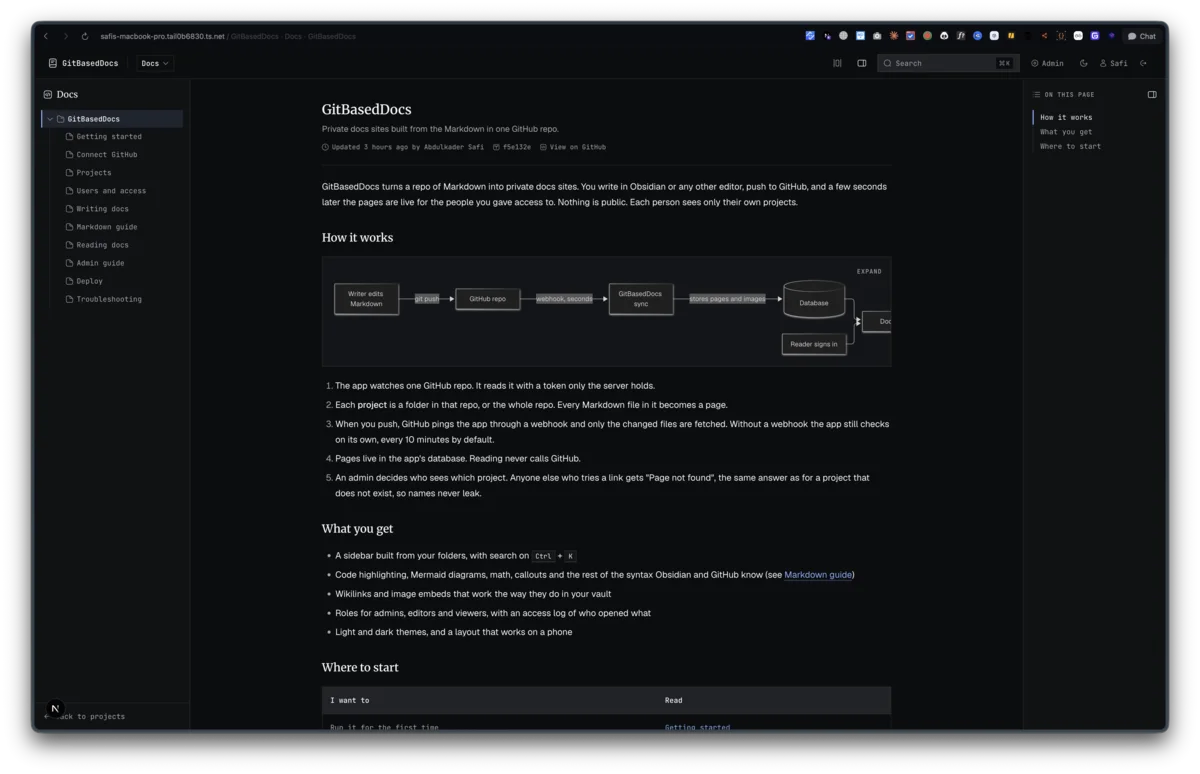
A reader signs in and lands on the projects shared with them. A project page has the folder sidebar on the left, the article in the middle and an on-this-page outline on the right. Cmd+K searches that project only: every term has to match the title or body, and title matches rank first. Each page shows who changed it last. Admins also see the commit id and a link to the file on GitHub.
The render pipeline is unified with remark and rehype: GFM, math, Shiki highlighting with titles, line marks and diffs, callouts with every Obsidian type and folding, then rehype-sanitize so raw HTML in a note cannot run script. Output is cached by page id plus blob sha, so an edit invalidates exactly one page. The whole pipeline stays on the server and out of the browser bundle.
Admins get one area for the rest: the GitHub connection with a test button, projects mapped to repo folders, users with forced password change and session revoke, sync runs with expandable errors, the access log of page opens and denied attempts, and a danger zone where each action needs a typed confirm and writes an audit line.
Deploy is one Node process with data/ on a persistent volume, holding the SQLite file and the cached images and PDFs. Migrations run on the first database call after boot, and next build never opens the database, so the build runs without the volume. There is no test runner. Each logic unit has a runnable *.check.ts beside it, and bun run lint && bun run typecheck && bun run build is the final gate.
Known gaps worth naming: it runs as a single instance, because the sync lock, the timer and the render cache live in the process. Postgres is not supported yet, since the schema is SQLite only. And there is one GitHub repo per install.
FAQ
About this project
Why not give clients read access to the GitHub repo?
GitHub permissions stop at the repo. If every client's docs live in one repo, anyone with read access sees all of them, plus the commit history. You could split into one repo per client, but then every new client means a new repo, a new token scope and a new place to push. GitBasedDocs keeps one repo and moves the per-client line into the app, where a project is a folder and access is a row in a table.
Does my content repo need GitHub Actions or a build step?
No. The app pulls from the GitHub API with a read-only token. The only setup in the content repo is an optional webhook pointing at `/api/webhooks/github`. Without it, the app checks for new commits every 10 minutes on its own, and admins can press Sync now.
Does it work with an existing Obsidian vault?
Yes, that is the case it was built for. Push the vault to a private repo and point the app at it. Wikilinks, image embeds, callouts with custom titles and folding, highlights and `%% comments %%` all behave the way they do in Obsidian. Folders keep their real names, a folder's `index.md` opens when you click the folder, and `.obsidian` and `.trash` are ignored.
What happens when someone opens a project they are not linked to?
They get "Page not found", the same page as for a slug that does not exist, so they cannot confirm a project name by guessing URLs. The attempt goes into the access log with the user, the path and the time, and the admin overview counts denied opens from the last 7 days.
Can it run on Vercel or another serverless host?
Not as it stands. The sync lock, the timed recheck and the render cache all live in one long-running Node process, and the SQLite file needs a persistent disk. Run it on a VPS or any container host with a volume, behind a TLS proxy such as Caddy or nginx. Postgres support would be the first step toward serverless.
Is it open source?
Yes, MIT. The repo also holds the planning: research notes on how git-based CMS tools work, one spec per feature, and the task board used during the build.