
Vs code · plugin · complete
I Built a Better File Explorer for VSCode Because macOS Finder is Painful
A custom VSCode extension that replaces macOS Finder with a full-featured file explorer inside your editor. Supports inline image previews, dual view modes, favorites, hidden files toggle, and full CRUD operations without ever leaving VSCode.

- Role
- Developer
- Timeline
- 1 Month
- Year
- 2025
- Status
- Completed
01
The overview
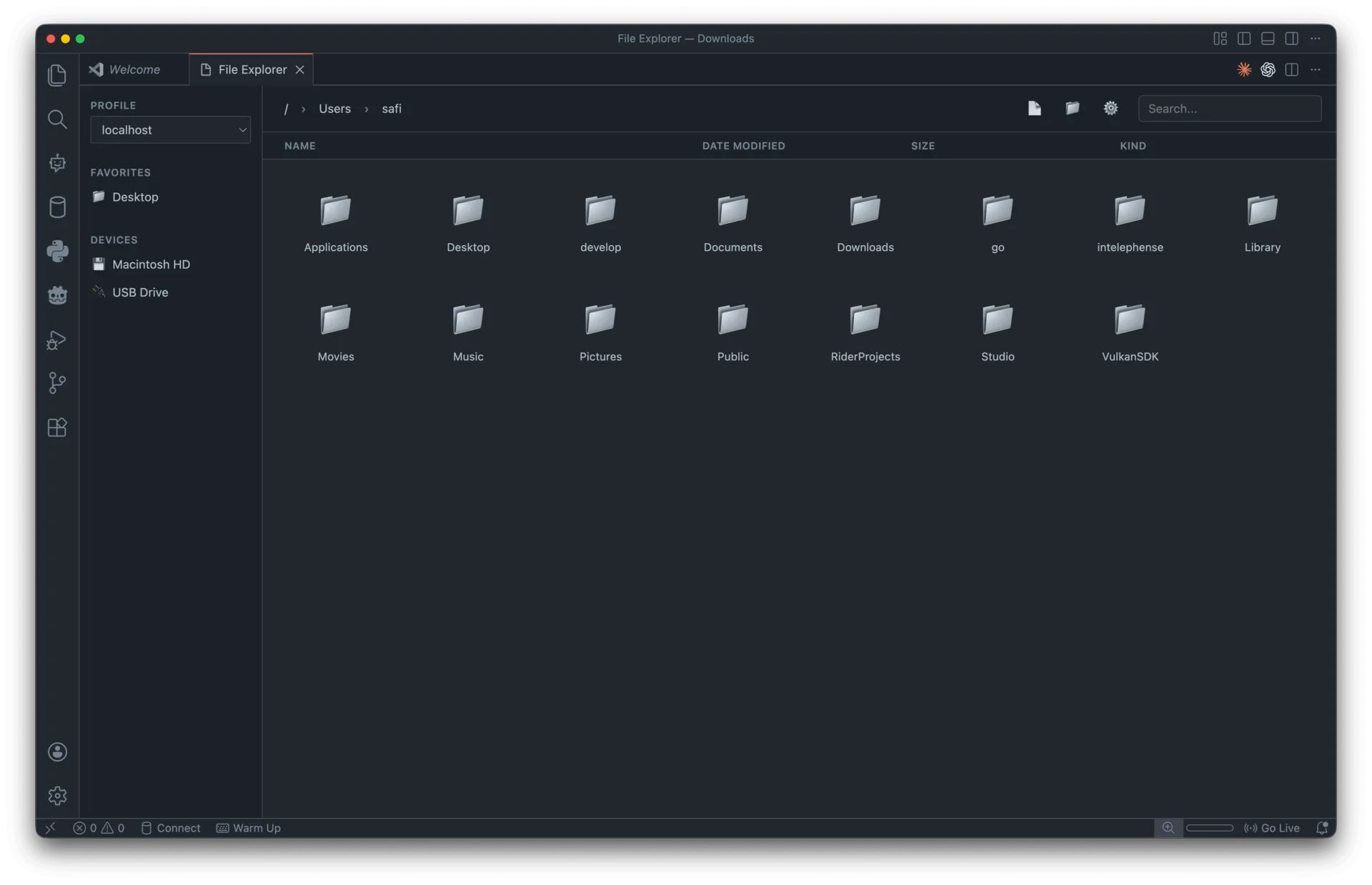
VSCode File Explorer is a TypeScript extension that brings a complete file management experience directly into Visual Studio Code. Built using VSCode's webview API, it uses a client-server architecture where the extension backend handles file I/O through Node.js fs.promises, and a vanilla JavaScript frontend renders a fast, CSP-compliant UI with grid and list view modes.
The extension communicates via VSCode's bidirectional messaging API, persists user preferences (favorites, view mode, hidden files) through globalState, and bundles with esbuild for minimal production output. Features include inline image previews (JPEG, PNG, GIF, SVG, WebP), a favorites/bookmarks system, full file operations (create, rename, delete), copy-path-to-clipboard, and instant file opening in editor tabs.
Available on the VSCode Marketplace and fully open source under MIT.
02
The challenge
Developers spend 8+ hours a day inside their code editor, yet constantly switch to the OS file manager for basic tasks like checking image assets, navigating nested directories, or managing files. Each context switch costs mental focus, and research suggests it takes around 23 minutes to regain full concentration after an interruption. Even 5 switches a day adds up to significant lost productivity.
macOS Finder in particular is painful for developer workflows: slow previews, no integration with the editor, no quick way to toggle dotfiles, and a completely separate UI language from the tool you're already working in. VSCode's built-in explorer covers the basics but lacks image previews, a favorites system, flexible view modes, and intuitive right-click CRUD operations.
03
The solution
The extension eliminates context switching entirely by embedding a full file explorer into VSCode's sidebar. The backend runs on Node.js with async file I/O so nothing blocks the editor. The webview frontend uses vanilla JS (no framework overhead) with custom CSS for responsive grid and list layouts, and loads directory contents lazily so large folders stay performant.
Key design decisions: image previews are generated as base64 and cached in the webview to avoid repeated disk reads. User state (favorites, settings, view preference) persists across sessions via VSCode's globalState API. A bidirectional message protocol keeps the backend and webview loosely coupled, with typed messages for navigation, file operations, and state sync. The result is a zero-dependency, privacy-focused file manager that lives exactly where developers already work.
FAQ
About this project
What problem does this VSCode File Explorer solve?
It removes the need to constantly switch between your code editor and the operating system file manager for basic tasks like checking image assets or navigating directories. Each context switch costs focus, so embedding a full file explorer inside VSCode keeps developers in one place. It is especially aimed at macOS users who find Finder slow and disconnected from their editor workflow.
What features does it include?
It provides inline image previews for formats like JPEG, PNG, GIF, SVG, and WebP, plus dual grid and list view modes. There is a favorites and bookmarks system, a hidden files toggle, and full file operations including create, rename, and delete. You can also copy a file path to the clipboard and open files instantly in editor tabs.
How is the extension built technically?
It is a TypeScript extension built on VSCode's webview API using a client-server architecture. The backend handles file I/O through Node.js fs.promises, while a vanilla JavaScript frontend with custom CSS renders a fast, CSP-compliant UI. A bidirectional messaging protocol keeps the backend and webview loosely coupled, and the project bundles with esbuild for minimal output.
How does it stay fast and remember my preferences?
Directory contents load lazily so large folders stay performant, and async file I/O ensures nothing blocks the editor. Image previews are generated as base64 and cached in the webview to avoid repeated disk reads. User state such as favorites, view mode, and settings persists across sessions through VSCode's globalState API.
Is it open source and where can I get it?
Yes, it is fully open source under the MIT license and available on the Visual Studio Code Marketplace. The source code is on GitHub. It was built solo by Abdulkader Safi as the developer over about one month in 2025 and is a zero-dependency, privacy-focused tool.
Work with me
Got a product in your head? Let's put it on a screen.
Tell me what you're building, who it's for and when it has to be live. I'll reply with questions first, then a fixed quote.
Start a project