ImageMagick for VS Code: Native image editing inside the editor
A VS Code extension that puts the full ImageMagick toolchain, resize, crop, rotate, compress, format convert, directly into the editor, with a live preview and a drag-and-drop UI. All processing runs locally with zero cloud uploads, so the extension is safe for proprietary assets.
- Role
- Lead Developer
- Timeline
- 1 Month
- Year
- 2026
- Status
- Completed
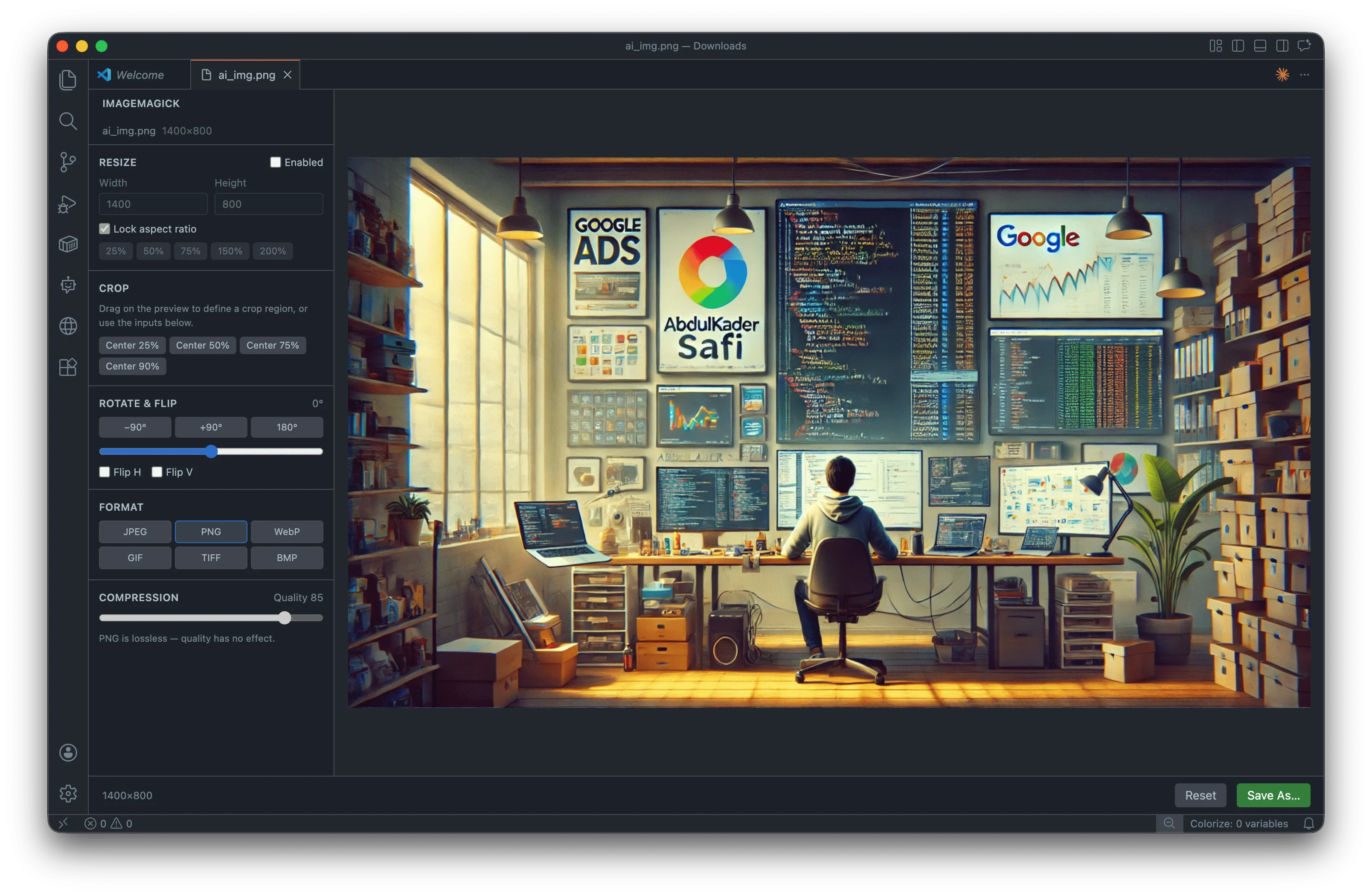
ImageMagick is a VS Code extension I built to remove the friction of context-switching to an external image tool every time a screenshot.png lands in a project folder. Right-click any image in the Explorer, and an in-editor panel opens with controls for resize, crop, rotate/flip, compress, and format conversion (JPEG · PNG · WebP · AVIF · GIF · TIFF · BMP). Every change updates a live preview within ~150 ms; the original is never overwritten, saving always goes through a file dialog with a smart default name (photo.optimized.webp).
Stack
- VS Code Extension API: webview panels, custom Explorer context menus, save dialogs
- Svelte 5 + Tailwind CSS v4: webview UI, runes-based reactive state (
$state,$derived,$effect) - TypeScript: strict, end-to-end, with a typed message protocol shared between host and webview
- esbuild: dual-target bundling (Node CJS for the extension host, ESM for the webview)
- magickwand.js: native ImageMagick-7 bindings for Node (the actual image engine)
Key features
- Three entry points: Explorer right-click, Command Palette, drag-and-drop into the panel
- Declarative editing pipeline (crop → rotate → flip → resize → format → quality), non-destructive, fully reversible, one-click reset
- Live size estimate alongside the preview so you can dial in quality vs. file size before saving
- Runtime encoder probing, the UI only offers formats the bundled binary can actually produce on your platform - Distributed as a 22 MB
.vsix, ready to install offline
GitHub · VS Code Marketplace · MIT
Every web and app developer ships images, and every project ends up needing the same five operations on them: resize, crop, rotate, compress, convert. The tools that exist for this all have the same problem, they live somewhere else.
- Online optimizers: (TinyPNG, Squoosh, Compressor.io) require uploading the file. That's a non-starter for client work, NDA assets, or anything you'd rather not hand to a third party. They also assume you have an internet connection, and they break the flow: download the optimized result, find the right folder, drop it in.
- Desktop apps: (Photoshop, Affinity, ImageOptim) are overkill for "make this 2 MB hero image into a 200 KB WebP." Switching apps means losing the project context, which folder the asset belongs in, what the rest of the codebase calls it, what dimensions the layout actually needs.
- CLI tools (magick, cwebp, sharp scripts) work, but only if you remember the flags. Quality 80? 85? -resize 50% or -resize 50x50? It's the kind of thing you re-Google every time. The result is the same loop, several times a week: stop coding, switch apps, optimize, switch back. It's small individually and exhausting in aggregate, and for sensitive assets there's no good answer at all.
A VS Code extension that does it all in-place, locally, without leaving the editor.
- Right-click → optimize: The image you're working on is already in the file tree; one click opens the editor panel with the file loaded.
- Live preview with size estimate: Adjust quality, format, or dimensions and watch both the pixels and the resulting file size update in real time, so you stop guessing whether 75% quality is "good enough."
- Fully local: ImageMagick runs natively inside the extension host. Nothing is uploaded, nothing leaves the machine, and it works offline.
- Originals stay safe: Saving always goes through a file dialog with
<name>.optimized.<ext>pre-filled, so accidental overwrites aren't possible. The five operations every project needs, where every project already is.
About this project
-
It brings the full ImageMagick toolchain directly into Visual Studio Code so you can resize, crop, rotate, flip, compress, and convert images without leaving the editor. Right-clicking any image in the Explorer opens an in-editor panel where every change updates a live preview within about 150 ms. It supports JPEG, PNG, WebP, AVIF, GIF, TIFF, and BMP formats.
-
Yes. All processing runs locally inside the extension host using native ImageMagick-7 bindings, so nothing is ever uploaded to the cloud and the extension works fully offline. This makes it suitable for client work, NDA assets, and anything you would not want to hand to a third-party online optimizer like TinyPNG or Squoosh.
-
The extension is built on the VS Code Extension API for webview panels, custom Explorer context menus, and save dialogs. The webview UI uses Svelte 5 with runes-based reactive state and Tailwind CSS v4, with strict end-to-end TypeScript and a typed message protocol shared between the host and the webview. Bundling is handled by esbuild with dual targets, and the actual image engine is magickwand.js, which provides native ImageMagick-7 bindings for Node.
-
Every project needs the same handful of image operations, but the existing tools all live somewhere else, online optimizers require uploads, desktop apps like Photoshop are overkill, and CLI tools mean re-Googling the right flags every time. This creates a repetitive loop of stopping work, switching apps, optimizing, and switching back, with no good option at all for sensitive assets. The extension removes that friction by doing everything in place, locally, inside the editor.
-
No. The editing pipeline is non-destructive and fully reversible with a one-click reset, and the original is never overwritten. Saving always goes through a file dialog with a smart default name like photo.optimized.webp pre-filled, so accidental overwrites are not possible. A live size estimate sits alongside the preview so you can balance quality against file size before you commit.
-
Yes, it is open source under the MIT license. The code is available on GitHub at github.com/Abdulkader-Safi/vscode-extensions-ImageMagick, and it is published on the VS Code Marketplace under AbdulkaderSafi.imagemagick. It is distributed as a roughly 22 MB .vsix file that can also be installed offline. The project was built by Abdulkader Safi as Lead Developer.