
Vs code · plugin · complete
SafiCrawl: In-Editor Website Crawler & SEO Auditor for VS Code
A zero-dependency VS Code extension that crawls any website, audits SEO across 11 categories, and reports Core Web Vitals, all without leaving the editor. No Python, no Docker, no hosted service.
- Role
- Lead Developer
- Timeline
- 1 Month
- Year
- 2026
- Status
- Completed
01
The overview
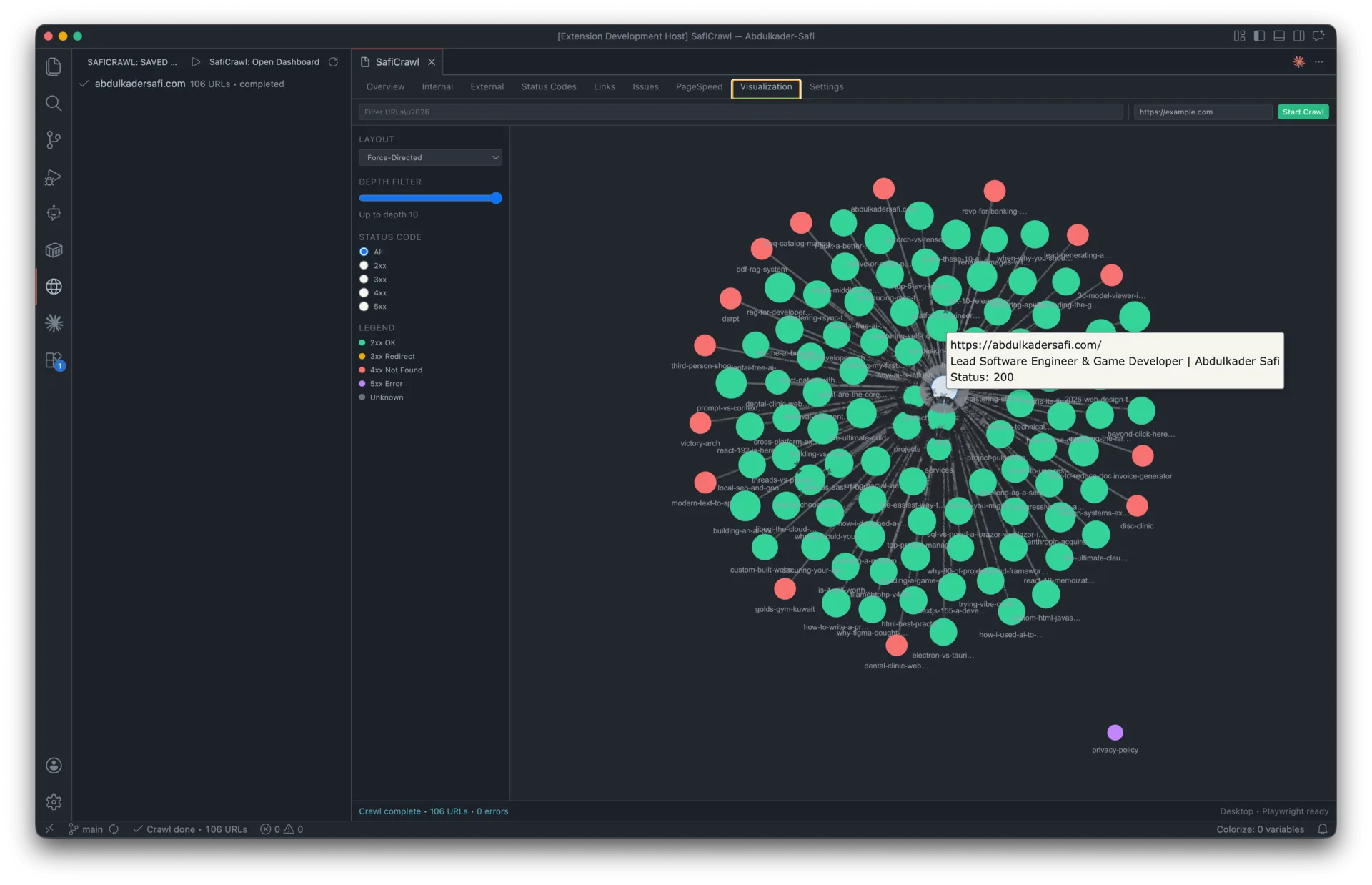
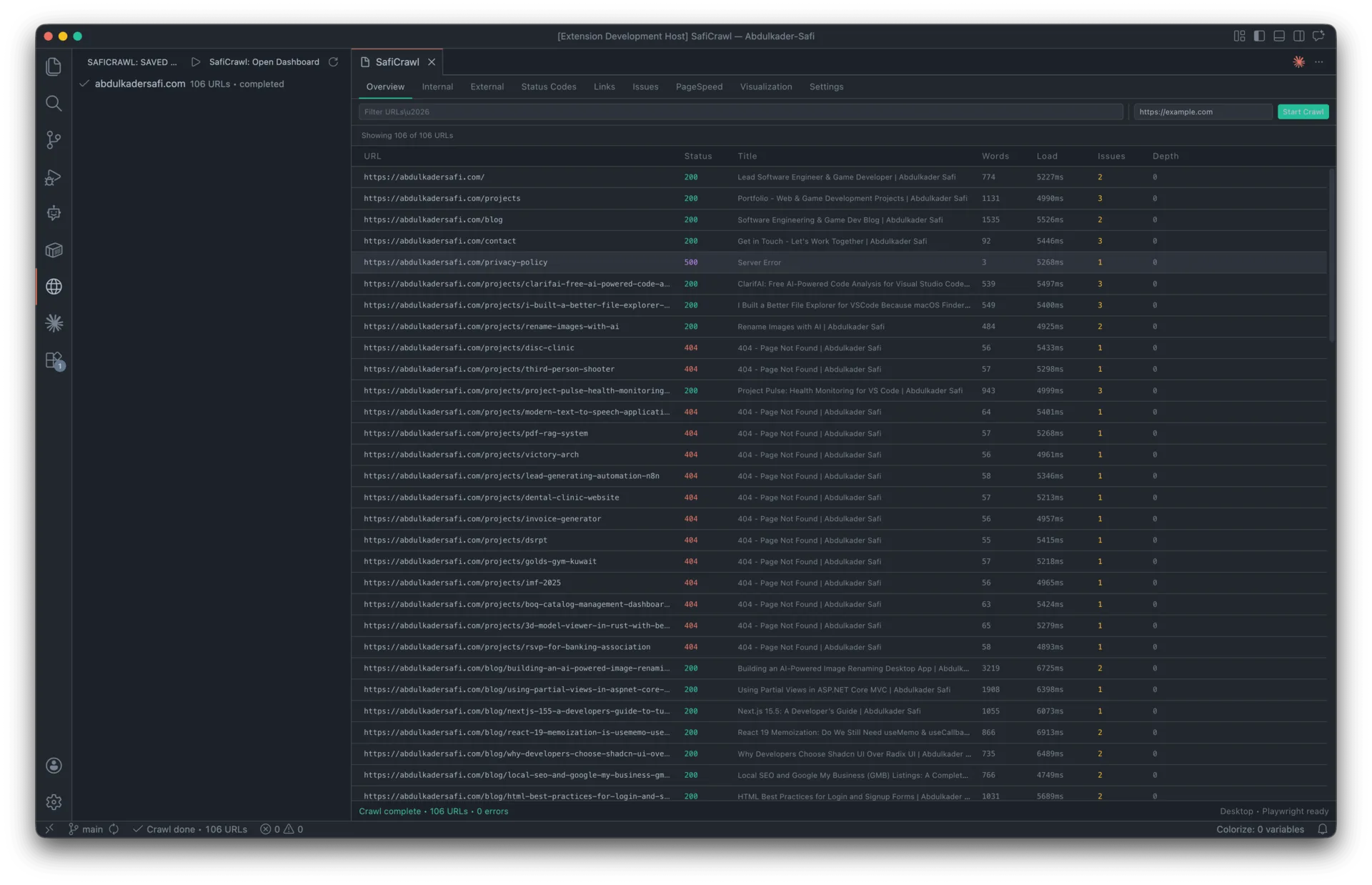
SafiCrawl is a Visual Studio Code extension that turns the editor into a full-featured SEO auditing workstation. It crawls any site from a seed URL, follows internal links, respects robots.txt, discovers sitemaps, and streams results live into a nine-tab React dashboard — all running inside the extension host.
Core capabilities
- Crawler engine — BFS with a Promise-based worker pool, token-bucket rate limiting, exponential-backoff retries, and gzipped sitemap-index recursion.
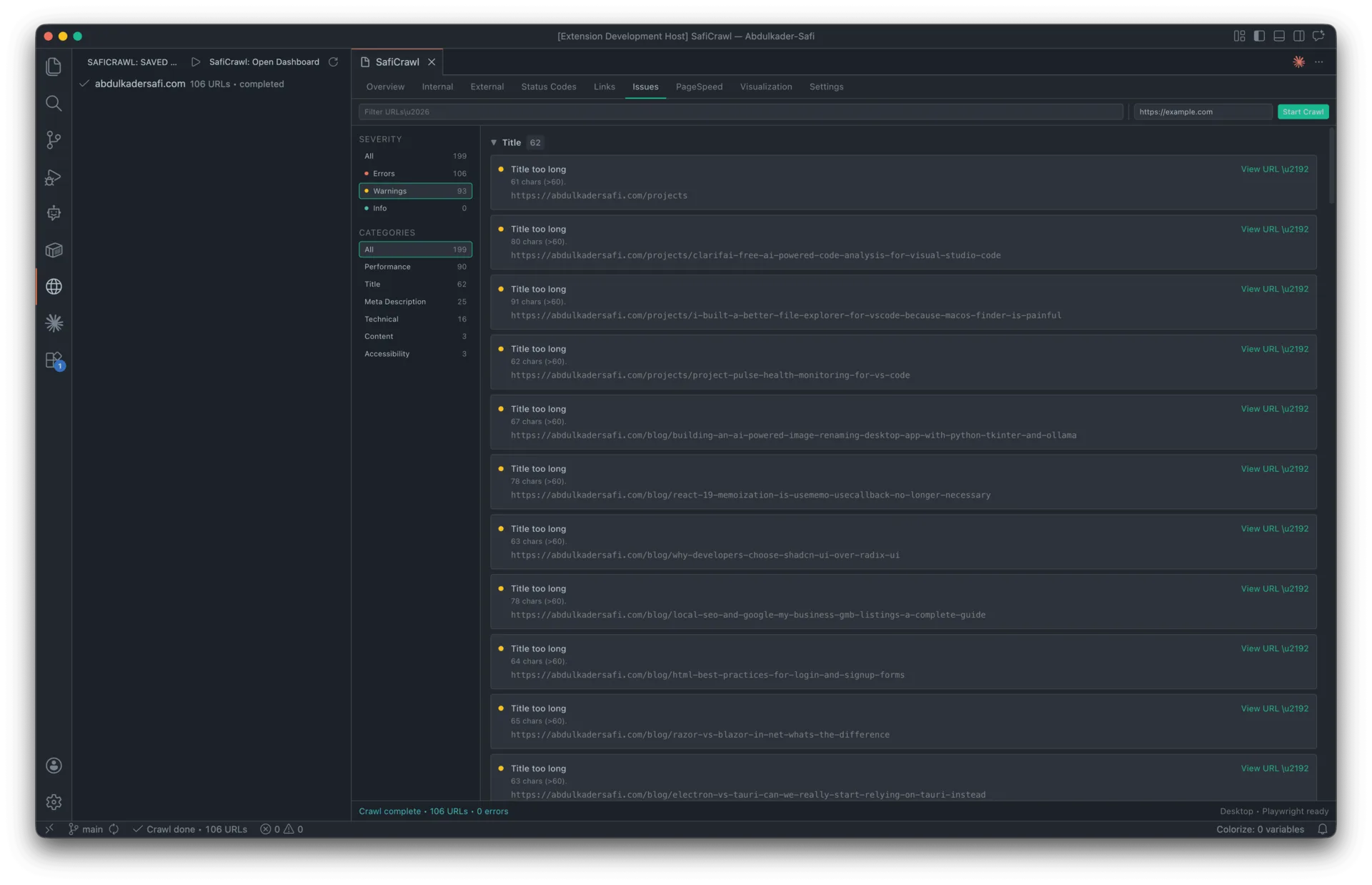
- SEO analysis — 11 categories covering title tags, meta descriptions, headings, content, canonicals, Open Graph, Twitter Cards, JSON-LD/microdata, hreflang, analytics, and indexability.
- JavaScript rendering — optional Playwright integration that crawls React / Vue / Angular / any SPA with fully-hydrated HTML.
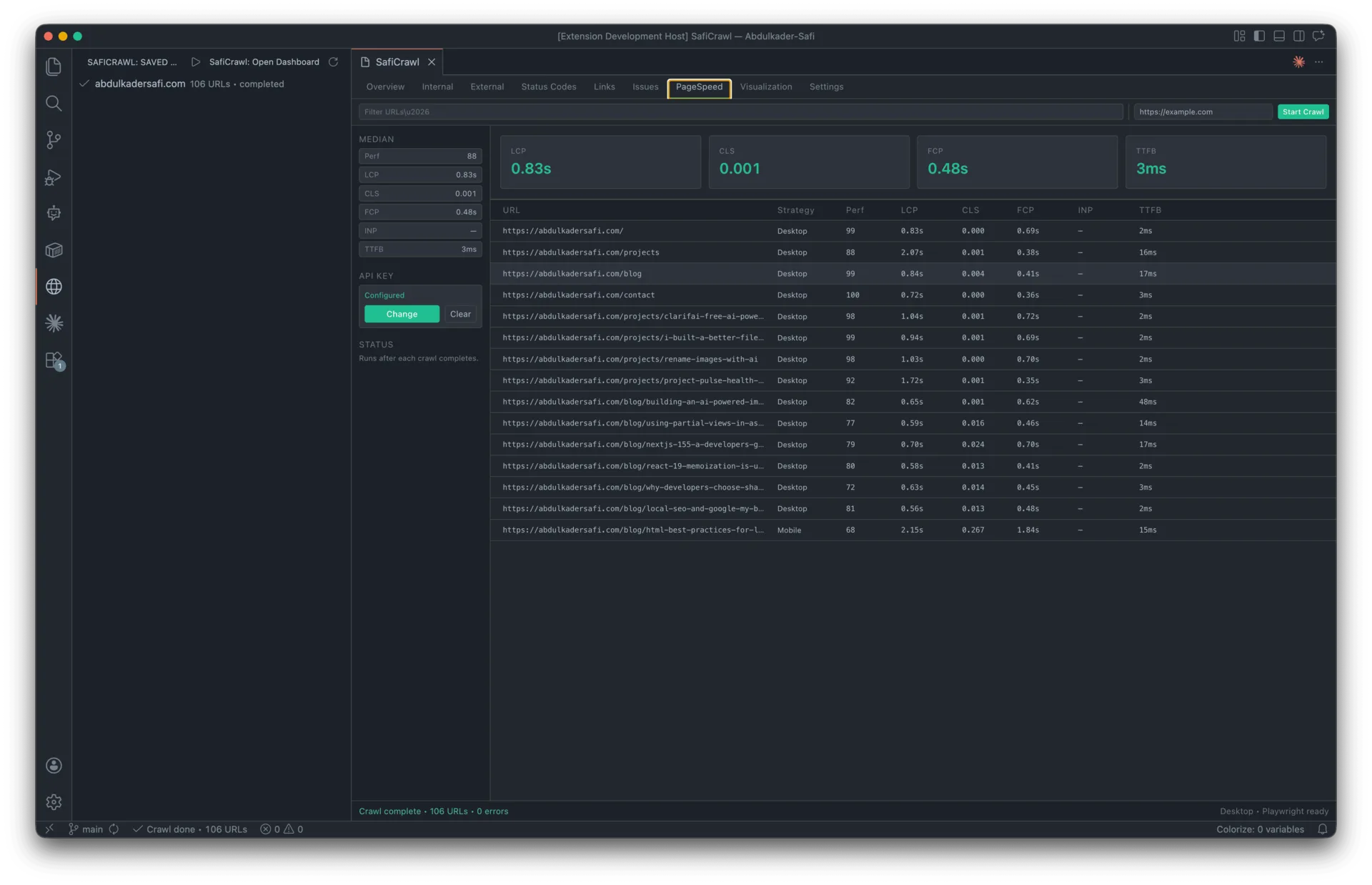
- Core Web Vitals — post-crawl PageSpeed Insights with LCP, CLS, FCP, INP, and TTFB medians per URL.
- Persistence — every crawl is saved to SQLite (via
sql.jsWASM) and can be loaded, resumed, archived, or deleted from the activity bar. - Visualization — interactive force-directed graph of the site structure with status-code coloring.
- Exports — CSV, JSON, and XML for external reporting.
02
The challenge
Existing SEO crawlers (Screaming Frog, Sitebulb, Ahrefs Site Audit) are powerful but live outside the developer's workflow. They require a separate desktop app, a paid subscription, or a hosted service — and none of them let you audit a staging site against a pull request or validate a docs change before it ships.
The problem compounded with specific technical constraints:
- No native modules allowed. VS Code ships a new Electron runtime every few weeks. Any extension that bundles a native SQLite binding (
better-sqlite3,node-sqlite3) would needelectron-rebuildfor every VS Code version — making a single.vsiximpossible to distribute. - Playwright is ~300 MB. Bundling a headless browser would violate the marketplace 100 MB size cap and make installs painful on slow connections.
- Web VS Code / Codespaces support. A browser-based editor has no Node process, no filesystem, and no child processes — so the extension had to degrade gracefully.
- Live streaming + persistence without blocking the UI. A 5,000-URL crawl produces tens of thousands of edges and issues; naive
postMessageand synchronous writes would freeze the extension host. - Secret storage. A Google PageSpeed API key can't live in
settings.json(it syncs, it leaks, it ends up in dotfiles repos).
03
The solution
SafiCrawl was built as a pure TypeScript VS Code extension — no external server, no language bridge, no Docker — with every architectural decision driven by portability and performance.
1. SQLite without native modules
Persistence uses sql.js — SQLite compiled to WebAssembly. A single .vsix works on every VS Code / Electron version with zero rebuilds. The database is a standard SQLite file stored in VS Code's globalStorage, openable with any SQLite GUI for ad-hoc analysis.
2. Bring-your-own Playwright
Instead of bundling a 300 MB headless browser, SafiCrawl auto-detects Playwright from three locations: an explicit path in settings, the workspace's node_modules, or the global npm root. Users install once with npm i -g playwright and the extension stays under the marketplace size cap. JS rendering is off by default and force-disabled in web contexts with a one-time notification.
3. Batched IPC for live streaming
The controller bridges the crawler engine and the React webview by batching up to 50 rows or 100 ms of events before posting. Every batch is also written through to sql.js, so a window close mid-crawl flips the row to interrupted on next activation and offers Resume from exact checkpoint.
4. Nine-tab React dashboard
A React 19 + Tailwind v4 webview with TanStack Virtual tables (handles 10k+ rows without frame drops), a vis-network force-directed site graph, and a zustand store driven by typed postMessage events. Settings form is live-synced two-way with VS Code's settings.json.
5. Secure key storage
The PageSpeed API key lives in the OS keychain (macOS Keychain / Windows Credential Vault / libsecret) via VS Code's SecretStorage API — never in settings.json, never sent to the webview, never in the SQLite DB.
6. Robust crawler engine
undicifor HTTP/2 with pooled connections and configurable timeouts.cheeriofor fast HTML parsing and SEO extraction.robots-parser+fast-xml-parserfor sitemap and robots.txt compliance (including gzipped sitemap-index recursion).- Token-bucket rate limiting with per-domain concurrency control.
- Exponential-backoff retries and 429 handling for the PSI client.
Results
A single .vsix runs on every VS Code version and every OS, crawls 5,000 URLs with live streaming and full persistence, and adds SEO + Core Web Vitals auditing to the editor workflow — no servers, no subscriptions, no context switching.
01 / 03
FAQ
About this project
What does SafiCrawl actually do?
SafiCrawl is a Visual Studio Code extension that crawls any website from a seed URL and audits its SEO without leaving the editor. It follows internal links, respects robots.txt, discovers sitemaps, and streams results into a nine-tab React dashboard, covering 11 SEO categories along with Core Web Vitals like LCP, CLS, FCP, INP, and TTFB. It runs entirely inside the VS Code extension host, so there is no separate desktop app, hosted service, or subscription involved.
What tech stack was used to build it?
The extension is written in pure TypeScript with no native modules or external server. The dashboard is a React 19 and Tailwind v4 webview using a zustand store, TanStack Virtual for large tables, and vis-network for the force-directed site graph. The crawler engine relies on undici for HTTP, cheerio for HTML parsing, robots-parser and fast-xml-parser for compliance, and persistence is handled by sql.js, which is SQLite compiled to WebAssembly. Playwright is supported optionally for rendering JavaScript-heavy sites.
Why use sql.js and bring-your-own Playwright instead of bundling everything?
Both choices were driven by portability and the marketplace size cap. Bundling a native SQLite binding would require rebuilding the extension for every new VS Code and Electron release, so SafiCrawl uses sql.js compiled to WebAssembly, letting a single .vsix run on every version and OS with zero rebuilds. Playwright is roughly 300 MB and would blow past the 100 MB marketplace limit, so instead the extension auto-detects an existing Playwright install from settings, the workspace, or the global npm root, with JavaScript rendering off by default.
What problem was this built to solve?
Existing SEO crawlers like Screaming Frog, Sitebulb, and Ahrefs Site Audit are powerful but live outside the developer's workflow, requiring a separate app, a paid subscription, or a hosted service. None of them let you audit a staging site against a pull request or validate a docs change before it ships. SafiCrawl brings full SEO and Core Web Vitals auditing directly into the editor so it fits naturally into a development workflow with no context switching.
Can it handle large crawls without freezing the editor?
Yes. The controller batches up to 50 rows or 100 ms of events before posting them to the webview, and every batch is written through to the sql.js database, so a 5,000-URL crawl streams live without blocking the extension host. If a window closes mid-crawl, the interrupted state is detected on next activation and the crawl can be resumed from its exact checkpoint, with results persisted and exportable to CSV, JSON, and XML.
Who built SafiCrawl and what was the role?
SafiCrawl was built by Abdulkader Safi as Lead Developer over roughly one month, completed in 2026. It was an end-to-end effort covering the crawler engine, the SEO and Core Web Vitals analysis, the React dashboard, and the architecture decisions around portability, persistence, and secure storage of the PageSpeed API key in the OS keychain.
Work with me
Got a product in your head? Let's put it on a screen.
Tell me what you're building, who it's for and when it has to be live. I'll reply with questions first, then a fixed quote.
Start a project