
Plugin · tools · complete
S-Calc
An Obsidian plugin that turns an s-calc code block into a live calculator. Each line is evaluated and its result printed inline in your theme accent colour, updating as you type. Covers arithmetic, variables, percentages, unit and live currency conversion, and plain-language dates.

- Role
- Solo developer
- Timeline
- 1 day
- Year
- 2026
- Status
- Completed
01
The overview
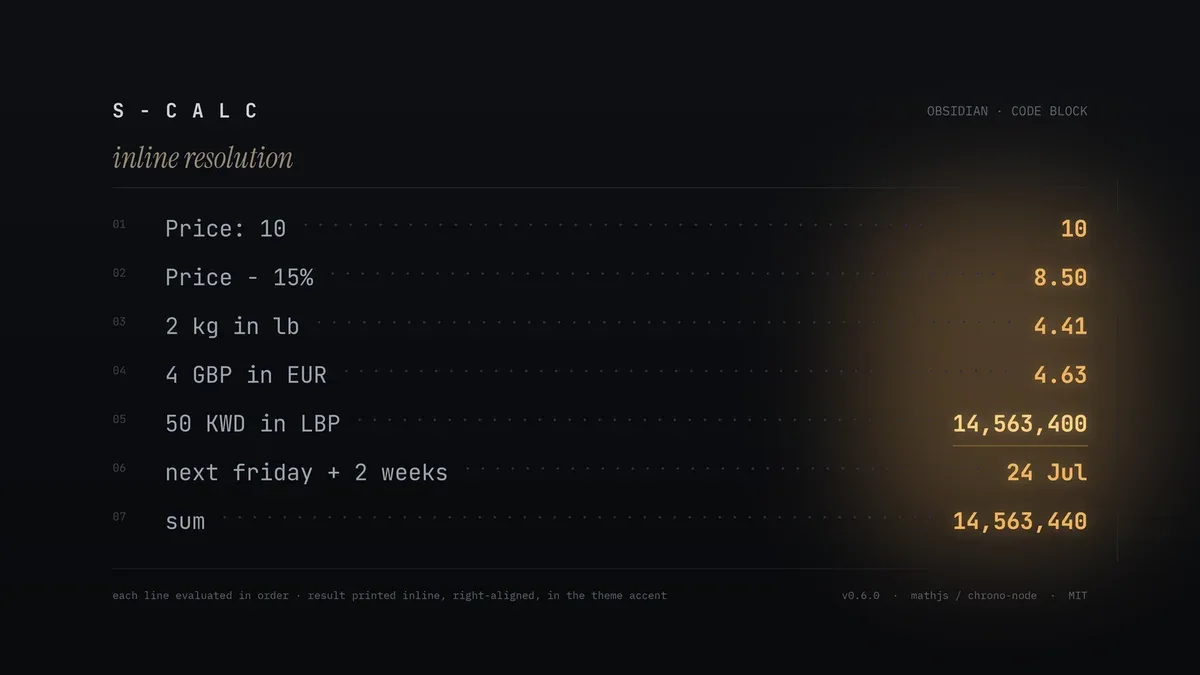
S-Calc adds a code block to Obsidian that does quick math without leaving the note. Write expressions in an s-calc block and each line's answer appears on the right of that line, in your theme accent colour, live as you type and in reading view. It works like Soulver or Numi, but native to Obsidian. It handles arithmetic with parentheses, variables and labels you can reuse later, running totals with sum and prev, percentages including reverse ones, unit conversion, live currency for every currency the rate feed returns, and plain-language dates like next friday + 2 weeks.
02
The challenge
Notes are full of small calculations: a price minus a discount, a unit conversion, a currency amount, a date a few weeks out. The usual flow is to alt-tab to a calculator, work it out, and copy the number back. That breaks the writing and loses the context the number belongs to. Obsidian had no built-in way to do the math in the note itself.
03
The solution
The plugin is split into small, testable pieces. A pure evaluate(lines) engine runs each line against a shared scope, so labels and the sum/prev keywords carry down the block. It preprocesses the parts a math library can't read directly (percentage phrases, in conversions, date arithmetic), evaluates with mathjs, falls back to chrono-node for dates, and formats the output. A currency module fetches USD-based rates once per session from a free no-key endpoint (open.er-api.com) and registers every returned currency as a mathjs unit, with name aliases so 4 GBP in euro resolves. A CodeMirror 6 view plugin finds s-calc fences and paints a right-aligned result per line, which is the live-while-typing part, plus a reading-view processor for the rendered note. Results read Obsidian's own theme variables, so they use the accent colour and match light and dark mode with no rebuild. It started from a Svelte plugin template; Svelte, Tailwind, and shadcn were stripped out because a code-block processor needs none of them, leaving two runtime dependencies.
FAQ
About this project
How do I use S-Calc?
Add a code block with the language s-calc and write one expression per line. Each line's result shows on the right, live as you type and in reading view. Blank lines and lines starting with # or // are ignored.
What can it calculate?
Arithmetic with parentheses, variables and labels, running totals with sum and prev, percentages including reverse ones like 20% of what is 30, unit conversion such as 2 kg in lb, live currency like 50 KWD in LBP, and natural-language dates like today + 90 days.
Where does the currency rate come from?
It fetches USD-based rates once per session from open.er-api.com, a free endpoint with no key. Every currency the feed returns is registered, including less common ones like KWD and LBP, and you can reference them by ISO code or common name.
Is it on the Obsidian marketplace?
Yes. It is listed in the community plugin marketplace as s-calc, currently at version 0.6.0, and the source is on GitHub under the MIT licence.
Does it work while I am typing?
Yes. A CodeMirror 6 editor extension recomputes and repaints results as you edit, and a separate reading-view renderer shows them in the rendered note.
Work with me
Got a product in your head? Let's put it on a screen.
Tell me what you're building, who it's for and when it has to be live. I'll reply with questions first, then a fixed quote.
Start a project