Abdulkader Safi

Building My First .NET Core MVC RSVP Platform for a Banking Association Event

Learn how I built a full RSVP system using .NET Core MVC, Razor Pages, and Alpine.js in just 9 days for a major banking event. Includes dashboard analytics, QR check-ins, and lessons from a developer based in the MENA region.

3 min read

Share
Building My First .NET Core MVC RSVP Platform for a Banking Association Event

I Just Built My First .NET Core MVC RSVP Platform — Here’s How It Went

I recently completed a fast-paced, high-pressure project: a full RSVP platform for a national banking association in the Middle East.

The catch? I had only 9 days to learn the stack, build it, and deliver results.

Let’s break it down.


🏦 The Goal: Smart RSVP for a Formal Banking Event

Every year, a national banking association in the MENA region hosts a major corporate event.

This time, they wanted a digital RSVP platform — to know exactly who’s coming, who canceled, and when.

Core requirements:

  • Online RSVP form
  • Real-time submission tracking
  • Email confirmation with QR code
  • Check-in system via QR scanning
  • Analytics dashboard
  • User and employee management

💻 The Tech Stack: Clean and Simple

I chose a lightweight, fast-moving stack that fits the project:

  • Backend: .NET Core MVC
  • Frontend: Razor Pages + Alpine.js
  • Database: PostgreSQL
  • Deployment: Client-side infrastructure

No React, no Vue — just fast Razor rendering and Alpine for smooth interactivity.


⚡ The Timeline: 9 Days, No Extensions

I started on July 8th, 2025. It needed to be ready by July 17th.

This meant:

  • Designing the data model
  • Building frontend and backend logic
  • Integrating email + QR code features
  • Building a responsive admin dashboard
  • Testing and refining in record time

✅ The Features I Delivered

Here’s what went live by the end of the sprint:

  • Dynamic RSVP Form
    • Name, email, guest info
  • Dashboard
    • Daily submissions
    • Submission timestamps
    • Total count, checked-in, and canceled stats
  • Email System
    • Sends confirmation with QR code
  • User/Admin Panel
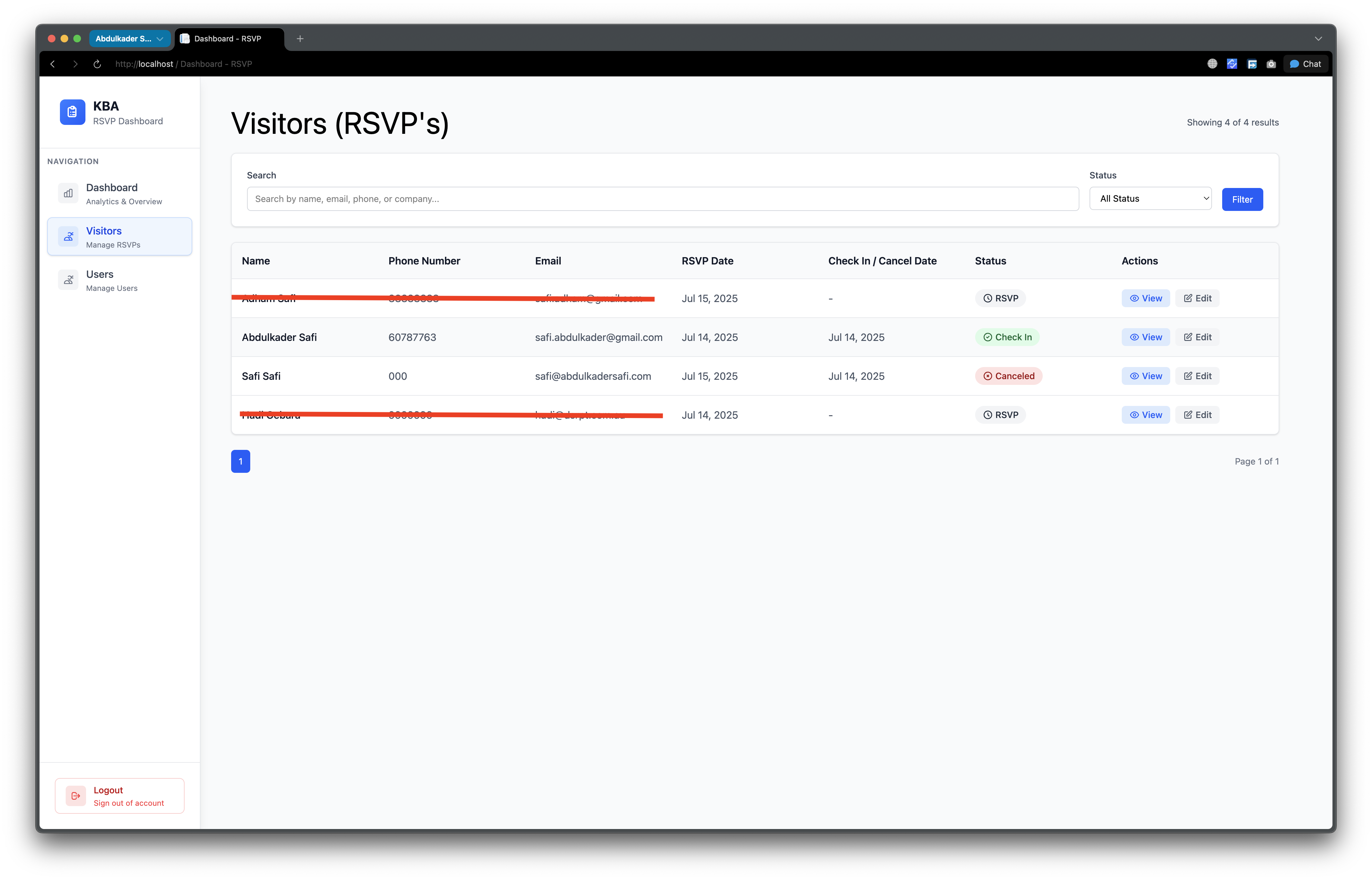
    • Manage attendees, employees, and access levels

The QR code scanner and check-in feature is the only part still in progress.


🧠 What I Learned (Fast)

This was my first real .NET Core MVC project.

In university, I only built basic WinForms — so Razor Pages, Identity, and Entity Framework were all new.

Key takeaways:

  • How to use Identity for authentication
  • How to organize services and repositories
  • Real-world MVC structure
  • Fast problem solving under tight deadlines

If I could start again, I’d first study .NET Core structure before writing a line of code. It would’ve saved time.


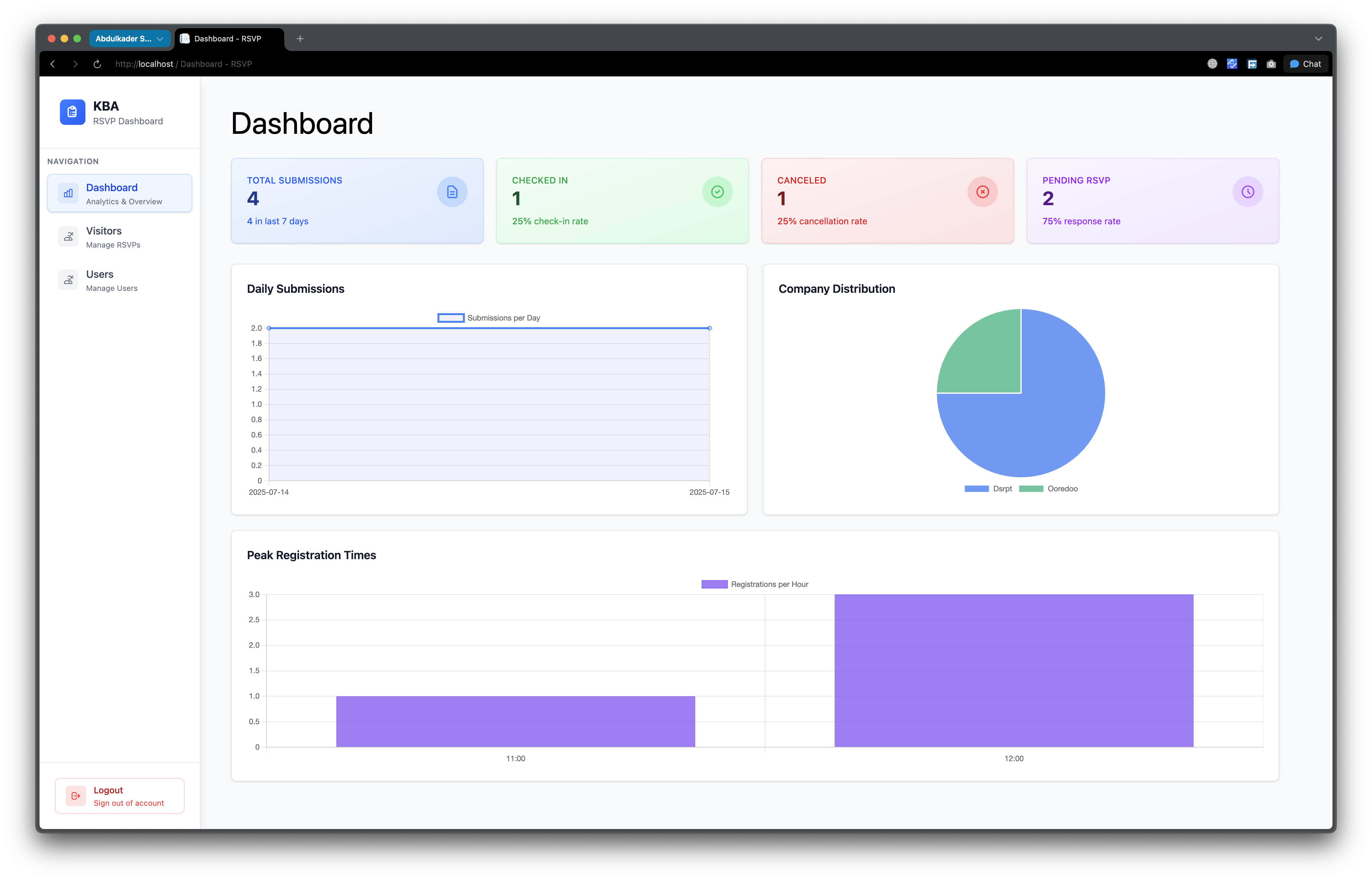
📊 A Look at the Dashboard

Here’s a quick snapshot of the dashboard I built.

It shows:

  • How many people RSVP’d
  • Who canceled or checked in
  • When submissions were made
Dashboard Submisstion

Clean, informative, and optimized for mobile too.


🌍 Built for the MENA Region

This RSVP platform was designed for a corporate banking event in the Middle East — with localization in mind and features tailored to formal business events.

It's a great example of how modern web tools like .NET Core MVC + Razor can build serious, real-world solutions quickly — without the bloat.


📍 Tech Stack Summary

Feature Tech Used
Backend .NET Core MVC
Frontend Razor Pages + Alpine.js
Database PostgreSQL
Email + QR Custom built
Deployment On-premise (client)

🤝 Need a Custom RSVP System or Dashboard?

I help businesses build tools that actually work — even on tight deadlines.

Whether you're planning an event, need internal tools, or want a custom dashboard for your team — I can help.

Reach out:

📧 Email: safi.abdulkader@gmail.com | 💻 LinkedIn: @abdulkader-safi | 📱 Instagram: @abdulkader.safi | 🏢 DSRPT

Drop me a line, I’m always happy to collaborate! 🚀

Last updated 29 May 2026

FAQ

Frequently asked questions

What tech stack is best for building an RSVP platform quickly?

A lightweight, fast-moving stack works well for RSVP platforms built under tight deadlines. This project used .NET Core MVC for the backend, Razor Pages with Alpine.js for the frontend, and PostgreSQL for the database, with the email and QR code features custom built. Skipping heavier frameworks like React or Vue in favor of fast Razor rendering and Alpine for interactivity kept things simple and quick to ship.

Can you really build a full RSVP system in 9 days with .NET Core MVC?

Yes, this project delivered a working RSVP platform for a national banking association in just 9 days, from July 8th to July 17th, 2025. The sprint covered designing the data model, building the frontend and backend logic, integrating email and QR code generation, and creating a responsive admin dashboard. It was achievable even though it was the developer's first real .NET Core MVC project, though studying the framework structure beforehand would have saved time.

What features should an event RSVP platform include?

A solid event RSVP platform typically includes a dynamic online RSVP form capturing name, email, and guest info, real-time submission tracking, and an analytics dashboard showing total counts plus checked-in and canceled stats. It should also send email confirmations with a QR code, support QR-based check-in at the event, and provide a user and admin panel to manage attendees, employees, and access levels.

How does QR code check-in work for events?

QR code check-in works by sending each attendee a confirmation email containing a unique QR code when they RSVP. At the event, staff scan that QR code to mark the attendee as checked in, which updates the dashboard stats in real time. In this build, the email confirmation with QR code was delivered, while the scanner and check-in feature was the one part still in progress at the end of the sprint.

Why choose Razor Pages and Alpine.js over React for a dashboard?

Razor Pages paired with Alpine.js is a good choice when you want fast server-side rendering and smooth interactivity without the overhead of a full single-page-application framework. For this RSVP dashboard the combination kept the build lean and fast to develop on a tight deadline, avoiding the extra tooling and complexity that React or Vue would add. It shows that modern .NET Core MVC plus Razor can deliver serious real-world tools without the bloat.

Written by

Abdulkader Safi

Software Engineer

Lead engineer at DSRPT, from Lebanon and based in Kuwait. I write about the tools and bugs from real client work, with the numbers I measured.

About me → GitHub LinkedIn

Need this kind of work done on your project?

Start a project →

Keep reading

All articles →
  • The Easiest Way to Run LLM Models Locally: A Practical Guide Using Ollama and LM Studio

    · 5 min read

    The Easiest Way to Run LLM Models Locally: A Practical Guide Using Ollama and LM Studio

    Running large language models (LLMs) on your local machine has become increasingly popular for privacy, cost-efficiency, and performance. While cloud-based solutions like Azure or Google Cloud offer powerful computation, they often come with costs and dependency on internet connectivity. Fortunately, tools like Ollama and LM Studio make it easier than ever to run LLMs locally, without requiring a developer's degree. In this guide, we’ll walk you through the easiest way to set up these tools and suggest the best models based on your device’s hardware.

  • Why 90% of Projects Don’t Need More Than SQLite

    · 3 min read

    Why 90% of Projects Don’t Need More Than SQLite

    Let’s be real. Not every project needs a heavyweight database system like PostgreSQL or MySQL. In fact, **90% of the time**, you’re better off keeping it simple. And for me? I use **SQLite** in most of my personal projects. Here’s why.

  • How I Designed a Full UI in 2 Hours Using UX Pilot AI

    · 4 min read

    How I Designed a Full UI in 2 Hours Using UX Pilot AI

    The secret weapon behind my latest project, designing a good UI, takes time. Great UI? Even more. But what if I told you I designed a full project layout, clean, responsive, and modern, in just 2 hours? Thanks to UX Pilot, that’s exactly what happened.