Power users give the most feedback and ask for the most features. Build all of it and you slowly lock everyone else out. Here is the filter I run requests through instead.
Your loudest users are usually your best users. They live in the product, they file the most tickets, and they have a feature wishlist longer than your roadmap. So you start building what they ask for. One request at a time, all reasonable on their own.
Then one day a new user opens the app, hits a wall of settings, and leaves before they ever see why the thing is good.
I've watched this happen on client builds more times than I'd like. The product didn't fail because nobody wanted it. It failed because it got too good at serving the ten people who already loved it, and too hard for the next thousand who might have.
Here's the part most founders miss: the fix isn't to ignore power users. It's to stop treating their requests as orders.
Power users are not your average user
Power users have already paid the learning cost. They know your weird shortcuts. They've built workarounds for the rough edges. When they ask for a feature, they're asking from the far end of the journey, where the product already makes sense.
New users are standing at the start of that journey. They hit friction on screen one. They don't know the workarounds exist. And they churn long before they'd ever become the kind of user whose feedback you're now building around.
So every feature you ship for the power user adds a little weight: one more setting, one more menu, one more thing to figure out. Each addition is tiny. Stack a year of them and the product turns into something only your biggest fans can drive.
That's not growth. That's a ceiling you built yourself.
I wrote about a related trap in 7 common frontend system design mistakes and how to avoid them. Complexity rarely arrives in one bad decision. It arrives one reasonable yes at a time.
Run every request through three filters
Saying yes to every request is lazy. So is saying no to everything. The useful move sits in between: a filter you run before you commit a single line of code.
Filter 1: does it fit where the product is going?
Every product has a point of view. A reason it exists and a person it's for. A request that drags the product away from that, no matter who's asking, is a request to build a different product.
Picture a clean, simple project tracker. A power user wants Gantt charts, resource allocation, and time tracking bolted on. Each feature helps them. Together they quietly turn your tracker into enterprise PM software, which is a different product for a different buyer with a different price.
Hold the request up against the direction. Sometimes the most useful thing you can tell a power user is "not right now," and then explain the why. The loudest voice isn't automatically the right one.
If you don't have a written direction to measure against, that's the real gap. A short product requirements doc gives you something to say no to, instead of vibing every decision in the moment.
Filter 2: can you build it without cluttering the screen?
Power user features should not tax everyone else. The good ones exist for the people who need them and stay invisible to the people who don't.
That's a design problem, and the toolkit is old and well worn:
- Progressive disclosure: show the complexity only when someone goes looking for it
- Smart defaults: the right behaviour out of the box, with an override sitting there for whoever wants it
- Contextual surfaces: advanced options that appear where they're relevant, not parked in the main nav
The keyboard shortcut. The advanced filter. The bulk action. That's power user depth done right. It adds capability without adding surface area. A new user never bumps into it until they're ready to.
Quick gut check: show a mockup to someone who has never touched your product. If they look confused, the feature is sitting too shallow. Push it deeper. This kind of layering is exactly what a real design system is for, building depth in a way that stays consistent instead of bolting on one-off panels.
Filter 3: does it confuse a first-time user?
A new user should open your product and feel the value almost immediately. If a power user feature adds a step, an option, or a flash of noise to that first run, it needs a rethink.
That doesn't make the feature wrong. It makes the placement wrong. The same capability can deepen a power user's workflow and stay completely out of a beginner's way. The only question is where it lives and how it shows up.
The best products pull off both at once. Not by shipping two apps, but by designing features that stack cleanly on top of each other.
What this looks like on a real screen
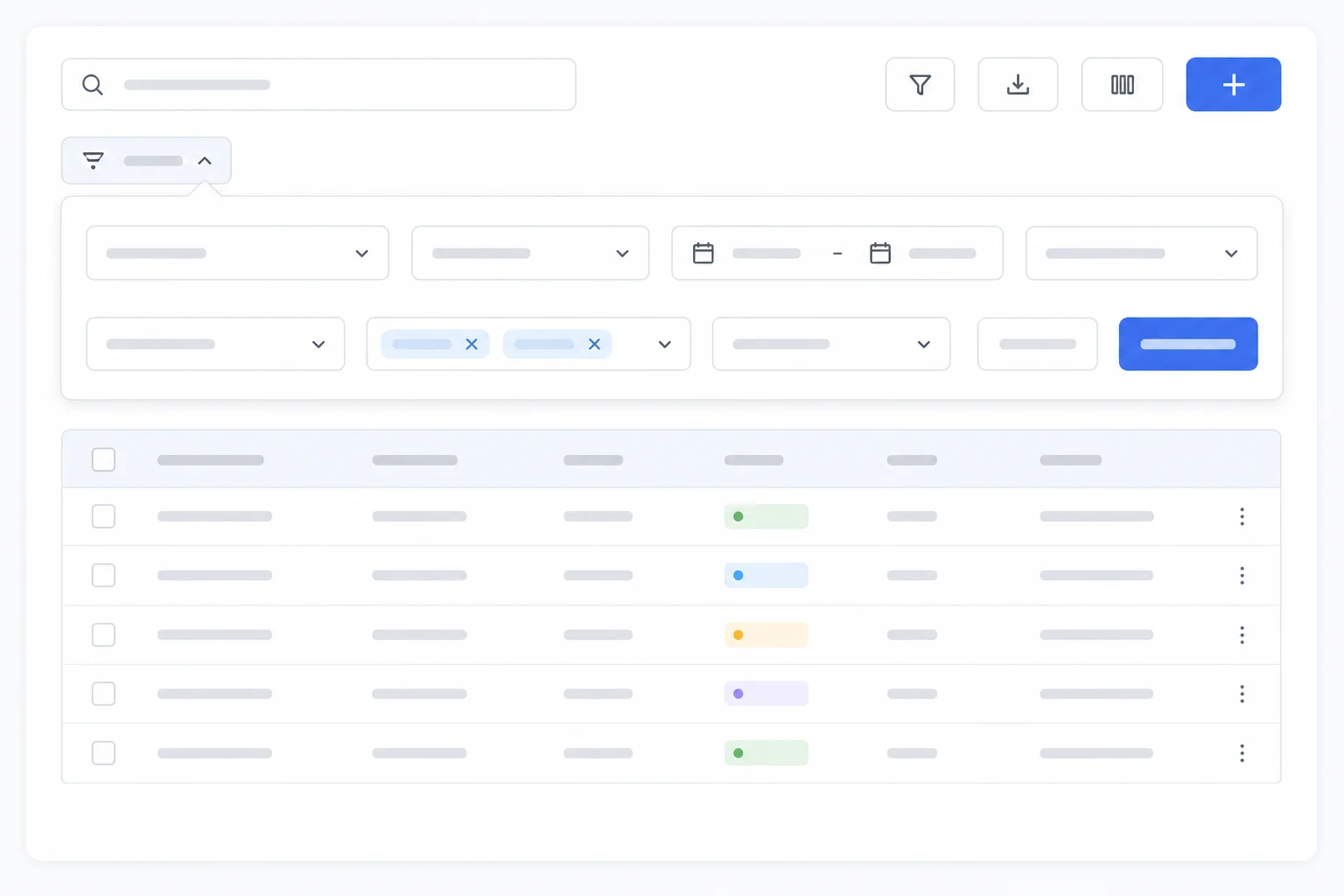
I built a dashboard for a client where the power users needed to filter across dozens of fields, and the new users just needed to see their data and act on it. On paper, those two needs fight.
The build: a plain table by default. One search bar. Three obvious action buttons. Underneath the search, a small "Advanced filters" link that opened into the full filtering system. Power users basically lived in that expanded panel. New users never knew it was there until the day they needed it.
Same screen. Same product. Two completely different experiences, decided by what each person actually needed in the moment. Nobody got confused. Nobody got boxed in.
That's the whole game. You're not picking a side between your power users and everyone else. You're designing so the answer to "who is this for" can be "both," depending on who's holding the mouse.
Serve them, don't follow them
Power users earn good features. They're your most engaged people and they genuinely push the product forward. But "push it forward" and "build whatever they ask for" are not the same sentence.
It means hearing the problem under the request, not just the request. Checking it against where the product is headed. Then designing something that adds depth without adding noise.
A good feature makes the product better for everyone, not only the person who filed the ticket. If you can't say that about the thing you're about to build, the request needs more thought before it needs more code.
Frequently asked questions
Should I ignore feature requests from power users? No. Ignoring them throws away your best signal about where the product can grow. The point is to treat each request as information about a problem, not as an instruction to build. Listen to the problem behind it, then decide whether building it fits the product's direction and how to ship it without hurting new users.
How do I know if a feature is too complex for new users? Show a mockup to someone who has never used your product. If they look confused or overwhelmed, the feature is surfaced too shallow and needs to be tucked deeper behind progressive disclosure. A first-time user should feel the product's core value before they ever meet an advanced option.
What is progressive disclosure in product design? Progressive disclosure means revealing complexity only when a user goes looking for it. The simple path stays clean by default, and advanced options appear in context when they're relevant. An "Advanced filters" link that expands into a full filtering system is a classic example: invisible to beginners, one click away for power users.
How do I say no to a power user without losing them? Be honest about why. Tell them the request doesn't fit the product's direction right now, and explain the reasoning instead of going quiet. Power users respect a clear point of view more than a vague "we'll consider it." Saying "not right now, and here's why" keeps trust intact and keeps the product coherent.
Won't focusing on new users frustrate my power users? Not if you layer features instead of removing them. A clean default view serves new users, while shortcuts, bulk actions, and advanced filters live one layer down for power users. The same screen can hold both experiences. You only lose power users when you strip depth out entirely, not when you hide it well.