I redesigned my portfolio from tech dashboard to editorial
Why I dropped the cyan-and-cards look every dev portfolio has, and rebuilt mine as a warm editorial site with one accent, magazine rows, and a flash-free theme toggle.

7 min read


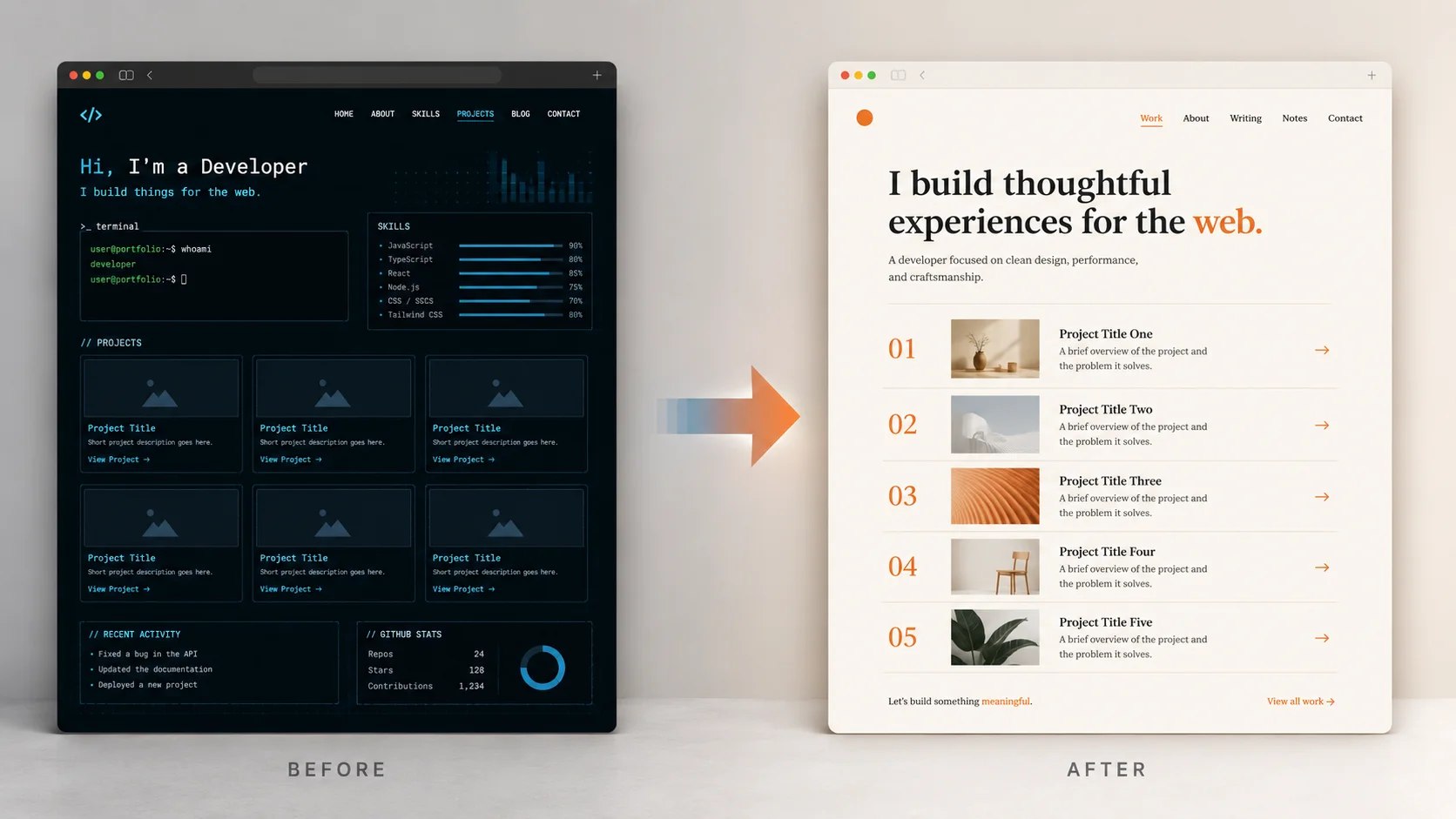
Every developer portfolio looks the same. Dark background, one neon accent, a grid of identical project cards, a contact form at the bottom. Mine was no exception. It was a cyan dashboard, and I was bored of it.
So I rebuilt the whole thing. The new abdulkadersafi.com is warm, editorial, and built around a single clay-orange accent. Here is what changed, why, and the two build details I think are worth stealing.
The old site was fine, and that was the problem
The previous version did its job. Near-black canvas, a cyan accent, a blinking terminal prompt in the hero, a big circular photo of me ringed in cyan glow. Skills in a grid, projects in a grid, services in a grid, a GitHub contribution graph near the bottom. It looked like a tech portfolio because it was built from the same parts as every other tech portfolio.
That is the trap. A portfolio is a sample of your taste. If it looks like a template, the work behind it reads like a template too. I wanted the site to feel like me before a visitor reads a single word, and "another dark dashboard" was not it.
The new direction: an editorial workbench
I gave myself one north star: make the site read like a well-set magazine, not a SaaS dashboard. I wrote it into the project's design notes so I would not drift back to old habits.
That meant rejecting three things on sight. No generic SaaS template, so no gradient hero, no stat blocks, no endless rows of icon-heading-text cards. Nothing corporate or sterile, so no flat beige and no cold grey. And no cold minimalism either, because plenty of "minimal" sites feel like a spreadsheet. The canvas had to stay warm and the type had to have a voice.
I leaned on a few patterns from current work without chasing every trend. If you want the wider context, I wrote up 9 web design patterns shaping 2026 separately.
One accent, and only one
The whole site runs on one accent: a clay orange, #d97a4f on the dark theme and a slightly deeper #c75c33 on the light one. There is no second colour anywhere. No gradient text, no rainbow tags.
This is a constraint, and constraints make design decisions for you. With one accent, the orange thing on the screen is always the important thing: a section label, the active nav link, the call to action. The moment you add a second hue, you spend the rest of the build arguing with yourself about which one wins. One accent plus weight and scale does the same job with none of the noise.
The canvases stay warm too. The background is #0c0b0a, a near-black with a brown tint, never pure #000. Light mode is #f4f1ea, warm paper, never pure white. Depth comes from hairline borders and a soft glow in one corner, not from drop shadows and boxes. I have made the case before that heavy component systems become tech debt you cannot see, and the same logic applies to visual clutter: every extra colour and shadow is a thing you have to maintain forever.
Rows, not cards
The biggest structural change: work and writing are now numbered editorial rows, not card grids.
A card grid flattens everything to the same weight. Eight identical boxes, none leading, all shouting at once. A list reads differently. A mono row number, a Space Grotesk title, one line of Inter underneath, a hairline between each. It scans like a magazine contents page, and it lets a single project breathe instead of competing for space.
On desktop there is one touch I am happy with: hover a row and a small screenshot floats in and follows your cursor, eased so it lags slightly behind the mouse. The image is not boxed into the layout, it appears only when you reach for it. On mobile and for anyone who asked their device for reduced motion, it never shows.
The typography got louder to match. Oversized Space Grotesk for headlines, Inter for reading, JetBrains Mono for the small labels and numbers. The hero name is set in a fluid size that scales with the viewport, tight line height, slightly negative letter spacing. Confident, but still easy to read.
The detail nobody sees: no flash on load
Here is the build detail I would actually recommend to other developers.
If you put your theme class on body and switch it with JavaScript after the page loads, dark-mode users get a white flash on every page load. The browser paints the default light page, then your script runs and repaints it dark. It is a small thing that feels cheap every single time.
The fix is to move the theme class to the html element and set it before the first paint. A tiny inline script in the head reads the saved choice from localStorage and adds the class immediately, before the body renders.
<script>
  (function () {
    var t = localStorage.getItem('theme') || 'm-dark';
    document.documentElement.classList.add(t);
  })();
</script>
Because it runs synchronously in the head, the browser paints the right background from the very first frame, including the overscroll area at the top and bottom. The navbar toggle then just flips the class and saves the new value. No flicker, no flash of the wrong theme, ever. CSS is doing more of this kind of work now in general, which I covered in CSS can now animate between pages.
The other detail: it works with everything turned off
The second thing I care about is that nothing on the site is hidden by CSS waiting for JavaScript to reveal it.
The reveal animations use GSAP, but they set their own start state in code with gsap.from. That means the elements are fully visible in the HTML by default, and the animation only adds the fade-and-slide on top when scripts run. Turn JavaScript off and every section is still there, fully readable. Nothing disappears.
The motion is gated too. The cursor-following screenshot and the scrolling tech marquee both sit behind a desktop check and a prefers-reduced-motion check, so a phone or a visitor who wants less movement gets a calm, static page. This is the boring discipline that separates a site that holds up from one that breaks the moment something does not load. If you want the philosophy behind picking real foundations over fragile shortcuts, that is the whole argument in the vibe-coding lie.
What I cut
A redesign is as much about removal as addition. The standalone skills grid is gone; those skills now scroll past in a single marquee band instead of taking up a whole section. The GitHub contribution graph is gone from the home page. The long About narrative shrank to a short block with a link to a dedicated About page.
Less to read, more to feel. The home page now moves cleanly from hero to work to services to a short About to writing to a FAQ to one closing call to action.
Why this matters if you might hire me
I will be honest about the real reason this exists. The redesign is the strongest case study on the site. AI tools have made it trivial to publish another identical dashboard, which is exactly why taste is now the thing that sets work apart. How I treated my own site, the warm palette, the one-accent rule, the flash-free theming, the page that still works with scripts off, is how I treat client work. The KIF rebrand used the same instinct, taking a dated institutional site to a modern dark-aesthetic web presence.
If you want a site that does not look like everyone else's, that is the job. You can see the work on the projects page or read what I offer on services.
What to do now
Open abdulkadersafi.com and toggle between dark and light. Watch for the flash that is not there. If you are redesigning your own site, steal two ideas: pick one accent and refuse to add a second, and set your theme before the first paint. Those two alone will make a site feel more considered than most.
If you have a product that deserves this kind of care, start a conversation. I reply within a business day.
Last updated 13 Jun 2026 · filed under Tailwindcss, website, portfolio, css, frontend, ui, ux