Is markdown dead? Why I keep asking AI for HTML notes instead
Markdown isn't dead, but for AI notes I read once I now ask for a self-contained HTML file that opens in the browser already styled. Here's when I switch, and when I stay on markdown.



Last week I stopped asking AI for notes in markdown.
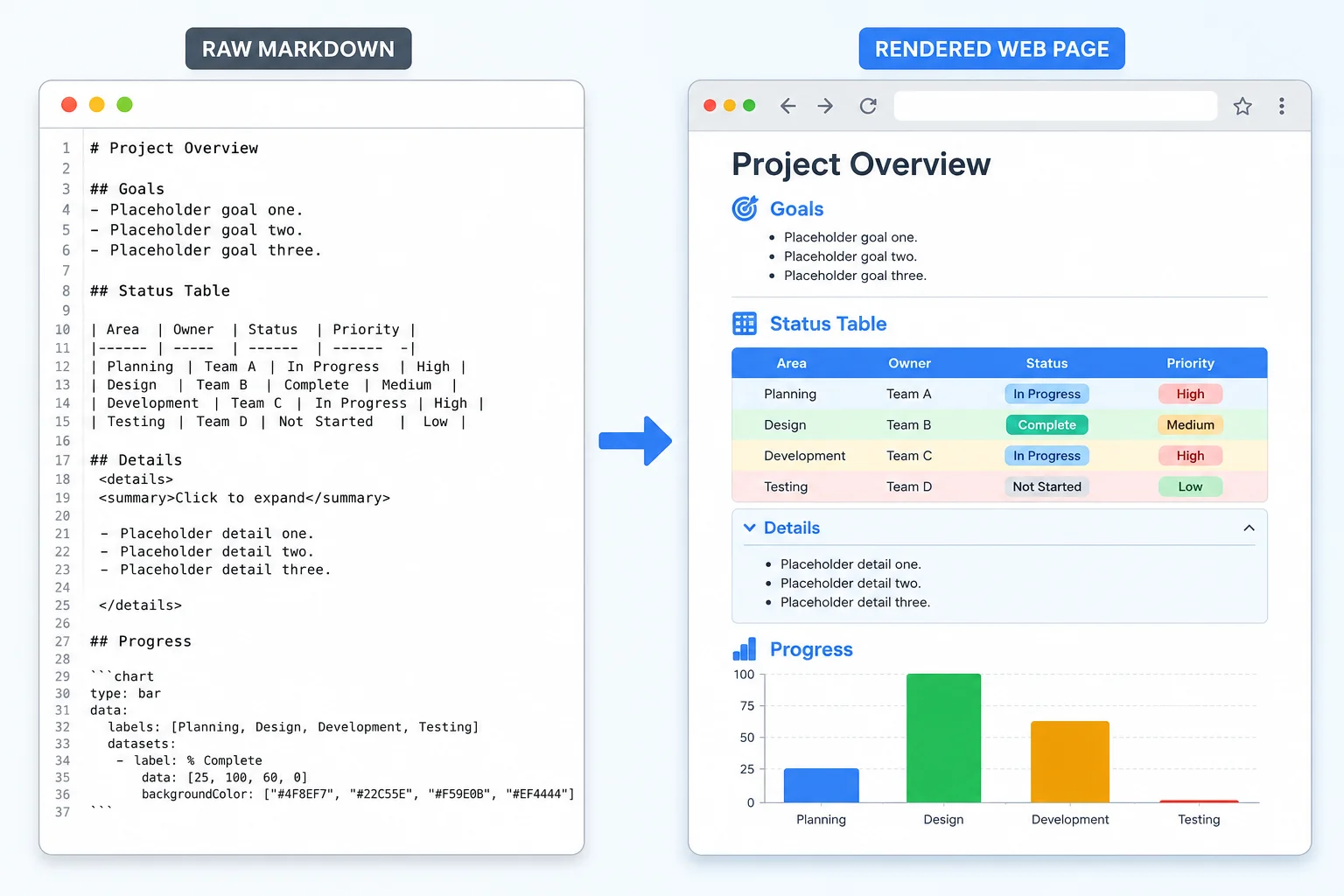
Not because markdown got worse. It didn't. I stopped because for one specific job, a note I read once and then throw away, I kept hitting the same small friction: the file shows me raw syntax until something renders it. So now I ask for a single HTML file instead. It opens in my browser already styled, with collapsible sections, coloured tables, and the occasional diagram. No rendering step. I just read it.
That switch made me ask the bigger question people keep posting about: is markdown dead?
Short answer, no. But the default is shifting, and it's worth understanding why, because the answer changes depending on what the note is for.
What markdown is actually good at
Markdown is plain text with a few symbols. A # for a heading, * for a list, backticks for code. That's the whole appeal. It's the lightest possible way to add structure to writing without leaving the keyboard.
And it's everywhere for good reasons. It lives cleanly in a git repo. It diffs well, so when you change one line, version control shows you exactly that one line and nothing else. It's portable: the same .md file reads fine in GitHub, in Obsidian, in a static site generator, in a plain text editor. I write almost all my own notes in markdown, and this blog is drafted in it. I've even written about the eight markdown files that quietly replaced my npm scripts, so I'm not about to call it dead.
Here's the catch. Markdown only looks good once something renders it. On its own, in a file, it's text with symbols in it. That's fine when you're reading it inside a tool that renders markdown for you. It's not fine when you've just asked AI for a dense briefing and the output lands as raw ## and ** that you have to mentally translate.
The job that broke for me
Picture the kind of note I'm talking about. I ask AI to summarise a long meeting transcript, or compare four hosting options, or lay out a security checklist for a client. The answer is information-heavy: tables, sections, a few things I want to collapse so I can scan the headings first.
In markdown, I get the content, but it's flat. To see it nicely I paste it somewhere that renders markdown. One more step. And tables in particular are painful in raw markdown: a wall of pipes and dashes that's almost unreadable until rendered.
So I started asking for the same answer as a single self-contained HTML file. One file, CSS inlined, no external links. I double-click it and it opens in the browser already styled. Sections I can fold away. Tables with actual borders and shading. The odd diagram. For a note I read once and bin, that's strictly better. The browser is the universal viewer everyone already has open, and HTML is what it speaks.
This isn't AI inventing a new format. It's AI meeting people where they already are, the same way CSS can now animate between full pages without a framework. The browser keeps absorbing jobs that used to need extra tooling.
Why HTML wins for read-once notes
A few concrete reasons I reach for HTML now when the note is disposable and visual.
It renders itself. No "paste this into a markdown previewer" step. The file is the finished view.
It carries real layout. Collapsible <details> blocks, coloured tables, two-column comparisons, a small chart. Markdown can technically embed some of this, but you're fighting it. HTML does it natively because that's what it's for.
It travels. One self-contained file works offline, emails cleanly, and opens on anyone's machine, technical or not. Hand a raw .md to a non-technical client and they see asterisks and hashes. Hand them an HTML file and they see a web page. They already know how to read a web page.
If you want to understand the mechanics under the hood, things like data attributes and inline scripts that make a single file behave like a small app, I've covered the building blocks in custom HTML and JavaScript attributes.
When I still reach for markdown, every time
This is where the "markdown is dead" framing falls apart. The format you want depends on what happens to the file next.
If the note will be edited by hand, tracked in git, or read inside a tool that already renders markdown, markdown wins and it isn't close. HTML is noisy to hand-edit. Open a styled HTML file and the actual content is buried in tags and inline styles. It also makes ugly diffs: change one sentence and version control may show a churn of markup around it. For anything that's a source document, that's a real cost.
So my own rule is simple. Markdown for things that live: source docs, anything in a repo, my Obsidian vault, this blog. HTML for things I read once: AI briefings, comparison tables, a checklist I'll act on today and never open again. One is the format you write and maintain in. The other is the format you consume and discard.
The mistake is treating it as a versus. It isn't. It's the same split we already make everywhere else in software, the right tool for the job, which I keep coming back to when people frame new AI workflows as a revolution rather than a fit. I made that argument at length in the vibe coding lie: wrapper tools vs foundation tools.
How to actually ask for it
If you want to try this, the ask is one line. Tell the AI: "Give me this as a single self-contained HTML file, CSS inlined, no external links, with collapsible sections." You'll get one file you can double-click straight into the browser.
A few things worth specifying so it comes out clean:
- Ask for
<details>blocks for anything long, so you can scan headings first and expand what you need. - Ask for real HTML tables, not markdown tables converted half-heartedly.
- Say "no external CDN links" if you want it to work fully offline. Everything inlined means the file is self-contained.
- Keep one HTML file per note. Don't let it sprawl into linked pages for a throwaway summary.
That's it. No tooling to install, no new app. You're using the browser you already have as the viewer.
This is also a small example of a bigger shift worth understanding: AI is changing not just what we write but the format we ask for it in. If you want the wider context on where this is heading, I rounded up the ideas in learn these 10 AI concepts before it's too late.
What to do now
Next time you ask AI for a dense note you'll read once, ask for a single self-contained HTML file instead of markdown and see if it reads easier. Keep markdown for everything you write, edit, or commit. The question was never which format wins. It's which one fits the job in front of you.
Last updated 8 Jun 2026 · filed under HTML, tools, ai